Still manually tracking employee hours for payroll? Relying on paper timesheets or spreadsheets often leads to mistakes, wasted time, and payroll headaches. For small business owners and freelancers, the solution is simple: switch to time tracking software QuickBooks users trust.
With the right QuickBooks time tracking apps or time clocks for QuickBooks, you can automate employee hour collection, streamline payroll, and cut down on costly errors. Thanks to tracking integration with QuickBooks, recorded hours flow directly into your accounting system. In this guide, we’ll explore the benefits of QuickBooks time tracking software and help you choose the best tools to simplify your workflow.
Table of contents
- What Is QuickBooks Time Tracking?
- QuickBooks Online vs Desktop Time Tracking Features
- Key Features of QuickBooks Time Tracking
- Top QuickBooks-Compatible Time Tracking Apps Comparison
- Case Study: Time Saved, Errors Reduced
- Tips & Best Practices for Accurate Time Tracking
- FAQs About QuickBooks Time Tracking Apps
What Is QuickBooks Time Tracking?
QuickBooks time tracking apps let businesses record, approve, and sync employee working hours directly with QuickBooks for payroll, billing, and project management. Whether you need to clock in/out, manage PTO, track job costs, or automate reports, these apps are the go-to solution for small businesses and accountants.
Why Is Time Tracking Crucial?
- Avoid payroll and billing errors
- Automate job costing and project management
- Stay compliant with labor laws
- Save up to 4% on payroll annually, per Intuit research
Why Time Tracking Matters
Time tracking is simply the process of recording how long employees (or you) spend on tasks and projects. Accurate time records ensure everyone gets paid correctly and clients are billed fairly. Digital time tracking allows owners to see who’s working, where, and on what. Manual records, on the other hand, are prone to errors and can result in payroll mistakes or even legal compliance issues.
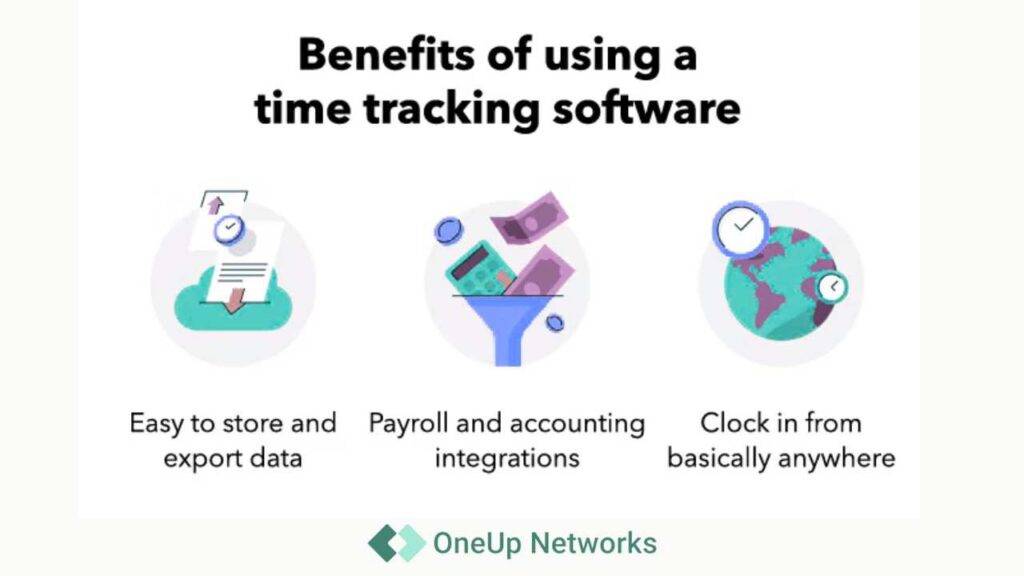
Digital time tracking changes the game. Employees punch in via an app or web browser, and hours are stored in the cloud. When payroll is due, exporting that data into QuickBooks can be as simple as clicking a button. This automation saves admin time and ensures taxes, benefits, and overtime are calculated correctly.
QuickBooks Online vs Desktop Time Tracking Features
QuickBooks includes basic time tracking features. Both QuickBooks Online and QuickBooks Desktop allow you to enter billable hours for employees or contractors. QuickBooks Online lets you add timesheets and clock-in data, while Desktop versions have similar tools.
However, native tools are basic. They allow you to record hours but lack advanced features like GPS tracking or scheduling. That’s where QuickBooks Time (formerly TSheets) and other compatible apps come in. QuickBooks Time provides mobile clock-in/out, geolocation, scheduling, PTO tracking, and more. QuickBooks Online Payroll even includes QuickBooks Time at no extra charge.
For businesses needing richer features, third-party time tracking apps integrate seamlessly with both QuickBooks Online and Desktop, automatically syncing hours for payroll and reporting.
Benefits of Time Tracking Integration
Integrating time tracking with QuickBooks offers several key advantages:
- Streamlined Payroll: Time apps push data directly to QuickBooks, eliminating double data entry. Payroll runs faster and more accurately.
- Fewer Errors: Automated syncing prevents typos, rounding issues, and ensures compliance.
- Accurate Billing & Reports: Hours can be tagged by client, project, or task, making invoices and job costing precise.
- Compliance & Auditing: Features like GPS and geofencing reduce buddy punching and maintain accurate records for audits.
- Time Savings & Insights: Quick access to dashboards shows who is working, project progress, and helps plan staffing and budgets.
Key Features of QuickBooks Time Tracking
- Time Clocks + Timesheets: Employee clock-in/out, supervisor approvals, timesheet audits
- PTO & Leave Tracking: Automated accruals, requests, approvals in one dashboard
- Employee Scheduling: Drag-and-drop shift assignment; overtime alerts
- Project Tracking & Job Costing: Tag hours to clients, jobs, tasks for billing and reports
- Automation & Advanced Reporting: AI-powered insights, payroll-ready exports, compliance reports
- GPS & Mobile Tracking: Geofencing, real-time location, mobile app access
- Integration-Friendly: Sync with payroll, HR, job costing, and more for efficiency
Use Case Examples:
- Small Businesses: Sync sales staff hours with QuickBooks, track PTO, and simplify payroll runs
- Freelancers: Track billable hours, automate invoices, and provide transparent reports for clients
- CPA Firms: Monitor job costs, client billing, staff utilization, and compliance in one unified workflow
Top QuickBooks-Integrated Time Tracking Apps
- QuickBooks Time (TSheets)
Official QuickBooks solution. Offers mobile clock-in/out, GPS, PTO tracking, scheduling, Kiosk mode, and reporting. Syncs seamlessly with QuickBooks Online and Desktop. Ideal for small and medium businesses wanting a full-featured official solution.
- ClockShark
Specializes in mobile time tracking for field service and construction. Offers GPS time clocks, offline mode, and drag-and-drop scheduling. Syncs with QuickBooks Online and Desktop. Best for businesses with multiple job sites.
- Hubstaff
Designed for remote teams and agencies. Features automatic timers, screenshots, activity monitoring, and GPS. Integrates with QuickBooks Online and Desktop. Ideal for freelancers and distributed teams.
- Connecteam
All-in-one solution: time tracking, scheduling, HR forms, messaging, and GPS. Works with QuickBooks Online and Desktop. Great for businesses needing scheduling and HR tools.
- Buddy Punch
User-friendly time clock app with GPS, photo/PIN punches, PTO requests, and break management. Syncs with QuickBooks Online and Desktop. Perfect for small teams wanting simplicity.
- Clockify
Free plan with unlimited users and projects. Export data to QuickBooks with a paid plan. Best for freelancers or small teams on a budget.
- Toggl Track
Simple timers, project tagging, and reporting. Integrates with QuickBooks Online via connectors. Ideal for freelancers, agencies, and creative teams.
- TimeCamp
Advanced tracking with auto time logging, project budgets, and analytics. Integrates with QuickBooks Online and Desktop. Best for agencies and professional services tracking billable time.
Top QuickBooks-Compatible Time Tracking Apps Comparison
Cloud vs Desktop Differences : Cloud apps support remote, mobile, and multi-device access, while desktop integrations require dedicated PC setups and are best for legacy workflows.
| App | Key Features | QuickBooks Compatibility | Best For | G2 Rating |
|---|---|---|---|---|
| QuickBooks Time (TSheets) | Mobile clock-in/out, GPS, PTO, scheduling | Online & Desktop | Full-featured official solution | 4.5/5 |
| ClockShark | GPS time clock, offline mode, scheduling | Online & Desktop | Field services, construction | 4.6/5 |
| Hubstaff | Auto timers, screenshots, activity monitoring | Online & Desktop | Remote teams, agencies | 4.4/5 |
| Connecteam | Time clock, scheduling, HR tools, GPS | Online & Desktop | Scheduling & HR intensive | 4.5/5 |
| Buddy Punch | GPS, photo/PIN punches, PTO, break tracking | Online & Desktop | Small teams, simplicity | 4.7/5 |
| Clockify | Free unlimited users, project/task timers | Online (paid integration) | Freelancers, small teams | 4.6/5 |
| Toggl Track | One-click timers, project tagging | Online (via connector) | Creative teams, freelancers | 4.6/5 |
| TimeCamp | Auto tracking, project budgets, analytics | Online & Desktop | Agencies, professional services | 4.5/5 |
Here’s how you can take the next step:
- Schedule a Demo: See QuickBooks Time or other compatible apps in action and discover how they simplify payroll and time tracking.
- Start a Free Trial: Test a QuickBooks-compatible time tracking app risk-free and experience the time-saving benefits firsthand.
- Chat With Expert: Speak with our experts to choose the best time tracking solution for your business and get it set up quickly.
With the right time tracking solution integrated with QuickBooks, you’ll save time, reduce errors, and gain more control over your payroll and projects—so you can focus on growing your business instead of chasing hours.
Case Study: Time Saved, Errors Reduced
A CPA firm with 20 employees adopted QuickBooks Time integrated with both QuickBooks Online and ADP payroll. By automating clock-in/out, tracking jobs in real-time, and syncing timesheets directly, the firm slashed payroll preparation time from 7 hours per week to just 45 minutes. Payroll errors dropped by 60%—no more manual edits, late approvals, or mismatched reports. Staff and clients alike saw faster turnaround and clearer billing statements.
Tips & Best Practices for Accurate Time Tracking
- Enable timers and automatic time clocks on all employee devices
- Use reminders and geofencing to ensure on-site clock-in/out
- Approve timesheets before payroll for error-free integration
- Track PTO, breaks, and project assignments inside your time tracking app
- Sync software with QuickBooks weekly for up-to-date payroll and billing
- Train staff on mobile and desktop app functionality—make it part of onboarding
FAQs About QuickBooks Time Tracking Apps
Download the QuickBooks Workforce mobile app or use browser-based dashboard for quick setup.
Yes, most top time tracking apps integrate with both QuickBooks Online and Desktop; check app documentation for specifics.
QuickBooks Time, Buddy Punch, and Clockify all offer mobile clock-in, geofencing, and GPS features for remote teams.
These apps track accruals, allow leave requests, and automate approvals so payroll stays accurate.
Absolutely—tag hours to clients, projects, or tasks, then sync with QuickBooks for billing and reporting.
Clockify is a strong choice due to its robust free plan and easy integration.
Yes—apps like QuickBooks Time and Paychex sync directly with payroll software for compliance, error reduction, and timely filings.
Conclusion
Accurate time tracking doesn’t have to be stressful or confusing. With QuickBooks and compatible time tracking apps, even beginners can turn messy timesheets and manual clock-ins into organized, automated payroll and reporting. From mobile clock-ins to PTO management and GPS tracking, these tools save time, reduce errors, and give you clear insights into your team’s productivity.
By integrating a QuickBooks-compatible time tracker, you’ll streamline payroll, prevent mistakes, and free up hours that can be better spent growing your business. Whether you choose QuickBooks Time, ClockShark, Hubstaff, or another app, the right solution will make managing employee hours effortless.
Take Action Today and Simplify Time Tracking
Power your business with secure, reliable, and scalable cloud solutions from OneUp Networks. Whether you need QuickBooks hosting, Thomson Reuters CS or UltraTax CS hosting, seamless app integrations, managed IT, virtual desktops, or enterprise-grade security, our team ensures you stay connected and productive anytime, anywhere. With support for 500+ business applications, we make it simple to run your entire firm in the cloud. Partner with us today and experience the smarter way to work.
Also Read These Helpfull Blogs: