

Many accounting firms are leaving Thomson Reuters Virtual Office CS for alternatives in 2026 because the platform is changing underneath them. Thomson Reuters is ending its managed Microsoft 365 email inside Virtual Office CS, pushing firms to run their own Microsoft tenant. Combined with busy-season performance strain and rising costs, firms are moving to fully managed private cloud hosting instead.
Quick summary
- Thomson Reuters is sunsetting Hosted Exchange email in Virtual Office CS and SaaS on August 31, 2026, and any mailboxes not migrated will be deleted when the service ends.
- Starting May 2026, Microsoft 365 Office apps are rolling out across Virtual Office CS/SaaS in phases, and firms must now bring and administer their own M365 license.
- That shifts email administration, spam filtering, retention, and DNS responsibility to the firm — a new IT burden many practices did not sign up for.
- Firms can keep their existing Thomson Reuters licenses and move the full CS Professional Suite to a managed private cloud built for accounting workloads, with migration handled to minimize downtime.
What is actually changing with Virtual Office CS
Virtual Office CS isn’t disappearing overnight. The bigger story is what’s changing around it. Thomson Reuters has stopped creating new email domains in Virtual Office CS and SaaS environments, and support for Thomson Reuters–managed Hosted Exchange email ends on August 31, 2026. Mailboxes that aren’t migrated before that date are scheduled to be securely deleted.
At the same time, beginning in May 2026, Microsoft 365 Office applications are being deployed across Virtual Office CS and SaaS firm environments in phases through June and July 2026. Going forward, your firm needs its own Microsoft 365 tenant and individual M365 accounts to use Outlook, Excel, Word, and the other Office apps inside the environment.
In plain terms: a part of your environment that Thomson Reuters used to manage for you is becoming your responsibility. Your firm now owns the Microsoft 365 tenant, mailbox administration, spam filtering, retention policies, and the DNS records that keep email flowing. For a tax or accounting practice — where client financial data lives in email — that’s not just an IT chore. A mishandled migration can create exposure under frameworks like IRS Publication 4557, the FTC Safeguards Rule, and AICPA standards for protecting client data.
For many firms, this is the moment to step back and ask a bigger question: if we have to re-architect part of our environment anyway, is staying on Virtual Office CS still the right call?
Why firms were already reconsidering Virtual Office CS
The Microsoft 365 transition is accelerating a conversation that was already happening. The most common reasons firms cite for moving on:
Busy-season performance strain. Remote accounting has expanded far beyond occasional after-hours access. Tax, bookkeeping, audit, and client-accounting teams now run distributed workflows continuously — often late into the night during filing deadlines. Older shared environments built around lighter usage patterns can feel sluggish exactly when the firm needs speed most: large UltraTax CS returns, multi-user Practice CS sessions, and SQL-heavy operations.
Limited flexibility. Standardized hosted environments aren’t easy to tailor to a firm’s specific application mix, add-ons, and workflow. Firms running UltraTax CS alongside QuickBooks, document management, and third-party add-ins often want everything in one environment that’s configured around how they actually work. Especially to avoid downtime incidents with Virtual Office cs, firms are looking for better & trusted alternatives like OneUp Networks.
Cost and control. As firms grow, they want predictable infrastructure costs, clearer support ownership, and the ability to scale users and resources without re-platforming. The new requirement to stand up and manage a Microsoft 365 tenant adds cost and administrative overhead on top of the existing subscription.
Support ownership. When something breaks at 9 p.m. on April 12, firms want a support team that knows their environment — not a general queue.
You don’t have to rebuild from scratch
The word “migration” sounds heavier than it usually is. You keep your existing Thomson Reuters licenses — a hosting partner runs your firm-owned, licensed applications; it does not sell or replace your software. Your UltraTax CS, Practice CS, Accounting CS, FileCabinet CS, and other CS Professional Suite applications move into a private environment, along with QuickBooks, Microsoft, and the add-ons your team relies on.
OneUp Networks is a managed cloud hosting provider that helps accounting firms move the full CS Professional Suite — plus Microsoft and other business-critical applications — into a secure, private cloud designed around real CPA-firm workloads. (OneUp Networks is an independent cloud hosting provider and is not affiliated with, sponsored by, or endorsed by Thomson Reuters. All trademarks belong to their respective owners.)
How OneUp Networks helps firms leaving Virtual Office CS
1) A private cloud built for accounting performance–
Instead of a generic shared setup, firms get private dedicated infrastructure with local NVMe SSD storage, DDR5 RAM, 3 GHz+ processors, high IOPS, and low latency — the kind of hardware that keeps demanding tax and SQL-based applications responsive during peak filing periods.
2) One environment for everything –
UltraTax CS and the rest of the CS Professional Suite can run alongside QuickBooks, Microsoft 365, and your add-ons and add-ins in a single hosted environment configured around your users and workflows — so your team isn’t bouncing between disconnected tools.
3) Microsoft handled for you –
Because the Hosted Exchange change makes Microsoft your firm’s responsibility, having a managed partner set up and run Microsoft within your environment removes the administrative burden the August 2026 sunset creates.
4) Backups and disaster recovery built in –
Data is protected with three backup copies across one onsite and two offsite locations, a 120-day rolling retention window aligned with Veeam recommendations, and a built-in disaster recovery plan — with a recovery point objective of roughly 2–4 hours and a recovery time objective of roughly 3–4 hours. At any given time there are multiple running copies (primary site, DR site, and backup copies), which helps protect against outages, data loss, and ransomware.
4) Security-focused infrastructure –
Private dedicated servers, physical and software firewalls, enterprise-grade endpoint detection and response, multi-factor authentication, encryption in transit, IDS/IPS, DDoS mitigation, role-based access controls, and tenant isolation — hosted in AICPA-approved data center facilities and following IRS cybersecurity guidelines. The underlying data centers support leading compliance standards including SOC 2, HIPAA, PCI DSS, and ISO 27001.
5) A structured migration, not a rushed one –
Moves follow a defined path — discovery and environment review, architecture and migration planning, setup and data migration, go-live with user onboarding, and post-go-live hypercare — so the transition is predictable and can be scheduled around your busy season with minimal downtime. OneUp can also coordinate with vendor support, including Thomson Reuters and Microsoft, to resolve issues faster and reduce the load on your internal team.
Virtual Office CS vs. a Managed Private Cloud: side by side
| Factor | Virtual Office CS / SaaS (2026) | OneUp Networks – managed private cloud |
|---|---|---|
| Microsoft 365 / email | Firm must bring and administer its own M365 tenant after Hosted Exchange sunsets Aug 31, 2026 | Microsoft set up and managed for you inside your environment |
| Performance | Shared environment; busy-season strain commonly reported | Private dedicated servers, NVMe SSD, DDR5, 3 GHz+ CPUs, high IOPS |
| Application scope | Remote access to CS Professional Suite apps | CS Professional Suite + QuickBooks + add-ons + Microsoft in one environment |
| Backups & DR | Managed by Thomson Reuters | 3 copies (1 onsite, 2 offsite), 120-day retention, DR plan, RPO 2–4h / RTO 3–4h |
| Support | Thomson Reuters support queue | Managed support with vendor coordination (Thomson Reuters, Microsoft, Intuit, CCH) |
| Licensing | Firm owns its CS licenses | Firm keeps its own licenses; OneUp hosts your client-owned applications |
| Customization | Standardized environment | Configured around your users, applications, and workflows |
For larger CPA firms
Larger practices and multi-user firms that want hosting, migration, premium support, disaster recovery, and a scalability roadmap in a single plan may be a fit for the Total Practice Plan — OneUp Networks’ highest-tier managed hosting designed specifically for CPA and accounting firms, with a dedicated account and technical manager and 24×7 premium support.
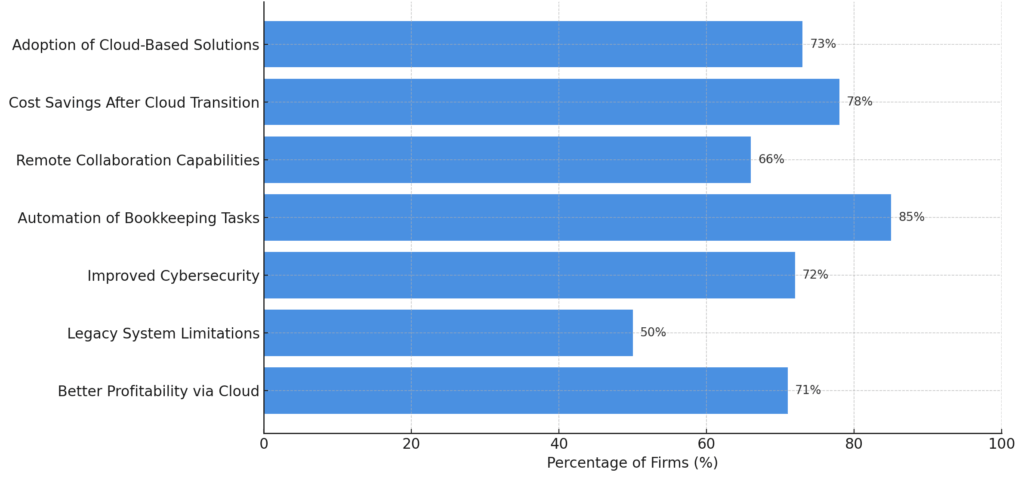
Some other reasons (in %) why firms are looking for Thomson Reuters Virtual Office CS alternatives like OneUp Networks-
Frequently Asked Questions before Migration:
Not entirely. What’s ending is Thomson Reuters–managed Microsoft 365 / Hosted Exchange email inside Virtual Office CS and SaaS, with support ending August 31, 2026. Starting May 2026, firms must bring and manage their own Microsoft 365 license. These changes are prompting many firms to reevaluate the whole environment.
No. You keep your own Thomson Reuters licenses. A cloud hosting partner works as Virtual Office CS alternatives and runs your firm-owned, licensed applications — it does not provide or replace the software itself.
Your firm needs its own Microsoft 365 tenant. Mailboxes not migrated before the sunset date are scheduled to be deleted. A managed hosting partner can set up and run Microsoft for you so email administration doesn’t fall entirely on your internal team so nothing to worry about hosted Exchange email in Virtual Office CS
Yes. Migrations follow a structured, phased process designed to minimize downtime, and the timing can be planned around your filing calendar rather than during peak deadlines.
The infrastructure is built with enterprise-grade security controls and hosted in AICPA-approved data centers that support standards such as SOC 2, HIPAA, PCI DSS, and ISO 27001, following IRS cybersecurity guidelines. No provider should claim to be “100% secure,” but the environment is designed to protect sensitive tax and accounting data.
Make the move on your timeline, not the sunset’s
The August 2026 changes give firms a clear reason to decide now rather than scramble later. Moving to a managed private cloud lets you keep your Thomson Reuters applications, hand off Microsoft and infrastructure management, and run busy season on hardware built for it. Map your Virtual Office CS exit today and get a migration plan built around your firm.
Keep Your Accounting Workflows More Stable During Busy Season With OneUp Networks
When Virtual Office CS environments begin slowing down during tax season, the problem usually extends beyond simple software frustration. Many accounting firms eventually experience growing workflow pressure caused by overloaded remote environments, unstable accounting responsiveness, reviewer bottlenecks, and increasing concurrency across distributed accounting teams.
Those operational slowdowns become more noticeable during filing deadlines when multiple departments remain connected simultaneously throughout the day. Reviewers reconnect repeatedly, accounting applications respond inconsistently, and teams begin creating temporary workarounds simply to maintain workflow continuity during busy season, this calls a search for Virtual Office alternatives
OneUp Networks helps accounting firms move toward more stable accounting-focused cloud environments designed around real CPA-firm workloads instead of generic shared hosting environments. With centralized infrastructure, smoother remote accounting access, improved multi-user application performance, and accounting-focused operational support, firms can maintain more predictable workflows across QuickBooks, UltraTax, Thomson Reuters, CCH, and other accounting applications during high-pressure workload periods.
- Contact Us: Talk with specialists who understand accounting workflows and hosted tax environments.
- Book a Demo: See how a stable accounting-focused cloud performs under real multi-user workloads.
- Start a Free Trial: Experience smoother remote accounting in a private cloud built for CPA firms.
- Request a Quote: Receive a tailored hosting recommendation for your firm’s workload and users.
With OneUp Networks, firms gain more than hosted infrastructure—they gain an accounting-focused environment designed to support steadier workflows, more predictable performance, and smoother operations during tax season.
Read Also:



































