What Is the Difference Between VDI, Citrix and RDP?
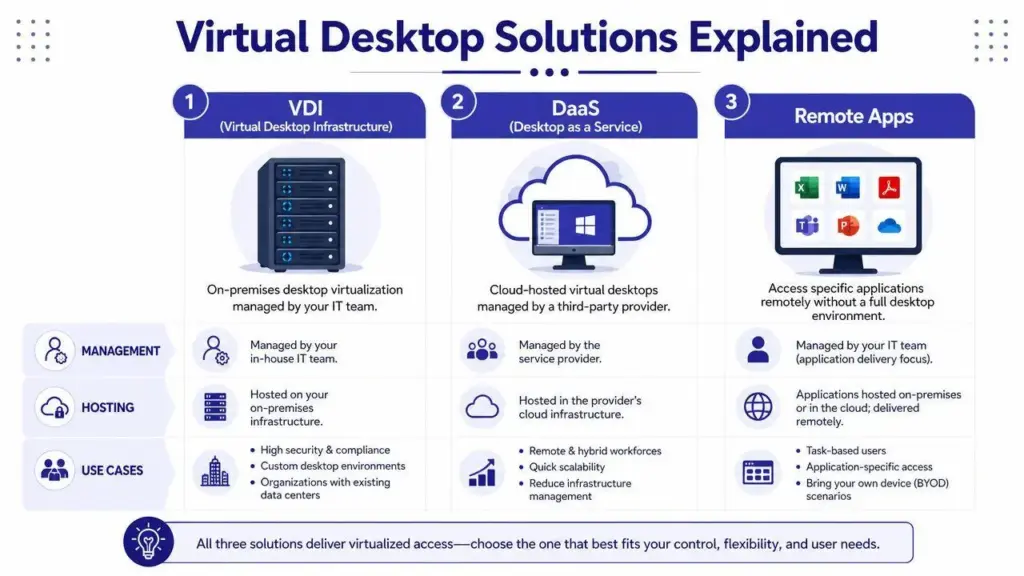
VDI (Virtual Desktop Infrastructure) is a technology architecture that allows employees to access virtual computers hosted on central servers or cloud infrastructure. Citrix is a platform that helps businesses deliver virtual desktops and individual applications to users remotely. RDP (Remote Desktop Protocol) is a communication protocol that allows users to connect to remote computers. Non-Citrix VDI refers to virtual desktop environments built using alternatives such as Microsoft Azure Virtual Desktop (AVD) or Omnissa Horizon. In simple terms, VDI is the concept, Citrix is one solution for delivering virtual desktops and applications, and RDP is one way remote computers communicate with user devices.
If you have ever wondered why companies use Citrix instead of simply giving employees remote desktop access, or why some businesses offer complete virtual desktops while others provide only individual applications, this guide will help you understand the difference.
1. What Is VDI (Virtual Desktop Infrastructure)?
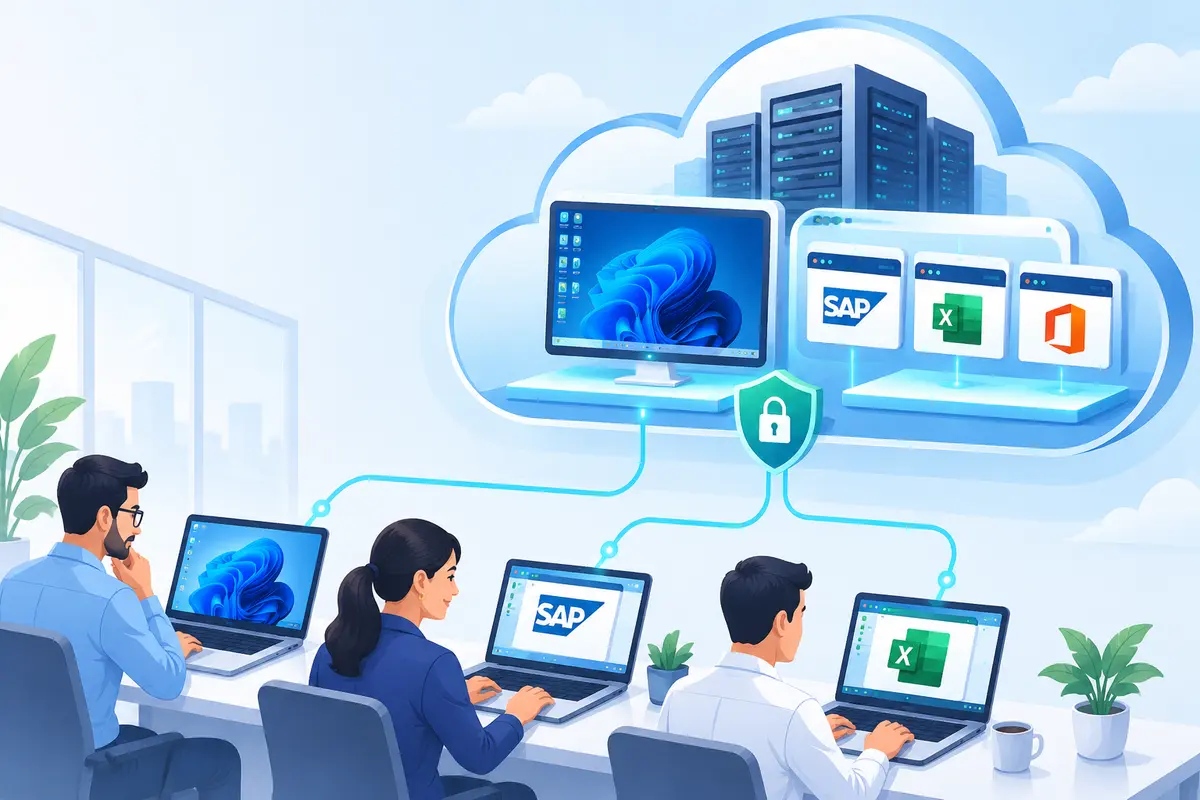
Imagine a company has 500 employees. Instead of purchasing and maintaining 500 powerful computers, the company decides to keep computing resources in a central data centre or cloud environment. It creates 500 virtual computers on powerful physical servers. Each employee can access their assigned virtual computer using an ordinary laptop, desktop or other supported device.
Every employee gets access to a Windows desktop, their applications and their working environment. This is called Virtual Desktop Infrastructure (VDI).
How does VDI work?
A typical VDI environment consists of:
- Physical servers or cloud infrastructure: These provide the computing power.
- Hypervisor: This software creates and manages virtual machines.
- Virtual machines (VMs): Each VM acts like an independent computer.
- Desktop operating system: Windows or another supported desktop environment runs inside the VM.
- Connection and management platform: This manages user access and desktop delivery.
- End-user device: The employee accesses the virtual desktop from a laptop, desktop or thin client.
The actual processing happens on the remote virtual machine. The employee’s device displays the desktop and sends keyboard and mouse input back to it.
Simple example:
Suppose Laura works in the finance department. She logs in from her personal laptop and receives a Windows desktop containing Excel, accounting software and company applications. Her laptop is not running the actual hosted Windows desktop. The desktop is running on a virtual machine in the company’s data centre. Laura can work from home, while the company maintains centralised control over the virtual desktop environment. That is VDI.
What are the benefits of VDI?
- Centralised desktop management.
- Easier application deployment and updates.
- Consistent user environments.
- Remote working capabilities.
- Greater control over corporate data.
- Flexible resource allocation, depending on the VDI architecture.
However, VDI requires careful planning of server capacity, storage, networking, licensing, security and user experience.
2. What Is Citrix? Is Citrix the Same as VDI?
No. Citrix and VDI are not the same thing.
This is one of the most common misconceptions in virtual desktop infrastructure. Think of VDI as a virtual office building. Citrix is one of the technology platforms that helps manage access to the offices, control who enters them and deliver the resources employees need.
It is a virtual application and desktop delivery platform. Citrix offers technologies such as Citrix Virtual Apps and Desktops and Citrix DaaS (Desktop as a Service). Businesses use these solutions to provide employees with access to:
- Complete virtual Windows desktops.
- Individual published applications.
- Centrally hosted business software.
- Remote working environments.
Citrix also provides HDX technology, designed to optimise the delivery of remote applications and desktops across different devices and network conditions.
How does Citrix work?
In a typical Citrix Virtual Apps and Desktops environment:
- Applications or desktops are hosted on Windows virtual machines or session-host servers.
- Citrix components manage resources, user access and connections.
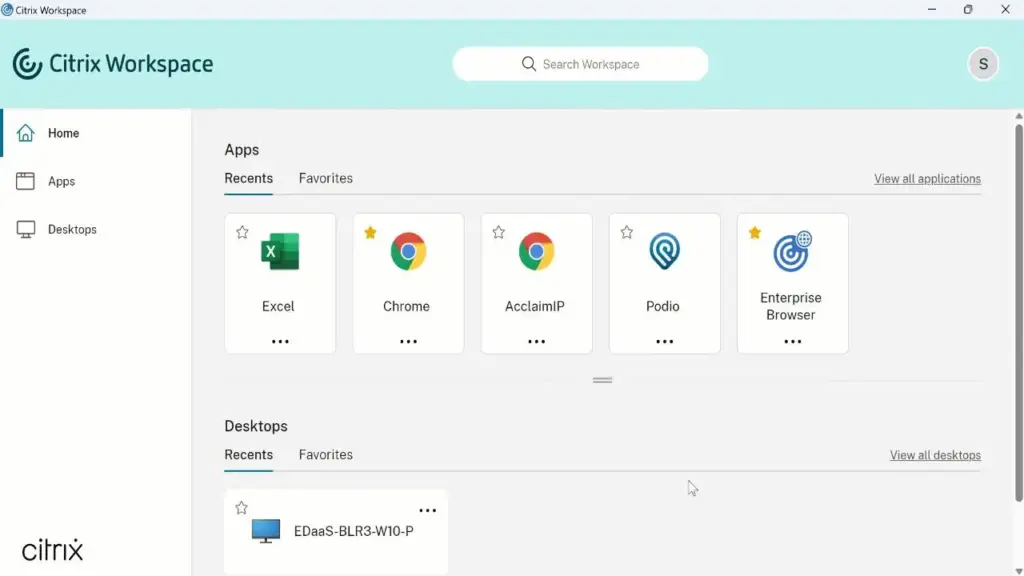
- Employees sign in through Citrix Workspace.
- They see the applications or desktops assigned to them.
- When they launch a resource, the remote environment executes it and sends the display to their device.
Citrix can work with infrastructure hosted in an on-premises data centre, Microsoft Azure, AWS or other supported hosting environments. OneUp Networks provide secure Citrix hosting for accounting firms with cloud-hosted Windows desktops, multi-user access to accounting software, daily backups, advanced security, and ongoing IT services.
The important distinction is that Citrix does not replace the underlying server or cloud infrastructure. It provides the platform for delivering and managing applications and desktops running on that infrastructure.
3. What Are Citrix Published Applications?
This is where Citrix becomes particularly useful for businesses.
Imagine a company uses SAP, Tally, Microsoft Excel and a specialised accounting application. Does every employee need a complete Windows desktop hosted remotely? Not necessarily.
Some employees may only need access to SAP or Tally. Instead of giving them a complete virtual desktop, the IT team can publish selected applications through Citrix. This is called Citrix Published Applications or Citrix Virtual Apps.
How does application publishing work?
Consider this example:
A company hosts SAP on a Windows Server in Microsoft Azure. The company configures Citrix to publish SAP to authorised employees. An employee opens Citrix Workspace on their laptop, clicks the SAP icon and launches the application.
SAP opens in a separate window, similar to an application installed locally. However, SAP is actually running on the remote server. The employee’s device receives the visual output and sends keyboard and mouse input to the remote application.
What does the employee see?
The employee sees SAP, not necessarily the entire Windows desktop. They can work with SAP as if it were a locally installed application, even though the application is executing remotely.
Why do businesses use Citrix Published Apps?
- Employees can access specific applications without receiving a full virtual desktop.
- Applications can be centrally managed.
- Software updates can be managed at the hosting layer.
- Business applications can be made available to distributed teams.
- IT teams can control which users can access particular applications.
An important technical distinction
A published application does not always require a separate virtual machine for every user. Citrix can publish applications running on:
- Shared Windows Server session hosts, where multiple users have separate sessions on the same server.
- Dedicated or shared virtual desktop machines, depending on the application-hosting design.
This means application publishing and VDI are related, but they are not identical. Citrix can deliver both full desktops and individual applications. OneUp Networks provides the Citrix as published app for the accounting and CPA firms to access the tax apps similarly.
4. What Is RDP (Remote Desktop Protocol)?
RDP stands for Remote Desktop Protocol. Think of RDP as a communication language that allows two computers to interact remotely.
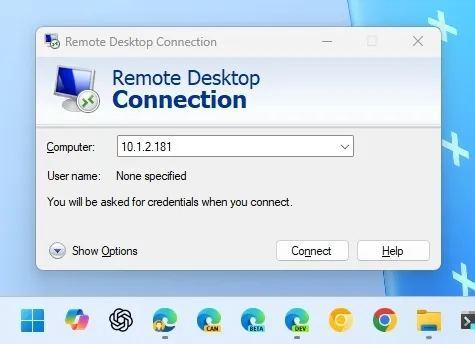
For example:
You are sitting at home with your laptop. Your office computer is switched on and connected to the office network. You use Windows Remote Desktop to connect to the office computer. You can now see its screen, use its keyboard and mouse, open applications and work on the remote machine. That connection uses RDP.
What does RDP actually do?
RDP carries information between the local device and the remote computer, including:
- Screen display information.
- Keyboard input.
- Mouse movements.
- Clipboard information, where enabled.
- Other supported device and peripheral redirection.
The remote computer performs the actual computing work. The local computer displays the remote session.
Is RDP a VDI solution?
Not by itself. RDP is a protocol, not a complete VDI management platform. It can be used to connect to a physical computer, a virtual machine or a shared Windows Server session.
For example, Microsoft Azure Virtual Desktop uses RDP as part of its connection technology. This is an important distinction: RDP and VDI are not competing technologies. RDP can be used within a VDI solution.
5. Citrix vs RDP: What Is the Actual Difference?
Citrix and RDP are often compared because both can be involved when employees access remote desktops and applications. However, they perform different roles. For accounting firms, you can check the full Citrix vs RDP comparison guide
| Comparison | Citrix | RDP |
|---|---|---|
| What is it? | Application and desktop delivery platform | Remote communication protocol |
| Primary purpose | Deliver and manage remote apps and desktops | Connect to remote computers and sessions |
| Application publishing | Yes | Available through Microsoft RemoteApp/RDS |
| Full desktop access | Yes | Yes |
| Centralised management | Citrix management components | Depends on the Microsoft or other management architecture |
| User access | Citrix Workspace and supported clients | Remote Desktop clients and supported clients |
| Remote display technology | Citrix HDX/ICA technology | Microsoft RDP |
| Cloud deployment | Yes | Yes, as part of a supported remote access architecture |
Does Citrix use RDP?
Citrix and RDP are different technologies. Citrix uses its own ICA-based remoting technology, enhanced through HDX. Microsoft RDP is used by Microsoft Remote Desktop Services and Azure Virtual Desktop.
Do not confuse the protocol with the entire platform. A company can use RDP without Citrix. It can also use Citrix without deploying a standalone Microsoft RDS environment as its primary delivery platform. In fact, some of our clients recently migrated from RDP to Citrix for more consistent remote access, session management, and scalability.
The key takeaway: RDP provides remote communication, while Citrix provides a broader platform for delivering, controlling and managing remote applications and desktops.
6. What Is Non-Citrix VDI?
Non-Citrix VDI simply means a virtual desktop environment that does not use Citrix as its desktop delivery platform.VDI does not belong exclusively to Citrix. Several technologies can provide virtual desktops and remote applications.
Some examples include:
1. Microsoft Azure Virtual Desktop (AVD)
Azure Virtual Desktop is Microsoft’s cloud-based desktop and application virtualization service. Businesses can host Windows desktops and applications in Microsoft Azure and allow employees to access them remotely.
AVD supports:
- Full virtual desktops.
- Pooled desktops.
- Personal desktops.
- RemoteApp application publishing.
AVD uses RDP for remote display and input.
2. Omnissa Horizon
Omnissa Horizon is another virtual desktop and application delivery platform. It can be used to provide centrally hosted desktop environments and remote access to business applications.
3. Microsoft Remote Desktop Services (RDS)
Microsoft RDS is a Windows Server-based platform for delivering remote desktops and applications. It supports session-based desktops, virtual desktops and individual applications through RemoteApp.
3. OneUp Networks
OneUp Networks offers multiple options on how clients access the server from their local device. It supports RDP, VDI, Citrix and non-Citrix VDI. We offer fully managed services so you have to just choose the type of connection and we setup everything for you.
So, what makes these solutions Non-Citrix VDI?
They provide remote desktop or application delivery without relying on Citrix as the primary delivery platform. The underlying infrastructure may still consist of physical servers, hypervisors, virtual machines, storage and networking. The difference is the software platform used to manage and deliver the environment.
7. Citrix VDI vs Non-Citrix VDI
Let’s compare the two approaches.
| Feature | Citrix-based solution | Non-Citrix solution |
|---|---|---|
| Desktop delivery | Citrix Virtual Apps and Desktops | Azure Virtual Desktop, Omnissa Horizon, etc. |
| Application publishing | Citrix Virtual Apps | AVD RemoteApp, RDS RemoteApp and other solutions |
| Remote display | Citrix HDX/ICA | Depends on the platform, such as RDP |
| User access | Citrix Workspace | Platform-specific clients |
| Cloud hosting | Azure, AWS and other supported environments | Depends on the selected platform |
| Management | Citrix management components | Platform-specific management |
| Licensing | Citrix and underlying infrastructure licensing | Relevant platform and infrastructure licensing |
Which one is better?
There is no universal winner.
- Citrix may be suitable for organisations that require its application delivery capabilities, advanced remoting features, centralised management and specific enterprise integrations.
- Azure Virtual Desktop may be suitable for businesses already invested in Microsoft Azure and looking for Microsoft’s managed virtual desktop service.
- RDS may be suitable for organisations with straightforward remote application and session-based desktop requirements.
The right choice depends on application compatibility, user requirements, security, network performance, scalability, management and total cost of ownership.
8. How Does Citrix Work in Cloud Hosting?
Now let’s understand how all these technologies fit into a real cloud hosting environment.
Imagine OneUp Networks is helping a bank host its business applications in the cloud. The bank has 500 employees who need access to SAP, Excel and its internal banking application. The company wants to move these applications from its physical office infrastructure to a cloud-hosted environment.
One possible approach is Citrix-based application hosting.
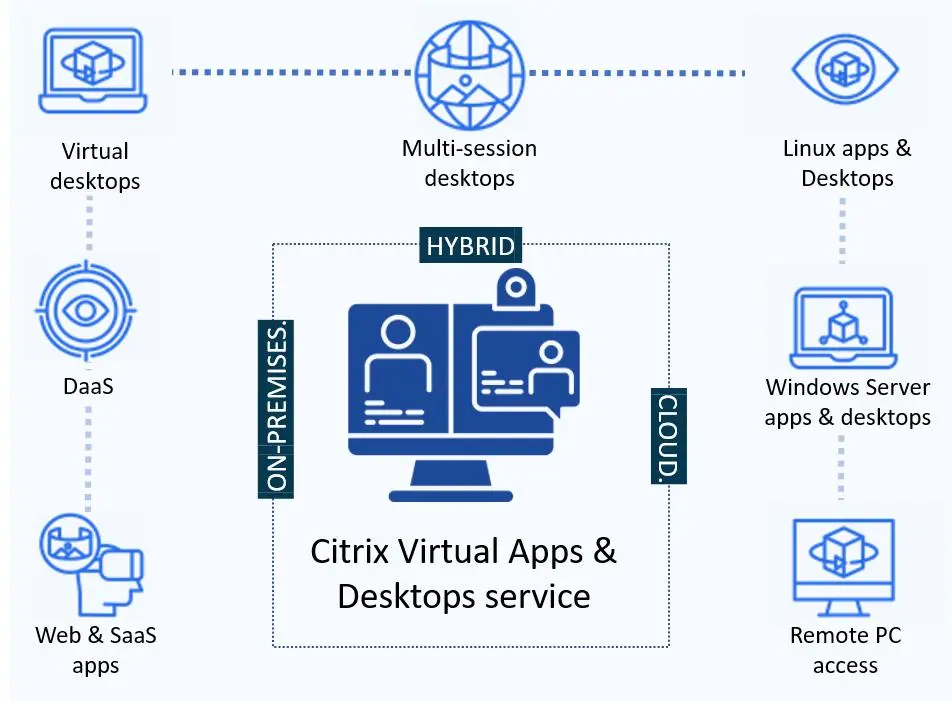
Citrix cloud hosting architecture
The architecture can include the following components:
1. Cloud infrastructure
The hosting environment may be Microsoft Azure, AWS or another supported cloud platform. This provides computing, storage and networking resources.
2. Windows virtual machines or session-host servers
These machines run the operating system and host the required business applications. Depending on the design, multiple employees may share a server through separate user sessions, or users may be assigned dedicated virtual machines.
3. Citrix delivery and management platform
Citrix manages application and desktop delivery, user access and connections. With Citrix DaaS, the Citrix cloud control plane provides management services while customer or partner-managed resource locations host the workloads. In other deployments, some or all control-plane components may be customer-managed.
4. Citrix Workspace
Employees use Citrix Workspace to sign in and access the applications or desktops assigned to them.
5. End-user devices
Employees can access their resources from supported laptops, desktops and other devices.
What happens when an employee opens SAP?
- The employee opens Citrix Workspace.
- The employee authenticates.
- Citrix checks which resources the employee is authorised to access.
- The employee selects SAP.
- The connection is established to the relevant hosting machine.
- SAP executes on the remote machine.
- The employee sees SAP on their local device.
The employee does not need to install the complete SAP application locally if the application is being hosted remotely. This is the basic principle behind Citrix application hosting in the cloud.
9. What Is the Difference Between Cloud VDI and Citrix Cloud Hosting?
These terms are related but should not be treated as identical.
Cloud VDI describes virtual desktop infrastructure hosted on cloud infrastructure.
Citrix cloud hosting describes an environment in which Citrix technologies are used to deliver applications or desktops hosted in a cloud environment.
For example:
- A company can run Azure Virtual Desktop without Citrix.
- A company can host Citrix Virtual Apps and Desktops workloads in Azure.
- A company can deploy Citrix DaaS with workloads running in AWS.
- A company can use Microsoft RDS in an Azure-hosted environment.
The cloud provider supplies the infrastructure, while the selected desktop or application delivery platform manages how users access the resources. The exact division of management responsibility depends on the deployment model.
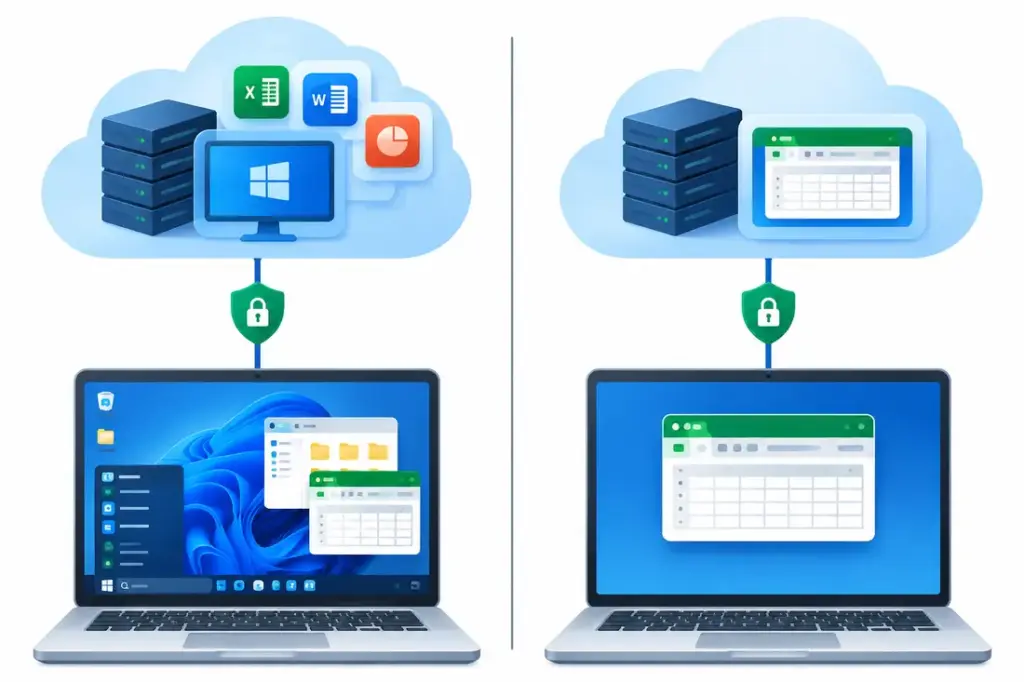
10. Full VDI vs Published Applications: Which Should a Business Choose?
This is one of the most important decisions when planning a cloud desktop or application hosting solution.
Option A: Full Virtual Desktop
Every employee receives a complete virtual Windows desktop. This is useful when employees need:
- A complete Windows working environment.
- Multiple applications.
- Personal desktop settings.
- A dedicated or pooled desktop experience.
- Access to applications that require a full desktop environment.
Option B: Published Applications
Employees receive access to selected applications rather than a complete desktop. This is useful when:
- Employees only need a few business applications.
- The company wants centralised application management.
- Multiple users can safely share application-hosting infrastructure.
- Users do not require a complete remote Windows desktop.
Option C: Hybrid Environment
A business does not have to choose only one model. It can provide:
- Full virtual desktops to finance and management teams.
- Published applications to customer service teams.
- Dedicated virtual machines to developers.
- Shared application-hosting servers to task-based employees.
This allows organisations to design infrastructure around actual user requirements.
11. Is VDI the Same as DaaS?
No, although the terms are closely related.
VDI stands for Virtual Desktop Infrastructure. It describes the technology architecture used to deliver virtual desktops.
DaaS stands for Desktop as a Service. It describes a service delivery model in which virtual desktops are provided as a managed or cloud-based service.
For example, a company can build and manage its own VDI infrastructure in its data centre. Alternatively, it can subscribe to a cloud-based desktop service and pay according to an agreed service model.
DaaS may reduce the amount of infrastructure a customer needs to operate directly, but it does not automatically remove responsibility for application management, identity, security or user support.
12. Frequently Asked Questions (FAQs)
Not exactly. Citrix is an application and desktop delivery platform. It can deliver virtual desktops as well as individual published applications. Some users confuse Citrix with VPN, for that we have a detailed comparison guide on Citrix vs VPN.
Yes. Microsoft Azure Virtual Desktop, Omnissa Horizon and other platforms can provide virtual desktop environments without Citrix.
No. RDP is a remote communication protocol. Citrix is a broader platform for delivering and managing virtual applications and desktops.
Not always in the sense of one VM per user. Citrix-hosted applications can run on shared Windows Server session hosts or on virtual desktop machines, depending on the architecture.
Yes. Citrix solutions can deliver applications and desktops hosted on supported cloud infrastructure, including Microsoft Azure and AWS.
Yes. Published applications can appear in individual windows on the user’s local device without displaying the full remote Windows desktop.
Citrix Published Apps deliver selected applications to users. VDI generally provides a complete virtual desktop environment. Citrix can deliver both.
Yes. Azure Virtual Desktop is Microsoft’s virtual desktop and application delivery service. It can operate without Citrix.
No. Remote Desktop Services (RDS) is Microsoft’s platform for delivering remote desktops and applications. RDP is the protocol used to connect to those remote sessions. Similarly, you can check the comparison between Citrix VDI and RDS.
Conclusion: Understanding the Right Virtual Desktop Solution
VDI, Citrix, RDP, Published Applications and Non-Citrix VDI are closely related, but each serves a different purpose. The easiest way to remember the difference is:
- VDI: The concept of providing virtual desktops hosted centrally.
- Citrix: A platform for delivering and managing virtual desktops and applications.
- RDP: A protocol for remote desktop communication.
- Citrix Published Apps: Individual applications delivered remotely through Citrix.
- Non-Citrix VDI: Virtual desktop environments delivered through platforms other than Citrix.
- DaaS: A service model for providing desktops as a service.
For businesses planning to move applications or desktop environments to the cloud, understanding these differences is the first step towards selecting the right hosting architecture.
The best solution is not necessarily the one with the most technology. It is the one that matches the organisation’s applications, users, security requirements, performance expectations and budget.
OneUp Networks can help businesses evaluate their infrastructure requirements and explore suitable hosting approaches for virtual desktops and remotely delivered applications.
Contact OneUp Networks to discuss your cloud hosting and virtual desktop requirements.