
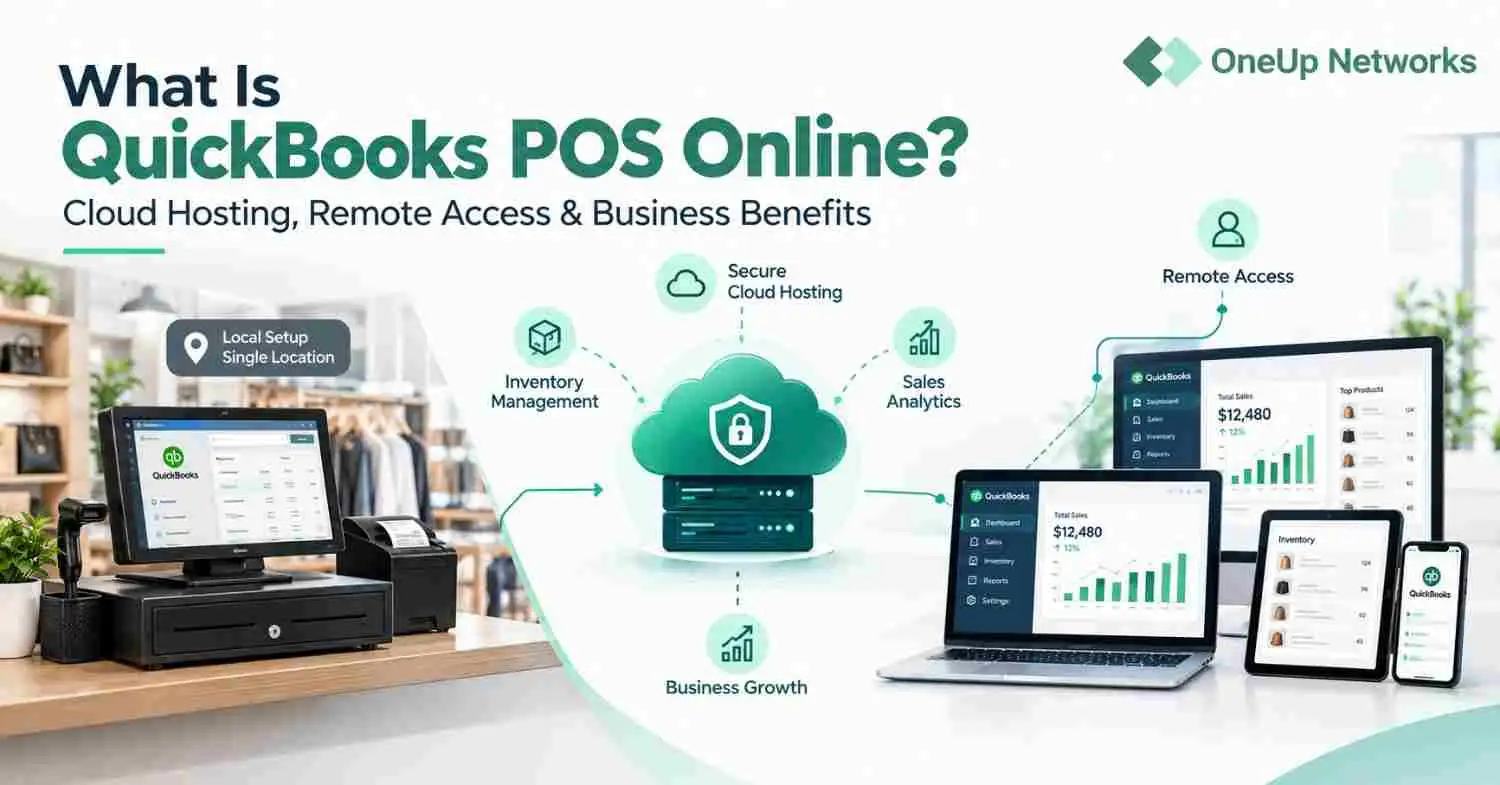
QuickBooks POS Online refers to running QuickBooks Point of Sale through a cloud-hosted environment instead of relying only on a local computer or server. It allows authorized users to access retail data remotely while the hosting provider manages the underlying infrastructure, security, backups, and technical support.
- QuickBooks POS Online is different from QuickBooks Online. QuickBooks Online focuses on accounting tasks, while QuickBooks Point of Sale supports retail operations such as sales transactions, inventory tracking, and customer management.
- Cloud hosting improves accessibility. Retail owners, managers, and authorized employees can access QuickBooks POS remotely without depending on one physical computer inside the store.
- Hosted QuickBooks POS reduces infrastructure workload. A managed hosting provider handles server management, maintenance, backups, and technical assistance so businesses can focus on daily operations.
- Businesses should evaluate hosting providers carefully. Important factors include application experience, security practices, backup strategy, migration support, and ongoing technical assistance.
- OneUp Networks provides managed application hosting. Businesses can host QuickBooks and other business-critical applications with support for migration, configuration, secure access, backups, and managed cloud infrastructure.
Introduction
Many retailers start with QuickBooks Point of Sale installed on a computer inside their store. For a small shop with a few employees, this setup may work well. However, as the business grows, owners often need access from different locations, better data availability, and less time spent managing technical problems. Though Intuit has discontinued sale of QuickBooks POS but if you have an existing license then QuickBooks POS Online hosting becomes useful.
QuickBooks POS Online generally refers to running the QuickBooks Point of Sale application through a cloud-hosted environment instead of keeping it only on a local computer or server. With this approach, authorized users can access sales records, inventory information, and customer data remotely while a hosting provider manages the server infrastructure, backups, security controls, and technical maintenance.
However, one common misunderstanding needs clarification. QuickBooks POS Online is not the same as QuickBooks Online. QuickBooks Online is Intuit’s cloud accounting platform, while QuickBooks Point of Sale was designed for retail operations such as checkout transactions, inventory tracking, and customer management. A hosted QuickBooks POS setup usually means businesses continue using their licensed POS application while a hosting provider manages the cloud environment.
What Is QuickBooks POS?
QuickBooks Point of Sale is a retail management application that helps businesses handle everyday store operations. Unlike accounting software that mainly focuses on financial records, a POS system works directly with sales activities.
Retailers use QuickBooks POS to manage tasks such as:
- Processing customer purchases
- Tracking inventory levels
- Managing product information
- Recording customer details
- Reviewing sales reports
- Connecting retail activities with accounting workflows
For example, a clothing store can use POS software to track product sales, monitor available stock, and understand which items perform better. Similarly, a specialty retailer can review customer purchase history and use sales reports to make better inventory decisions.
A traditional QuickBooks POS setup usually runs on computers located inside the business. The company manages the hardware, network connection, software installation, and data storage. That setup can work well for businesses with simple requirements. However, problems often appear when companies need more flexibility.
For instance, a business owner may want to check sales reports while travelling, a manager may need access from another location, or multiple employees may need to work with the same information. At that point, many businesses start exploring cloud hosting.
What Is QuickBooks POS Online?
QuickBooks POS Online refers to hosting QuickBooks Point of Sale on a remote cloud server so users can access the application without depending only on one physical computer. The software itself does not change. Employees still use QuickBooks POS in the same way. The main difference is where the application runs.
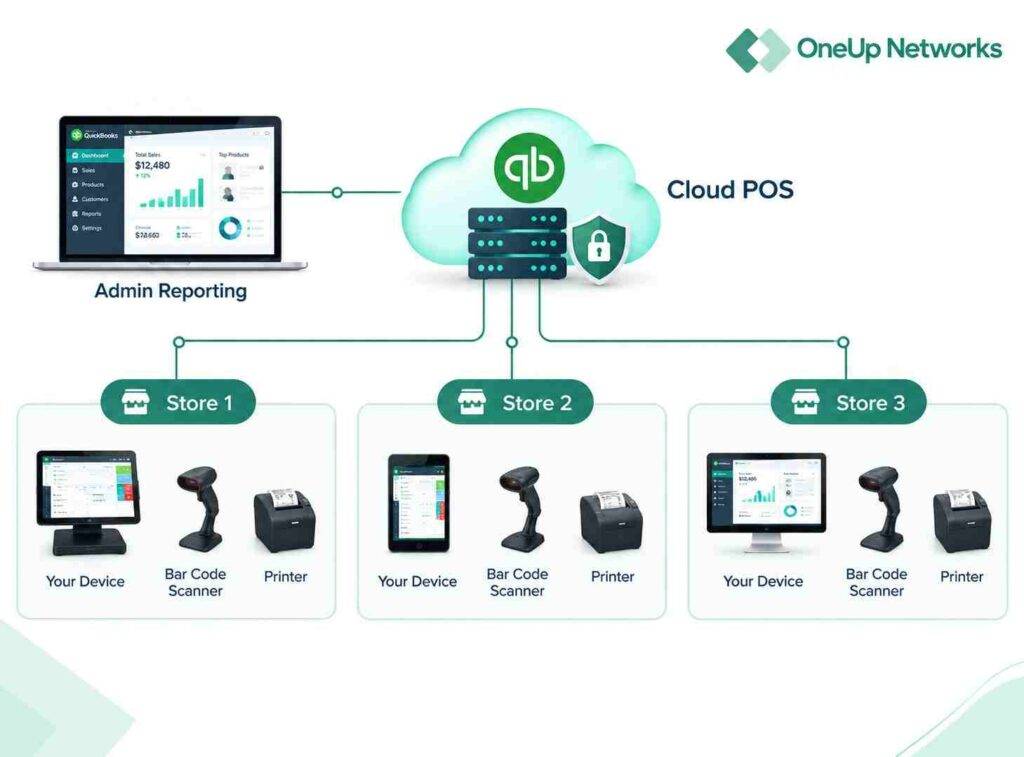
With a traditional setup:
- QuickBooks POS runs on a local computer or server.
- The business manages hardware maintenance.
- Access depends on the local network.
- Data protection responsibilities remain internal.
With QuickBooks POS hosting:
- The application runs on cloud infrastructure.
- Authorized users connect remotely.
- The hosting provider manages the server environment.
- Businesses can access the application from approved locations.
This model helps companies move away from managing every technical detail themselves. For many retailers, the biggest advantage is not a new software feature. Instead, it is the ability to access the same application from more places without relying on one computer sitting inside the store.
How Does QuickBooks POS Online Hosting Work?
QuickBooks POS hosting works by moving the application from a local environment to a QuickBooks managed cloud server. The process usually includes several steps.
1. Reviewing the Current Setup
Before migration, the hosting provider reviews the existing QuickBooks POS environment.
This includes:
- Current users
- Data size
- Application requirements
- Existing workflows
- Hardware setup
This step helps identify possible issues before moving the application.
2. Preparing the Cloud Environment
After reviewing the requirements, the provider prepares a cloud server environment suitable for running the application.
The setup may include:
- Server configuration
- User access settings
- Security controls
- Application installation
3. Moving Data and Configuring Access
The existing QuickBooks POS data can then be moved into the hosted environment based on the migration plan. After that, users receive secure access to the application. The goal is simple: employees should be able to continue their daily work without learning an entirely new system.
4. Managing the Environment
Once the application is running in the cloud, the hosting provider manages the infrastructure.
Depending on the service agreement, this may include:
- Server monitoring
- Maintenance
- Backup management
- Technical assistance
- Security updates
This allows businesses to focus on retail operations instead of server management.
QuickBooks POS Online vs Traditional POS
Both traditional and hosted POS systems can support retail operations. The right choice depends on the size of the business, number of users, and future requirements.
| Feature | Traditional QuickBooks POS Setup | QuickBooks POS Online Hosting |
|---|---|---|
| Application location | Local computer or onsite server | Cloud-hosted server |
| Remote access | Limited by local setup | Available through secure access |
| Hardware management | Managed by business | Managed by hosting provider |
| Data availability | Depends on local network | Available from approved locations |
| Maintenance | Internal responsibility | Supported by hosting provider |
| Backup management | Usually handled internally | Managed according to service plan |
A single-location retailer with limited users may continue using a traditional setup. However, companies with remote teams, multiple locations, or growing operations often look for a more flexible approach.
Cloud hosting does not make every business process better automatically. It solves infrastructure challenges, but businesses still need proper inventory management, employee training, and operational processes.
Benefits of QuickBooks POS Online Hosting
Access QuickBooks POS From Anywhere
One of the main reasons businesses move QuickBooks POS to the cloud is easier access. Unlike a local setup, users do not need to stay at the store or rely on the same network to work with the application. A hosted environment allows authorized users to access QuickBooks POS remotely and manage sales, inventory, and reports from different locations.
For example, a retail owner can check sales information while visiting another location or meeting with suppliers without depending on someone at the store to provide updates. This makes it easier to stay connected with daily operations and make faster decisions.This can help:
- Store owners monitor operations
- Managers review sales activity
- Accounting teams access reports
- Remote employees work more efficiently
Of course, remote access requires proper security settings. User permissions and access controls remain important.
Manage Multiple Locations More Easily
Managing multiple stores can become complicated when each location depends on separate systems. A hosted QuickBooks POS environment creates a centralized working location where approved users can access the application.
This can make daily operations easier by helping teams:
- Review sales information
- Monitor inventory
- Maintain consistent workflows
- Share access between locations
For example, a retail company with three stores may want its management team to review performance without collecting separate reports from each location. Cloud hosting helps connect the technology side of the business. However, companies still need clear processes to manage their operations effectively.
Reduce IT Maintenance Work
Local servers require ongoing attention.
Businesses often deal with:
- Hardware failures
- System updates
- Network issues
- Backup tasks
- Security management
For smaller businesses, these responsibilities can become a distraction.
A managed hosting provider takes care of much of the infrastructure work behind the application. As a result, internal teams spend less time dealing with technical maintenance. Instead of managing servers, employees can focus on customers, sales, and business growth.
Improve Backup and Recovery Planning
Retail data is valuable and Sales records, customer information, and inventory details all play an important role in daily operations. A technical issue affecting a local computer can create unnecessary disruption. Cloud hosting providers usually include backup services as part of their hosting plans. However, businesses should understand how the backup process works before selecting a provider.
Important questions include:
- How often are backups created?
- How long are backups stored?
- Where are backup copies maintained?
- How does recovery work?
A backup is useful only when the business can restore access when needed.
Strengthen Security Management
Retail applications store important business information. Because of this, security should remain a major consideration.
A professional hosting environment may include:
- Multi-factor authentication
- Firewall protection
- User access controls
- Monitoring systems
- Encryption practices
However, security is not only about technology.
Businesses also need good internal practices, such as:
- Removing access for former employees
- Using strong passwords
- Reviewing user permissions regularly
A secure environment requires both technology and responsible management.
Support Business Growth
As a retail business grows, its technology needs often change along with it. A company that starts with a few employees and a single location may later need to support more users, additional stores, or remote access for managers and owners.
With a traditional setup, every major change can require extra hardware, system upgrades, and technical support. For example, adding new users or expanding to another location may involve setting up additional computers and maintaining more infrastructure.
A cloud-hosted QuickBooks POS environment gives businesses more flexibility as their requirements change. Instead of rebuilding the entire setup whenever the business expands, companies can adjust their hosted environment based on their current needs. This makes cloud hosting a practical option for retailers that want to grow while keeping their technology easier to manage.
QuickBooks POS Online vs QuickBooks Online
Many users confuse QuickBooks POS Online with QuickBooks Online because the names sound similar. However, they serve different purposes.
| QuickBooks POS Online | QuickBooks Online |
|---|---|
| Retail point-of-sale solution | Cloud accounting platform |
| Focuses on sales and inventory | Focuses on bookkeeping and financial management |
| Supports store operations | Supports accounting workflows |
| Used mainly by retailers | Used by businesses and accounting teams |
Although they share the QuickBooks name, QuickBooks Online and QuickBooks Point of Sale serve different purposes. QuickBooks Online mainly helps businesses manage accounting tasks such as tracking expenses, creating invoices, recording transactions, and preparing financial reports. It also includes inventory features in certain plans, but its primary purpose remains financial management.
QuickBooks Point of Sale, on the other hand, was built around retail operations. It focuses on activities that happen at the store level, including processing sales transactions, managing products, tracking inventory, and maintaining customer purchase information.
Understanding this difference helps businesses choose a solution based on how they actually operate. A company that mainly needs accounting and financial reporting may find QuickBooks Online suitable, while retailers with point-of-sale requirements need to consider how their sales, inventory, and customer workflows will be managed.
Is QuickBooks POS Online Still Available?
Businesses researching QuickBooks POS should also understand the current product situation. Intuit discontinued QuickBooks Desktop Point of Sale 19.0 and related connected services on October 3, 2023. According to Intuit, discontinued services included QuickBooks Point of Sale Payments, Gift Card Service, Mobile Sync, Store Exchange, Webgility ecommerce integration, and live support services. Existing users can continue using the software, but discontinued products no longer receive critical security patches or feature updates.
Because of this change, many retailers are reviewing their long-term options. Some businesses may move to another POS platform. Others may need help maintaining existing workflows or planning a future transition.
Before making a decision, companies should review:
- Current software needs
- Existing integrations
- Data requirements
- Future business plans
Who Should Consider QuickBooks POS Hosting?
QuickBooks POS hosting can be a useful option for retailers that need easier access, better flexibility, and less dependence on local computers. However, it is not the right choice for every business. The best fit usually depends on the number of users, store locations, daily workflow, and how much time the company wants to spend managing technology.
Retail Businesses With Multiple Stores
For retailers operating multiple locations, keeping sales and inventory information organized can become challenging. Each store may have its own employees, systems, and daily activities, which makes it harder for owners and managers to get a complete view of the business.
With QuickBooks POS hosting, authorized users can access the same hosted environment instead of depending on separate local systems at each location. As a result, managers can review important information more easily and stay connected with store operations from different places.
For example, a retailer with several stores may want the owner to check sales performance while visiting another location or meeting suppliers. Instead of waiting for reports from individual stores, the required information can be accessed through the hosted system.
Businesses Without Dedicated IT Teams
Many small and mid-sized businesses do not have an internal IT team to handle servers, updates, backups, and technical problems. At first, managing a local setup may seem simple, but over time, these responsibilities can take attention away from daily business activities.
Because of this, many companies choose managed hosting to reduce the technical workload. The hosting provider takes care of the infrastructure side, while the business team can focus on customers, sales, and operations.
In addition, a managed hosting approach can help companies avoid spending time on tasks such as hardware maintenance, system configuration, and troubleshooting.
Businesses With Remote Management Needs
Business owners and managers are not always working from the same location as their teams. They may travel between stores, work from home, or need access while meeting with suppliers and partners.
With a hosted QuickBooks POS environment, authorized users can access the application remotely instead of being tied to one computer inside the store. This makes it easier to review sales information, check inventory details, and stay updated on business activities even when they are away from the physical location.
However, remote access should always be managed carefully. Proper user permissions and security controls help ensure that only approved employees can access business information.
What Should You Look for in a QuickBooks POS Hosting Provider?
Choosing a QuickBooks POS hosting provider is not only about finding a company that can install the software. The right provider should understand how retail applications work, how your team uses the system every day, and what your business needs to keep operations running smoothly.
A reliable hosting partner should have experience with application setup, configuration, data migration, and ongoing support. In addition, they should be able to explain how they manage security, backups, and technical issues before you move your business data to their environment.
Application Experience
QuickBooks POS is an important part of daily retail operations, so your hosting provider should understand more than just server setup. They should know how to configure the application, move existing data, support user access, and handle common issues that may affect your workflow. A provider with application experience can help reduce migration problems and make the transition easier for employees.
Security and Data Protection
Because POS systems contain important business information, security should always be a major consideration. Before choosing a provider, review how they manage user access, authentication, monitoring, and data protection. A good hosting environment should include proper security controls while also helping businesses maintain responsible access practices.
Backup and Recovery
Backups are not only about storing copies of data. They are about being able to restore information when something goes wrong. Before selecting a provider, understand their backup process, including how often backups are created, where copies are stored, how long they are retained, and how recovery works during an unexpected issue.
Technical Support
A hosting provider should support you beyond the initial setup. Your team may need help with configuration changes, user access, troubleshooting, or future updates.
The right partner should understand both the technology and your business workflow. This helps ensure that QuickBooks POS remains a reliable tool for managing daily retail operations instead of becoming another technical challenge. both technology and the way businesses use their applications.
Host Your Business Applications With OneUp Networks
OneUp Networks helps businesses host accounting, tax, and business applications through managed cloud environments. The focus is not only on providing servers. It is about helping companies run important applications without handling every infrastructure responsibility themselves.
OneUp Networks supports businesses with:
- Managed application hosting
- Cloud migration assistance
- Application configuration
- Secure remote access
- Backup and recovery planning
- Technical support
Customers maintain their software licenses with the original software vendors. OneUp Networks provides the managed hosting environment required to run licensed applications in the cloud.
Frequently Asked Questions About QuickBooks POS Online
QuickBooks POS Online refers to hosting QuickBooks Point of Sale on cloud infrastructure so authorized users can access the application remotely instead of relying only on local computers.
No. QuickBooks Online is an accounting platform, while QuickBooks POS focuses on retail transactions, inventory management, and customer information.
Yes. A hosted QuickBooks POS environment allows authorized users to access the application remotely through secure connections.
No. Businesses maintain their software licenses with the original vendor. Hosting providers provide the cloud infrastructure and technical management.
QuickBooks POS hosting may suit businesses that need remote access, centralized workflows, multiple-user access, or reduced IT management responsibilities.
Make QuickBooks Easier to Access With Managed Cloud Hosting
Running QuickBooks through a local computer can work well for smaller setups. However, as teams grow and more users need access, managing hardware, updates, backups, and remote connections can become difficult. A managed cloud hosting environment gives businesses a more flexible way to access their applications without depending on one physical system.
QuickBooks POS Online highlights how cloud hosting can help retailers access important business information from different locations while keeping their workflows connected. Instead of managing servers and technical tasks internally, businesses can rely on a managed hosting partner to handle the infrastructure behind the application.
For companies that need remote access, better collaboration, centralized workflows, and reduced IT responsibilities, managed cloud hosting can provide a practical solution. The right approach depends on factors such as business size, application requirements, security expectations, and long-term growth plans.
Your applications should support your business, not slow it down. Talk to OneUp Networks to build a managed cloud hosting environment for QuickBooks and other critical applications.


























