
- UltraTax CS by Thomson Reuters is professional tax-prep software with separate modules for individual, business, fiduciary, and nonprofit returns.
- The main versions map to return types: 1040 (individuals), 1120/1120S/1065 (businesses), 1041 (estates and trusts), and 990 (exempt organizations).
- Each module shares the same workflow, e-filing, and diagnostics, so firms can run several return types in one environment.
- Many firms run UltraTax CS on a hosted cloud server for remote access and centralized data — covered briefly at the end.
In the ever-evolving landscape of tax preparation, the demand for robust, efficient, and accurate tax software has never been higher. UltraTax CS Tax Software is a complete tax solution made for accountants and CPAs to meet their changing needs. UltraTax CS hosting allows CPA firms and tax professionals to run Thomson Reuters UltraTax CS on a secure cloud server instead of a local office computer. This gives staff remote access, centralized data, easier collaboration, backups, and improved control during busy tax season.
What is UltraTax CS Tax Software?
UltraTax CS, developed by Thomson Reuters, is a leading tax preparation software that offers a full suite of tools designed to streamline the tax filing process. It caters to various types of tax returns, including federal, state, and local taxes for individuals, businesses, and other entities.
UltraTax CS is a professional tax preparation application from Thomson Reuters used by CPAs, accounting firms, and tax preparers. It prepares federal, state, and local returns for individuals, businesses, and other entities, and connects with the wider CS Professional Suite (such as Accounting CS, Practice CS, and FileCabinet CS) for data sharing across a firm’s workflow. Rather than being a single program, UltraTax is organized into modules tied to the type of return you prepare. Understanding which version does what helps firms scope licenses correctly and plan their tax-season workflow.
Types of UltraTax CS Software
UltraTax CS comes in different versions to cater to the diverse needs of tax professionals:
1. UltraTax CS for Individual Returns (1040)
- Tailored for preparing individual tax returns.
- Includes features like e-filing, direct deposit capabilities, and comprehensive error checking.
2. UltraTax CS for Business Returns (1120, 1120S, 1065)
- Designed for corporate and partnership tax returns.
- Facilitates easy handling of complex business tax situations.
3. UltraTax CS for Estates and Trusts (1041)
- Focuses on estate and trust tax returns.
- Provides specialized tools for fiduciary accounting.
4. UltraTax CS for Exempt Organizations (990)
- Dedicated to non-profit organizations’ tax filings.
- Simplifies the process of maintaining compliance with IRS regulations.
UltraTax CS versions, by return type
| Version (module) | Primary return forms | Best suited for |
|---|---|---|
| UltraTax CS 1040 | Form 1040 (individual) | Individual returns, including e-filing, direct-deposit setup, and error checking |
| UltraTax CS 1120 / 1120S / 1065 | C-corp, S-corp, partnership | Corporate and partnership returns and more complex business filings |
| UltraTax CS 1041 | Form 1041 (estates and trusts) | Fiduciary work, with tools geared to estate and trust accounting |
| UltraTax CS 990 | Form 990 (exempt organizations) | Nonprofit filings and IRS compliance for tax-exempt entities |
Because the modules share a common interface and data, a firm handling several entity types can prepare individual, business, fiduciary, and nonprofit returns within one consistent environment rather than switching tools.
Core capabilities across every version
- Efficiency and accuracy — automated calculations and data entry reduce manual errors, and built-in diagnostics flag issues before filing.
- Comprehensive reporting — detailed client reports and summaries with customizable formats.
- Suite integration — data flows between UltraTax CS and other CS Professional Suite applications, reducing re-keying.
- Client collaboration — portals support document exchange and status tracking.
- Ongoing compliance updates — regular updates keep the software aligned with current tax rules.
Benefits of Ultra Tax CS
1. Efficiency and Accuracy
- Automated calculations and data entry reduce the risk of errors.
- Streamlined workflows save time and enhance productivity.
2. Comprehensive Reporting
- Generate detailed reports and summaries for clients.
- Customizable report formats to fit specific needs.
3. Integration Capabilities
- Seamlessly integrates with other Thomson Reuters products.
- Enables data sharing and synchronization across different platforms.
4. Client Collaboration
- Client portals allow for easy document sharing and communication.
- Real-time updates and progress tracking enhance client satisfaction.
5. Compliance and Updates
- Regular updates ensure compliance with the latest tax laws and regulations.
- Built-in error checks and diagnostics help maintain accuracy.
Challenges Faced by Accountants and CPAs with Ultra Tax Software
Data Security
- Safeguarding sensitive client information is paramount.
- Traditional methods often lack robust security measures.
Accessibility and Collaboration
- Difficulty in accessing tax software from multiple locations.
- Limited collaboration capabilities hinder teamwork.
Scalability
- Traditional on-premises software may struggle to handle increasing workloads.
- Lack of scalability can impede growth and efficiency.
Running UltraTax CS in the cloud
A common way firms address those limitations is to host their existing UltraTax CS license on a secure cloud server, so the same software is available remotely with centralized data and routine backups. This is a separate topic with its own detailed guide.
➜ Learn more on our UltraTax CS Cloud Hosting page.
How OneUp Networks supports UltraTax CS firms
OneUp Networks provides cloud hosting for firms that already license UltraTax CS and want to run it remotely. We host your existing license or any Thomson Reuters Suite on cloud — licenses are always purchased from Thomson Reuters — and focus on:
- Secure access to your hosted environment, with a 120-day rolling backup retention as an added layer of protection.
- Remote, multi-user access so your whole team can work from anywhere during tax season.
- Reduced IT overhead, since server maintenance, updates, and backups are managed for you.
- Responsive support that any member of your office can reach — not just owners.
- Scalability and Flexibility, easily scale resources up or down based on demand.
- Pay-as-you-go model, optimizes costs and resources for creative solutions accounting.
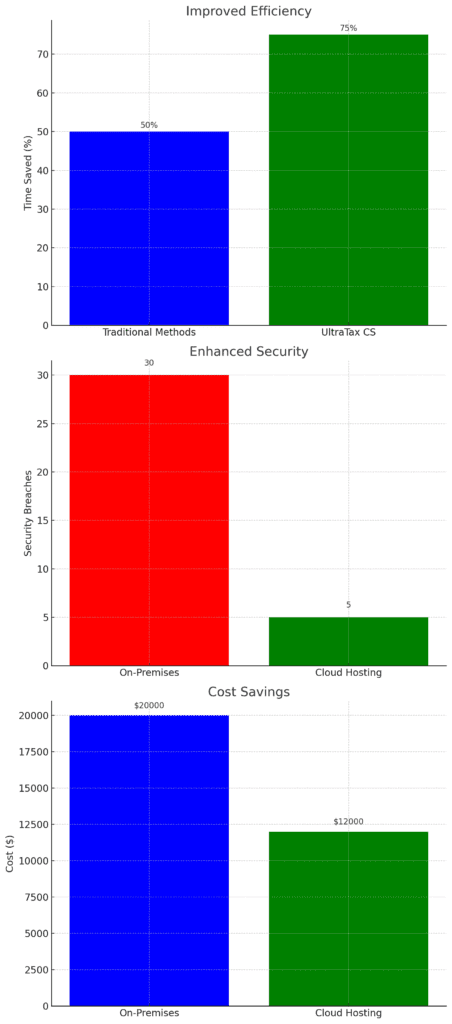
These graphs clearly demonstrate the significant benefits of using UltraTax on the cloud, highlighting improvements in efficiency, security, and cost savings.
Frequently Asked Questions
UltraTax CS is offered in modules by return type: 1040 for individuals, 1120/1120S/1065 for businesses, 1041 for estates and trusts, and 990 for exempt organizations.
Yes. The modules share a common interface and data within the CS Professional Suite, so a firm can prepare several return types in one environment.
UltraTax CS can be hosted on a secure cloud server so staff can access it remotely. You keep your existing Thomson Reuters license; a host like OneUp Networks runs it for you. See our UltraTax CS Cloud Hosting page.
No. All types or modules of UltraTax CS licenses are purchased from Thomson Reuters. A hosting provider only hosts the software you already license.
Cloud Hosting For CS Accounting & Tax services
In the competitive world of tax preparation, leveraging advanced tools like CS UltraTax Application by Thomson Reuters, combined with the power of cloud hosting, can set your practice apart. OneUp Networks’ cloud solutions address important issues like data security, accessibility, and scalability. This gives businesses a strategic edge by improving efficiency, cutting costs, and increasing productivity.
Contact OneUp Networks today to learn more about our cloud hosting solutions for UltraTax CS and experience the future of tax software.
Related Articles: