Last updated: October 9, 2026 · Pricing checked on each provider’s website on October 9, 2026
Quick answer – The four QuickBooks hosting providers most US businesses and accounting firms shortlist in 2026 are OneUp Networks (from $35.99/user/month, private dedicated server on every plan), Rightworks (QuickBooks Hosting from $55/user/month), Ace Cloud Hosting (from $49.99/user/month for 3+ users, plus a $5/user Microsoft fee) and Verito (from $69/user/month on an annual plan, plus $100/month per firm for the server). Cloud9 Real Time and Apps4Rent are also worth comparing.
QuickBooks Desktop is still the accounting system of choice for many small and mid-sized businesses and the CPA firms that serve them. Hosting it in the cloud lets your team open the same company file from anywhere, with the server, backups and updates managed for you. This guide compares the leading QuickBooks hosting providers on price, backups, uptime, support and app compatibility, so you can make an informed decision.
Disclosure: OneUp Networks publishes this guide and lists itself first. Every competitor fact comes from that provider’s own public website, linked in the sources at the end.
Why Choose QuickBooks Hosting?
Enhanced accessibility
With QuickBooks cloud hosting, your licensed QuickBooks Desktop runs on a remote server, and your team signs in from Windows, Mac or a browser. Multiple users can work in the same company file at the same time, from the office or from home, without VPNs or a file server in the back room.
Improved security
A managed host keeps your financial data in professionally run data centers rather than on office PCs. Look for multi-factor authentication, encryption, firewalls, automated off-site backups and a clear backup retention period. Hosting supports your firm’s security program; it doesn’t replace your own policies, such as a written information security plan (WISP).
Cost Efficiency
Hosting replaces the cost of buying, patching and replacing an office server with a predictable per-user monthly fee. Most providers include setup, updates and support in that fee, so you pay for the users you have and add or remove them as your team changes.
Top QuickBooks Hosting Providers:
How we compared: we looked at each provider’s published per-user price, server model (dedicated or shared), backup retention, uptime commitment, support hours, free trial and app compatibility. Prices are monthly list prices in USD, excluding your QuickBooks license, and were checked on October 9, 2026. Promotions change often, so confirm with the provider before you buy.
1. OneUp Networks
OneUp Networks is a managed cloud host built for accounting firms, CPAs and businesses that run QuickBooks Desktop and Enterprise alongside tax and practice software.
- Private dedicated server: your company files and apps are not shared with other customers’ workloads.
- 120-day rolling backups on Professional and Enterprise plans, with daily automated backups on every plan — among the longest retention periods in this comparison.
- 24/7 support from engineers, including holidays, who also handle QuickBooks and tax software updates.
- Free application migration and setup, with Windows, Mac and browser access.
- Pricing: Virtual Office Starter $35.99, Professional $45.99 and Enterprise $55.99 per user per month; 5% off with annual billing.
Best for: firms that want QuickBooks and tax software on one private server with long backup retention. One login and one vendor to manage everything.
2. RightWorks
Rightworks (formerly Right Networks) is one of the longest-running QuickBooks hosting providers and describes itself as a leading Intuit solution provider.
- Plans for businesses: QuickBooks Hosting from $55/user/month (new customers only), Cloud Hosting from $85, and Cloud Hosting Pro from $110, which adds Microsoft Office apps. A Cloud for QuickBooks Online plan starts at $30.
- 90-day backups, multi-factor authentication and data encryption, in Tier III and IV geo-redundant data centers.
- App ecosystem: Cloud Hosting includes access to 300+ desktop and cloud apps and Spark AI tools.
- 99.99% uptime and 24/7 expert support, as listed on its pricing page; a 1-month free trial is offered on some plans.
Best for: businesses that want a large app catalog and AI add-ons from an established provider. Weighing Rightworks alternatives? See our side-by-side comparison.
3. Ace Cloud Hosting
Ace Cloud Hosting offers managed hosting for QuickBooks and many other accounting and tax applications, on private dedicated servers.
- Pricing: promotional dedicated plans from $49.99/user/month for 3+ users ($82.99 for a single user). A $5/user/month Microsoft connection fee and hosted Excel ($5.99/user/month) are charged separately.
- Backups: 30-day retention on Essential and 45-day on Business and higher plans.
- 7-day free trial with no credit card required, and up to 10% off with annual billing.
- Larger plans: an Unlimited plan starts at $150/user/month.
Best for: teams that want to save cost initially but can be costlier later due to upselling by team. Weighing Ace Cloud alternatives?
4. Verito
Verito offers cloud hosting and managed IT for tax and accounting firms, including QuickBooks Desktop and professional tax software.
- Pricing: Essentials $89, Pro $119 and Elite $179 per user per month on month-to-month terms, or $69, $99 and $149 on an annual plan. Each firm also pays $100/month for its server and a $500 one-time setup fee.
- Resources by plan: pooled RAM (10 GB, 15 GB or unlimited), 100–200 GB of NVMe storage, and 2, 6 or unlimited application slots.
- Backups run 4 times a day and are kept 60 days on Essentials and Pro, 90 days on Elite.
- 24/7 support, a 99.95% uptime commitment in its terms of service, and a 30-day money-back guarantee on recurring fees.
Best for: tax and accounting firms that want a firm-level server with pooled resources. Weighing Verito alternatives?
Compare QuickBooks Hosting Providers
To assist you compare the features of these providers, below is a brief summary:
| Provider | Starting price (per user/month) | Server model | Backup retention | Trial / setup | Best for |
|---|---|---|---|---|---|
| OneUp Networks | $35.99 (Starter); $45.99 with 120-day backups | Private dedicated server, every plan | Daily; 120 days on Professional+ | Free migration and setup | QuickBooks + tax apps on one server |
| Rightworks | $55 (QuickBooks Hosting, new customers) | Managed cloud platform | 90 days | 1-month trial on some plans | Large app ecosystem, AI tools |
| Ace Cloud Hosting | $49.99 (3+ users, promo) + $5 Microsoft fee | Private dedicated server | 30–45 days | 7-day free trial, no card | Try before you buy |
| Verito | $89 month-to-month ($69 annual) + $100/month server per firm | Firm server with pooled RAM | 60–90 days, backups 4× daily | $500 setup; 30-day money-back on recurring fees | Tax and accounting firms |
Want every detail side by side, including uptime commitments, contract terms and a savings calculator? See our QuickBooks hosting comparison hub, which compares OneUp with Rightworks, Verito and Ace Cloud Hosting point by point.
Other providers worth comparing
- Cloud9 Real Time (Cloudnine Realtime) offers private virtual servers and a hosted Cloud Desktop for QuickBooks, Sage and 400+ other apps, with nightly automated backups. Per-user prices weren’t shown on its pricing page when we checked, so expect a quote. Its $50/user setup fee is waived, and 2 months are free, with annual payment.
- Apps4Rent offers session-based (shared) QuickBooks hosting at $12/month for the first 3 months, then $24/month, and dedicated QuickBooks servers from $34.95/month. It’s month-to-month with no setup fees and lists a 99.9% uptime guarantee and daily backups.
Benefits of Cloud Hosting QuickBooks
As your company grows, your accounting needs change. A QuickBooks hosting provider can add users, RAM or storage in hours, and scale back after busy season, so your system grows with you.
Cloud hosting also improves collaboration. Several users can work in the same company file at once, which helps firms with remote staff and clients who need shared access.
Disaster Recovery
A good host keeps automated, off-site backups and can restore a company file or a whole server after a mistake, a failed update or ransomware. Retention matters: the longer backups are kept, the further back you can recover. In this comparison, retention ranges from 30 days to 120 days.
The performance of your accounting software affects your work every day. Here’s how each provider approaches performance and reliability:
- OneUp Networks runs every customer on a private dedicated server, with NVMe storage from the Professional plan and high-availability infrastructure on Enterprise. OneUp Networks commits to 99.99% uptime.
- Rightworks hosts in Tier III and IV geo-redundant data centers and lists 99.99% uptime on its pricing page.
- Ace Cloud Hosting uses private dedicated servers with NVMe drives and lists 99.99% uptime.
- Verito gives each firm a server with pooled RAM (10 GB to unlimited by plan) and 100–200 GB of NVMe storage, and commits to 99.95% uptime in its terms of service.
Security Features:
Financial data security should be a top priority when choosing QuickBooks Enterprise hosting or any hosted accounting setup. Here’s how these providers describe their protections:
- OneUp Networks: an enterprise-grade security stack with brute-force protection and a private IP on Professional plans, advanced IP access controls and granular user policies on Enterprise, and backups stored in multiple Tier III/IV data centers that are compliant with SSAE-18, HIPAA requirements, FTC Safeguard.
- Rightworks: multi-factor authentication, data encryption and SOC 1, 2 and 3 compliance, as listed on its plans page.
- Ace Cloud Hosting: business continuity and disaster recovery, intrusion detection and prevention, and AES encryption, as listed on its site.
- Verito: backups 4 times a day and SOC 2 Type II, as listed on its site.
Customer Support
Reliable support is crucial when QuickBooks is how you close the books. Here’s what each provider offers:
- OneUp Networks: 24/7 support from engineers, including holidays, with priority support on Enterprise. The team joins three-way calls with Intuit or your tax software vendor when needed.
- Rightworks: 24/7 expert support, plus a community and knowledge resources.
- Ace Cloud Hosting: a help desk with ticketing and support around the clock, as listed on its site.
- Verito: 24/7 support, as listed on its pricing page.
Integrations and Compatibility
Choose a host that supports the tools your business already uses. Here’s how they compare:
- OneUp Networks: installs any Windows application or QuickBooks add-on you need. Many clients run accounting and tax software on the same dedicated server, such as UltraTax CS hosting combined with QuickBooks Enterprise hosting.
- Rightworks: access to 300+ desktop and cloud apps on its Cloud Hosting plan, with self-install options.
- Ace Cloud Hosting: hosts QuickBooks add-ons and other accounting apps; hosted Excel is an add-on.
- Verito: 2, 6 or unlimited application slots depending on plan, with extra slots available as an add-on.
Cost Analysis
The per-user price is only part of the total. Here is what a 5-user team would pay per month at each provider’s published list price, before your QuickBooks license:
| Provider and plan | Monthly cost for 5 users | One-time fees |
|---|---|---|
| Apps4Rent Dedicated Silver (1 user included + 4 × $26) | $151.95 | None listed |
| OneUp Networks Starter (5 × $35.99) | $179.95 | None (setup and migration free) |
| OneUp Networks Professional (5 × $45.99) | $229.95 | None (setup and migration free) |
| Ace Cloud Hosting Essential (5 × $49.99 + 5 × $5 Microsoft fee) | $274.95 | Not listed |
| Rightworks QuickBooks Hosting (5 × $55) | $275.00 | $99 |
| Verito Essentials, month-to-month (5 × $89 + $100 server) | $545.00 | $500 setup |
On Verito’s annual plan, the same team would pay $445/month plus the $500 setup fee. Cloud9 Real Time is quote-based, so it isn’t in the table. Also compare what each price includes: backup retention, storage, Microsoft Office, and the notice period and fees for leaving.
Ready to move QuickBooks to a private cloud server? →
Choosing the Right QuickBooks Hosting Provider
Selecting the right QuickBooks hosting provider means matching the plan to how your business works. Evaluate these factors:
1. Business Size:
Count the users who need QuickBooks at the same time, including seasonal staff. Some plans price per user; others charge per server plus per user, which changes the math as you grow.
2. Budget:
Look beyond the headline price to setup fees, Microsoft or app add-on fees, storage overage charges and promotional prices that rise after the first months.
3. Required Features:
List what you can’t do without: dedicated server, backup retention, tax software support, Microsoft Office, browser or Mac access, and 24/7 support.
4. Contract and Exit Terms:
Check the notice period, auto-renewal, early-termination fees and how you get your data back if you leave. These terms vary widely between providers and are easy to miss before you sign.
5. Trial Periods:
Look for providers that offer trial periods or money-back guarantees, so you can test performance with your own company file before committing.
6. Reputation and Reviews:
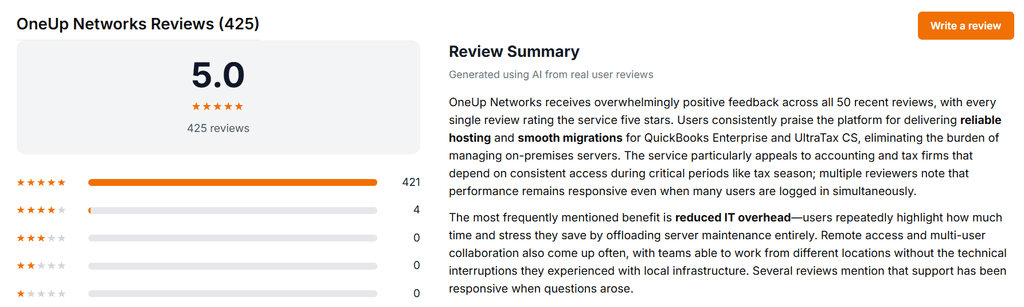
Read recent reviews on G2 and Capterra and ask for case studies from firms like yours. Recent reviews tell you more than ratings from several years ago.
Conclusion
The right QuickBooks hosting provider depends on your team size, the apps you run and how much backup history you need. OneUp Networks, Rightworks, Ace Cloud Hosting and Verito each take a different approach, and Cloud9 Real Time and Apps4Rent are worth a look too. Compare the total monthly cost for your user count, confirm backup retention and exit terms, and trial the service with your own data. When you’re ready, talk to our team or compare providers side by side.
Frequently Asked Questions
It depends on your needs. OneUp Networks suits firms that want QuickBooks and tax software on a private dedicated server with 120-day backups. Rightworks suits businesses that want a large app ecosystem. Ace Cloud Hosting offers a 7-day free trial with no credit card. Verito is built around tax and accounting firms. Apps4Rent has the lowest entry price.
Published list prices range from about $24 to $150 per user per month, before your QuickBooks license. For a 5-user team, that works out to roughly $150 to $545 per month, depending on the provider, plan and one-time setup fees.
No. QuickBooks hosting runs your licensed QuickBooks Desktop (Pro, Premier or Enterprise) on a provider’s cloud server. QuickBooks Online is Intuit’s own web-based product and doesn’t need hosting.
Usually yes. Hosting fees cover the server, backups and support, not the QuickBooks license. Some providers, including OneUp Networks, can also supply and manage QuickBooks licenses for you.
Yes, on providers that support multiple apps. OneUp Networks clients often run QuickBooks Enterprise and UltraTax CS together on one dedicated server.
Check your current contract’s notice period and termination fees, request a copy of your data, and schedule the cutover outside a filing deadline. OneUp Networks provides free guided migration with a cutover date you choose.
Read Also: