
For financial professionals, IT decision-makers, and cloud hosting experts, virtualization isn’t just a “tech buzzword” anymore — it’s the backbone of efficiency, compliance, and secure operations. From evaluating Hyper-V vs VirtualBox to scaling hybrid financial IT infrastructures, the market is booming. By 2027, global virtualization software is projected to surpass $120 billion (Statista, 2024), driven by digital transformation, cloud workloads, and the demand for secure, agile systems.
Two of the most widely used virtualization platforms — Hyper-V (Microsoft) and VirtualBox (Oracle) — are often compared, especially for organizations deciding how to structure virtual machines (VMs). But the “Hyper-V vs VirtualBox” debate extends beyond performance. Factors like regulatory compliance (important for accountants/financial firms), long-term costs, integration with cloud, and data security play a major role.
What is a Hypervisor ?
A hypervisor is the software or hardware layer that creates virtual machines (VMs). It lets one physical server run multiple operating systems simultaneously.
- Type 1 Hypervisors (bare-metal) run directly on hardware (like Microsoft Hyper-V, VMware ESXi). They’re faster, more secure — popular for enterprise.
- Type 2 Hypervisors (hosted) run on top of an existing OS (like Oracle VirtualBox). They’re more flexible for personal use, testing, and smaller environments.
What is Hyper-V?
Hyper-V is Microsoft’s Type 1 hypervisor built into Windows. It’s designed for businesses, enterprise servers, IT deployments, and cloud environments. For accountants and financial firms using QuickBooks on Windows Server or Azure Cloud, it is often the first choice (reinforced by its native integration with Azure and Active Directory).
What is VirtualBox?
Oracle VirtualBox is a Type 2 hypervisor. It’s free, open-source, multi-platform (Windows, Mac, Linux), and widely used for developers, students, and businesses who need testing, cross-platform environments, or a free virtualization tool.
Hyper-V vs VirtualBox: A Direct Comparison
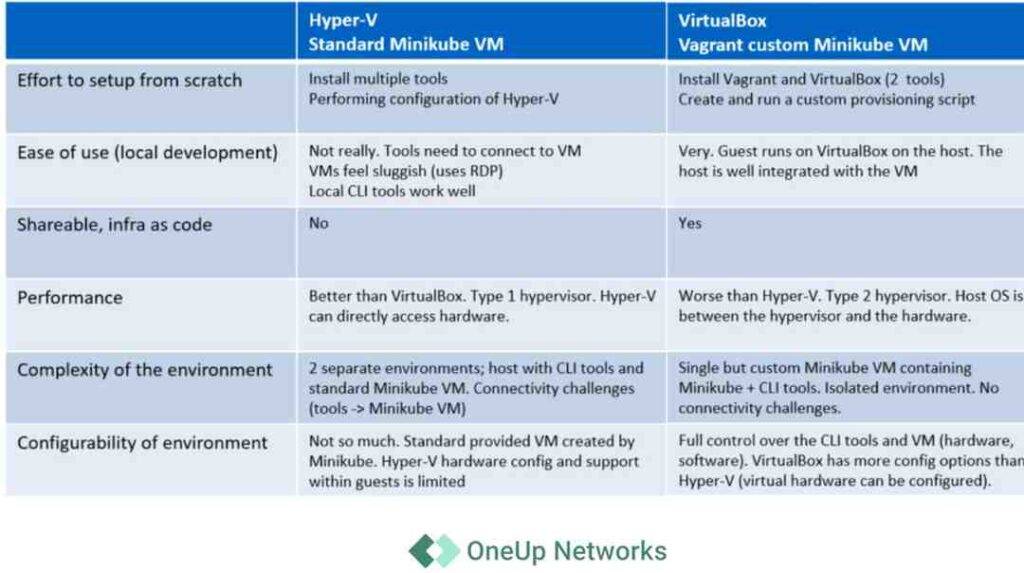
Below is a side-by-side table comparing the two:
| Feature | Hyper-V (Microsoft) | VirtualBox (Oracle) |
|---|---|---|
| Type of Hypervisor | Type 1 (bare-metal) | Type 2 (hosted) |
| Best For | Businesses, cloud workloads, accountants & financial firms | Developers, testers, students, small businesses |
| Performance | Faster, hardware-level virtualization, better resource allocation | Slower (runs on top of existing OS) |
| Platform Support | Windows, Windows Server | Windows, Linux, macOS, Solaris |
| Integration | Tight with Microsoft ecosystem (Azure, Active Directory, OneDrive, MS 365) | Broad multi-platform guest support |
| Use Case Example | Hosting QuickBooks Desktop in a secure cloud environment | Running Ubuntu VM on a Windows laptop |
| Cost | Free with Windows Pro/Enterprise editions | Free (Open Source) |
| Complexity | Medium-to-high (requires setup knowledge) | Beginner-friendly, simple to start |
| Security | Enterprise-grade, virtualization-based security supported | Flexible but weaker in hardened enterprise use cases |
Hyper-V vs VirtualBox: Detailed Breakdown
Performance and Efficiency
- Hyper-V leverages hardware acceleration (Intel VT-x, AMD-V), which makes it superior for enterprise workloads like ERP systems, accounting software hosting, or financial database management.
- VirtualBox is a great VirtualBox alternative for testing, but performance drops when scaling multiple VMs, especially with resource-heavy finance apps.
Stat: Gartner (2023) found Type 1 hypervisors perform 40% faster under heavy workloads compared to Type 2 hypervisors.
Security & Compliance
For financial firms under IRS, FINRA, and SOC 2 compliance:
- Hyper-V’s Virtualization-Based Security (VBS) and seamless integration with Windows Defender Credential Guard make it a better fit.
- VirtualBox lacks enterprise-level built-in compliance features, requiring third-party monitoring tools.
Cloud & Ecosystem Integration
- Hyper-V: Works directly with Azure Cloud Hosting, making QuickBooks Desktop hosting, tax software deployment, and financial data security easier.
- : Great for multi-platform experimental environments (Linux testing on Windows, UTM vs VirtualBox for Mac users).
Use Cases for Accountants & Financial Firms
1: A CPA Firm Hosting QuickBooks for Clients
- Best Choice: Hyper-V (high performance, better compliance, can integrate into OneUp Networks’ private cloud hosting).
2: A Tax Professional Testing Tax Software on Linux
- Best Choice: VirtualBox (multi-OS support, easy setup).
3: IT Department in a Mid-Sized Accounting Firm Needing Enterprise Security
- Best Choice: Hyper-V, since it supports VBS, shielded VMs, regulatory audit trails.
Alternatives to VirtualBox & Hyper-V
Some firms may want VirtualBox alternatives or alternatives for Hyper V.
| Software | Type | Best For |
|---|---|---|
| VMware Workstation/ESXi | Type 1/2 Hybrid | Best balance of enterprise & developer needs |
| UTM (macOS) | Type 2 | Mac users looking for UTM vs VirtualBox comparisons |
| Parallels Desktop (Mac) | Type 2 | Running Windows on macOS in finance firms |
| Proxmox VE | Type 1 | Advanced IT deployment |
Hyper-V vs VirtualBox vs VMware (The Full Picture)
Here’s how all three compare:
| Feature | Hyper-V | VirtualBox | VMware Workstation/ESXi |
|---|---|---|---|
| Type | Type 1 | Type 2 | Both |
| Best Audience | Businesses, firms, IT teams | Developers, small offices | Enterprise & advanced IT |
| Performance | High | Medium | High (slightly better than Hyper-V in Linux workloads) |
| Cost | Free | Free | Paid (Workstation), Free basic ESXi |
Practical Recommendations
- Best virtual machine software for Windows 10/11 → Hyper-V.
- Best VM software for Linux & Mac → VirtualBox or UTM.
- For accountants & financial firms needing compliance → Hyper-V Manager + OneUp Networks cloud integration.
- Best free VM software → VirtualBox.
FAQs on Hyper-V vs VirtualBox
Yes. VirtualBox is a Type 2 (hosted) hypervisor that runs on top of an operating system.
Type 1 runs directly on hardware (faster, more secure). Type 2 runs inside a host OS (easier, for developers/testing).
For professionals, Hyper-V (built-in to Windows Pro/Enterprise) is best. For casual use or multi-platform testing, VirtualBox works.
Yes. VMware, Proxmox, and UTM are excellent VirtualBox alternatives depending on whether you’re on Windows, Linux, or Mac.
Not efficiently. While Windows updates have made partial coexistence possible, it often causes conflicts, so it’s recommended to use one or the other.
Conclusion
When it comes to Hyper-V vs VirtualBox, the choice ultimately depends on your goals: Hyper-V is a powerhouse for accountants, CPAs, and financial firms needing enterprise-grade security, regulatory compliance, and seamless integration with Windows and Azure ecosystems. On the other hand, VirtualBox is the preferred option for developers, students, and professionals seeking a free, flexible, and cross-platform virtualization solution.
At OneUp Networks, we specialize in helping accounting and financial firms deploy secure, high-performance cloud-hosted environments using enterprise virtualization solutions.Whether you’re hosting QuickBooks Desktop, tax software, or ERP systems, our team will ensure you’re running on the best VM software for your needs with guaranteed uptime, data security, and IT support.
Also Read these helpful blogs:


























