
Virtualization has become a cornerstone for modern IT infrastructure, especially in the accounting and finance sectors where data security, scalability, and reliability are paramount. Whether you’re running complex financial models, managing sensitive data, or testing new software, choosing the best virtual machine (VM) for Linux can dramatically impact your workflow, security, and bottom line. In this comprehensive guide, we’ll break down the leading Linux VM software, compare their features, and help you select the right solution for your needs.
Table of contents
What is a Virtual Machine (VM)?
A virtual machine is a software-based emulation of a physical computer. It allows you to run multiple operating systems (OS) on a single hardware host, creating isolated environments for different applications or users. For example, you can run a Linux VM on a Windows PC or use Citrix to test new software or securely handle sensitive accounting data without affecting your main OS.
Key Terms:
- Virtualization: The process of creating a virtual version of something, such as an operating system, server, or storage device.
- Hypervisor: The software layer that enables virtualization, managing VMs on a host machine. There are two types: Type 1 (bare metal) and Type 2 (hosted).
Key Takeaways
- Virtualization is crucial in IT infrastructure, especially in accounting and finance for data security and scalability.
- The best VM for Linux offers features like data isolation, cost efficiency, and disaster recovery tailored for financial needs.
- Leading Linux VMs include VMware Workstation Pro, Oracle VirtualBox, and KVM/QEMU, each with unique strengths and use cases.
- When choosing a VM, consider performance, ease of use, enterprise features, and cost to meet specific accounting requirements.
- A proper VM solution can secure and enhance the flexibility of operations, future-proofing IT infrastructure for finance professionals.
Why Use a Linux VM in Accounting & Finance?
Accounting and finance professionals benefit from Linux VMs in several ways:
- Data Isolation: Keep sensitive client data separate from other environments.
- Testing & Compliance: Safely test new accounting software or updates without risking production systems.
- Cost Efficiency: Reduce hardware costs by running multiple OS instances on a single server.
- Disaster Recovery: Quickly restore VM snapshots in case of data loss or breaches.
According to Gartner, over 75% of organizations now use virtualization to improve operational efficiency and security, with financial services leading adoption due to regulatory requirements and data sensitivity.
Top Virtual Machine Solutions for Linux
Below is a detailed comparison of the most popular Linux VM software, focusing on performance, flexibility, ease of use, and suitability for accounting and finance professionals.
| VM Software | Type | Performance | Flexibility | Ease of Use | Licensing | Best For |
|---|---|---|---|---|---|---|
| VMware Workstation Pro | Type 2 | ★★★★★ | ★★★★★ | ★★★★☆ | Paid | Enterprise, Power Users |
| Oracle VirtualBox | Type 2 | ★★★★☆ | ★★★★★ | ★★★★★ | Free/Open | SMBs, Developers |
| KVM/QEMU | Type 1 | ★★★★★ | ★★★★★ | ★★★★☆ | Free/Open | Servers, Advanced Users |
| Proxmox VE | Type 1 | ★★★★★ | ★★★★☆ | ★★★★☆ | Free/Open | Data Centers, Clusters |
| GNOME Boxes | Type 2 | ★★★☆☆ | ★★★☆☆ | ★★★★★ | Free/Open | Beginners, Quick Setup |
| Parallels Desktop | Type 2 | ★★★★☆ | ★★★★☆ | ★★★★★ | Paid | Mac/Linux Integration |
Detailed Breakdown of Leading Linux VM Solutions
1. VMware Workstation Pro
Overview:
VMware Workstation Pro is a premium, industry-standard virtualization solution known for its robust performance, advanced networking, and enterprise-grade features. It supports running multiple Linux and Windows VMs simultaneously, making it ideal for complex accounting workloads and secure data environments.
Key Features:
- Snapshot management for quick rollback
- Advanced networking (NAT, bridged, host-only)
- Seamless integration with vSphere and ESXi
- High performance with hardware acceleration
Use Case Example:
A CPA firm uses VMware Workstation Pro to test new tax software updates in isolated Linux VMs before deploying them to production, ensuring compliance and minimizing downtime.
Fact: VMware holds over 30% of the global virtualization market share, according to Statista 2024.
2. Oracle VirtualBox
Overview:
VirtualBox is a free, open-source VM software popular for its cross-platform compatibility and ease of use. It’s widely used by SMBs and developers for running Linux VMs on Windows, Mac, or Linux hosts.
Key Features:
- Supports a wide range of guest OS (Linux, Windows, macOS)
- User-friendly GUI and command-line tools
- Snapshots and cloning for easy testing
- Extensive community support
Use Case Example:
An accounting consultancy uses VirtualBox to run legacy Linux-based bookkeeping applications on modern hardware, ensuring continued access to critical data.
Fact: VirtualBox has been downloaded over 100 million times worldwide.
3. KVM/QEMU (Kernel-based Virtual Machine/Quick Emulator)
Overview:
KVM is a Linux kernel module that turns your Linux server into a hypervisor. Combined with QEMU, it offers near-native performance and is favored for server environments and large-scale deployments.
Key Features:
- Type 1 (bare metal) hypervisor for maximum performance
- Supports live migration and advanced resource management
- Integrated with cloud platforms (OpenStack, Proxmox)
- CLI and GUI management via Virt-Manager
Use Case Example:
A fintech startup deploys KVM/QEMU on Ubuntu servers to isolate client databases and run compliance audits in secure, high-performance VMs.
Fact: KVM is the default virtualization technology for most enterprise Linux distributions, including Red Hat and Ubuntu.
4. Proxmox Virtual Environment (VE)
Overview:
Proxmox VE is an open-source virtualization platform combining KVM for VMs and LXC for containers. It’s designed for data centers and clusters, offering web-based management and advanced backup options.
Key Features:
- Web-based GUI for easy management
- Integrated backup and snapshot tools
- High availability clustering
- Supports both VMs and containers
Use Case Example:
A regional bank uses Proxmox VE to manage multiple Linux VMs for secure transaction processing and disaster recovery.
Fact: Proxmox VE is used by over 500,000 organizations globally.
5. GNOME Boxes
Overview:
GNOME Boxes is a lightweight, user-friendly VM manager for Linux desktops. It’s ideal for quick setups and testing, with minimal configuration required.
Key Features:
- Simple, streamlined interface
- Automatic OS detection and configuration
- Great for beginners and non-technical users
Use Case Example:
A freelance accountant uses GNOME Boxes to quickly spin up a Linux VM for testing new payroll software.
6. Parallels Desktop for Linux
Overview:
Parallels is best known for Mac virtualization but also offers Linux support. It provides a polished user experience, seamless OS integration, and strong support for Windows apps on Linux.
Key Features:
- Easy setup and migration tools
- Coherence mode for running Windows apps alongside Linux
- Optimized for performance and battery life
Use Case Example:
A CFO uses Parallels to run a Windows-only accounting application on their Linux laptop, maintaining workflow continuity.
Visual Comparison: Feature Matrix
| Feature | VMware Workstation | VirtualBox | KVM/QEMU | Proxmox VE | GNOME Boxes | Parallels Desktop |
|---|---|---|---|---|---|---|
| Performance | ★★★★★ | ★★★★☆ | ★★★★★ | ★★★★★ | ★★★☆☆ | ★★★★☆ |
| Ease of Use | ★★★★☆ | ★★★★★ | ★★★★☆ | ★★★★☆ | ★★★★★ | ★★★★★ |
| Cost | Paid | Free | Free | Free | Free | Paid |
| Enterprise Features | Yes | Limited | Yes | Yes | No | Yes |
| Snapshot Support | Yes | Yes | Yes | Yes | No | Yes |
| Best For | Power Users | SMBs | Servers | Clusters | Beginners | Mac/Linux Users |
Case Study: Running Linux VM for Accounting Software
Suppose you want to run Sage or QuickBooks Desktop (Windows apps) on a Linux machine for accounting purposes. You can use a VM to install Windows inside Linux using VirtualBox or VMware, then run your accounting software securely and in isolation. This approach is especially useful for firms transitioning to Linux for cost savings and security but still needing access to legacy Windows applications.
Key Considerations When Choosing a Linux VM
- Performance: For resource-intensive tasks (large databases, analytics), opt for KVM or VMware.
- Ease of Use: For quick setup and minimal learning curve, VirtualBox or GNOME Boxes are best.
- Enterprise Features: If you need advanced networking, clustering, or backup, consider VMware or Proxmox.
- Cost: Open-source solutions like KVM and VirtualBox are free, while VMware and Parallels may require licensing.
- Support: Paid solutions often include professional support, while open-source relies on community forums.
Frequently Asked Questions (FAQ)
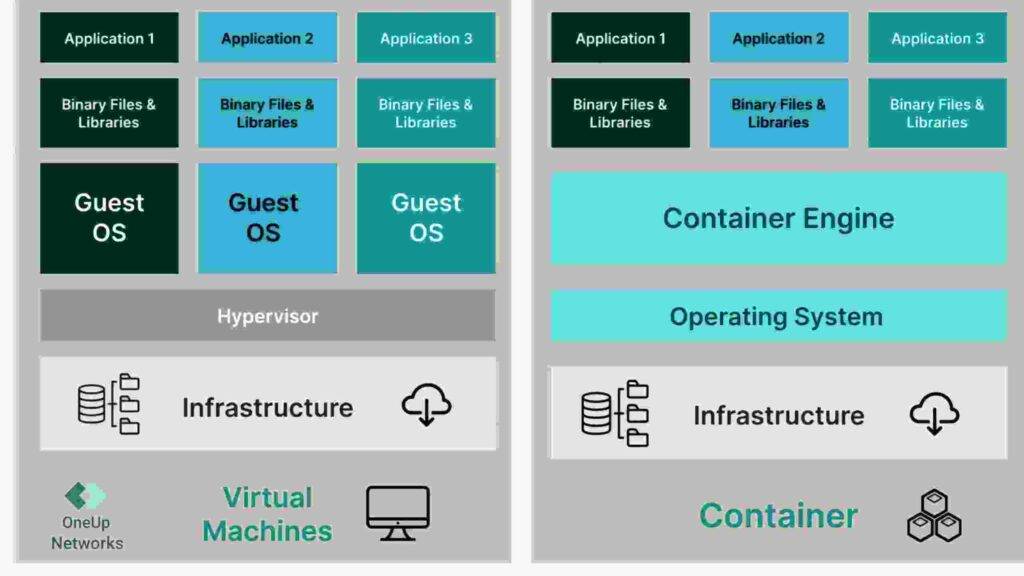
A VM emulates an entire operating system, including the kernel, while a container shares the host OS kernel but isolates applications. VMs are better for running different OS types; containers are lighter and faster for running multiple instances of the same OS.
Yes, you can install Windows as a guest OS inside a Linux VM using VirtualBox, VMware, or KVM, then run Windows-only accounting or finance applications.
Yes, when configured correctly. VMs provide strong isolation, and leading VM software supports encryption, secure snapshots, and compliance features. Always follow best practices for VM security and backups.
It depends on your workload. For basic accounting software, 4GB RAM and 2 CPU cores are sufficient. For heavy data processing or multiple VMs, allocate 8GB+ RAM and 4+ cores per VM.
VirtualBox and GNOME Boxes are the most user-friendly for new users, offering simple setup and intuitive interfaces.
Yes, most VM platforms support exporting VMs for use on cloud providers like OneUp Networks, AWS, Azure, or Google Cloud, enabling hybrid or fully cloud-based workflows.
Conclusion
Choosing the best VM for Linux depends on your specific needs, budget, and technical expertise. For accounting and finance professionals, robust performance, security, and ease of management are crucial. VMware Workstation Pro and KVM/QEMU lead in enterprise features and performance, while VirtualBox and GNOME Boxes are excellent for smaller firms and quick setups. Proxmox VE is ideal for those managing clusters or requiring high availability.
By leveraging the right Linux VM solution, accounting and finance professionals can ensure secure, flexible, and cost-effective operations—future-proofing their IT infrastructure for years to come.
For tailored cloud hosting solutions optimized for accounting and finance, contact OneUp Networks—your trusted partner in secure, high-performance virtualization.
Read Also:


























