
Form W-4 and Form W-2 are both related to payroll, but they serve different purposes. A W-4 tells your employer how much federal income tax to withhold from your future paychecks, while a W-2 reports the wages you earned and the taxes already withheld during the year.
- Employees complete Form W-4 when starting a job or updating their tax withholding information.
- Employers prepare Form W-2 after the end of the year and provide it to employees for tax filing.
- A W-4 affects future paychecks, but it cannot change previous payroll records or correct an already issued W-2.
- If a W-2 contains incorrect information, the employer may need to issue a corrected Form W-2c.
- Employees with multiple jobs, dependents, or major income changes should review their withholding and update their W-4 when needed.
- Independent contractors generally do not use W-2 and W-4 forms; they typically follow different reporting forms such as W-9 and 1099.
Introduction
If you have ever confused a W-2 with a W-4, you are not alone. The names are very similar, and both forms are connected to your paycheck, but they are used for completely different reasons.
The simplest way to remember the difference is this: a W-4 helps your employer decide how much federal income tax should be withheld from your paycheck, while a W-2 shows the income you earned and the taxes that were already withheld during the year.
Your W-4 affects what happens while you are getting paid throughout the year. Your W-2 helps you understand what happened after the year is complete and provides the information you need when filing your tax return.
W-2 vs W-4: Quick Difference
W-2 and W-4 are both related to employee taxes, but they serve different purposes in the payroll process. A W-4 helps your employer calculate the amount of federal income tax to withhold from your paycheck, while a W-2 records your earnings and the taxes that were actually withheld during the year.
| Difference | W-4 | W-2 |
|---|---|---|
| Purpose | Helps your employer calculate federal income tax withholding from each paycheck | Reports your yearly wages and the taxes withheld during the year |
| Completed by | Employee | Employer |
| Used for | Providing withholding information and adjusting future paycheck deductions | Preparing and filing your income tax return |
| Timing | Completed during employment or when withholding information changes | Provided after the end of the tax year |
| Impact | Affects how much federal income tax is deducted from future paychecks | Records the final payroll information from the previous year |
Simple way to remember:
W-4 = Instructions for payroll.
W-2 = Record of payroll results.
Your W-4 helps determine what happens during the year, while your W-2 shows the outcome when the year is complete.
Understanding Form W-2
A W-2 is the document your employer provides after the end of the year to show how much you earned and how much tax was withheld from your paychecks. It is one of the most important documents you need when preparing your tax return.
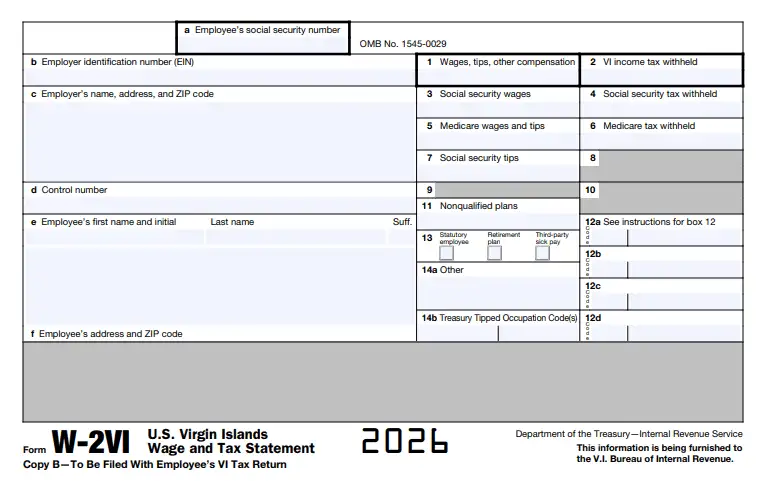
Who fills it out: Your employer.
What it’s for: It reports your yearly wages, tips, and other compensation along with the federal income tax, Social Security, and Medicare taxes withheld from your earnings. It may also include details about certain benefits, retirement contributions, and other payroll-related information depending on your situation.
How it works: Your employer creates your W-2 using payroll records collected throughout the year. You use the information shown on this form when filing your income tax return because it provides the official record of your earnings and taxes already paid through withholding.
A typical W-2 includes details such as:
- Total taxable wages
- Federal income tax withheld
- Social Security wages
- Medicare wages
- State and local tax information
For example, if you earned $70,000 during the year and your employer withheld $6,500 in federal income tax, those amounts are reported on your W-2. The W-2 does not change your salary or affect future paychecks. It simply provides a record of your earnings and taxes already reported.
What Information Is Included in a W-2?
Your W-2 contains several important details about your earnings and the taxes that were withheld from your pay during the year. Each box on the form provides specific information that helps you, your employer, and tax agencies accurately report income and payroll taxes.
Some of the most important sections include:
- Box 1: Wages, tips, and other compensation — Shows your taxable income reported for federal tax purposes.
- Box 2: Federal income tax withheld — Shows the total federal income tax already deducted from your paychecks during the year.
- Box 3: Social Security wages — Reports wages subject to Social Security tax.
- Box 4: Social Security tax withheld — Shows the Social Security taxes withheld from your earnings.
- Box 5: Medicare wages and tips — Reports income subject to Medicare tax.
- Box 6: Medicare tax withheld — Shows the Medicare taxes deducted from your pay.
- Box 12: Additional codes — Includes information related to items such as retirement contributions, benefits, and other payroll-related amounts.
- Boxes 15–20: State and local tax information — Provides details about state and local wages and taxes when applicable.
Each section of the W-2 serves a specific reporting purpose. Incorrect information, such as an incorrect wage amount or tax withholding figure, can create problems when your tax return is processed.
In most cases, employers must provide a W-2 to employees who received wages, tips, or other compensation during the year. Independent contractors generally do not receive a W-2 because they are usually reported using different tax forms, such as Form 1099-NEC.
Employers use W-2 information to report employee wages and reconcile payroll taxes, including Social Security and Medicare taxes. Employees use the information on their W-2 when preparing their income tax returns.
You can view the official IRS Form W-2 and instructions for more details.
Understanding Form W-4
A W-4 helps your employer understand your tax situation so they can calculate the correct amount of federal income tax to withhold from your paycheck. The information you provide on this form guides payroll calculations throughout the year.
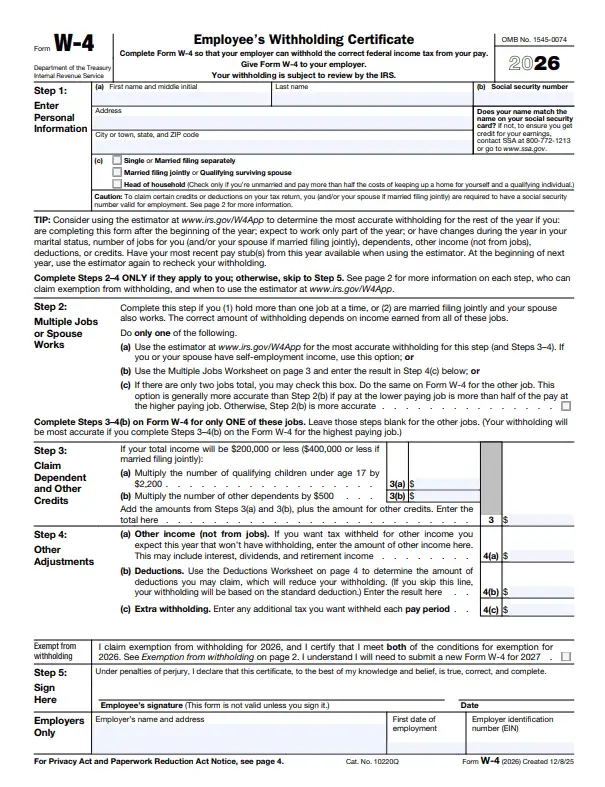
Who fills it out: You, the employee.
What it’s for: It tells your employer important details that affect your federal income tax withholding, such as your filing status, multiple jobs, dependents, other income, deductions, or any additional amount you want withheld from each paycheck.
How it works: Your employer uses the information from your W-4 along with payroll withholding rules to determine how much federal income tax should be deducted from your pay. If your financial situation changes, such as getting married, having a child, starting another job, or experiencing an income change, you can submit a new W-4 to update your withholding.
When Should You Update Your W-4?
Many employees complete a W-4 when they start a job and then forget about it. However, your withholding may no longer match your situation after major financial or personal changes.
You may want to review your W-4 if you:
- Get married or divorced
- Have a child
- Start another job
- Experience a major income change
- Have changes in deductions or credits
Updating your W-4 at the right time can help avoid situations where too little tax is withheld and you owe a large amount during tax filing. It can also prevent excessive withholding where you receive a larger refund but have less money available in each paycheck during the year.
What Information Is Included in a W-4?
A W-4 collects the information your employer needs to calculate how much federal income tax should be withheld from your paycheck. The details you provide help payroll determine the correct withholding amount based on your personal tax situation.
The main sections of a W-4 include:
- Step 1: Personal Information — Includes your name, address, Social Security number, and expected filing status. This information helps determine the tax rates and standard deduction used for withholding calculations.
- Step 2: Multiple Jobs or Spouse Works — Used when you have more than one job at the same time or when you are married and your spouse also earns income. This helps adjust withholding so enough tax is collected based on combined household income.
- Step 3: Claim Dependents and Credits — Allows you to include eligible dependents and certain tax credits that may affect your withholding amount.
- Step 4: Other Adjustments — Used for additional income, deductions, or any extra amount you want withheld from each paycheck. This section helps employees adjust withholding based on situations that are not covered in the earlier steps.
- Step 5: Signature — Your signature confirms that the information provided on the form is accurate and allows your employer to use it for payroll withholding purposes.
Each section of the W-4 serves a specific purpose. Providing incorrect information or failing to update the form after major life changes can result in too much or too little tax being withheld throughout the year.
Employees may need to submit a new W-4 when their financial situation changes, such as getting married, having a child, starting another job, or experiencing a significant change in income. A revised W-4 affects future paychecks; it does not change taxes that were already withheld in previous pay periods.
You can review the official IRS Form W-4 and instructions for more details.
How W-4 and W-2 Forms Work Together?
W-4 and W-2 are two connected parts of the same payroll process. The W-4 starts the process by providing your employer with the information needed to calculate federal income tax withholding from your paycheck. The W-2 completes the process by showing the wages you earned and the taxes that were withheld during the year.
Think of it this way:
The W-4 sets the withholding instructions.
The W-2 shows the final payroll results.
Your W-4 influences what happens during the year, while your W-2 documents what actually happened after all your paychecks have been processed.
1) You Complete Form W-4 to Guide Payroll Withholding
The process begins when you provide your employer with a completed W-4.
This form gives payroll the information needed to calculate how much federal income tax should be withheld from your paycheck. It may include details such as:
- Filing status
- Multiple jobs or spouse income
- Dependents
- Other income
- Deductions
- Any additional amount you want withheld
Your employer cannot know your complete tax situation just from your salary amount. The W-4 allows you to provide the details that may affect your withholding calculation.
For example, two employees earning the same salary may have different withholding amounts if one has dependents, another job, or different deductions.
2) Payroll Uses Your W-4 Information During Each Pay Period
After receiving your W-4, your employer’s payroll system uses that information along with IRS withholding rules, your earnings, and your pay schedule to calculate federal income tax withholding.
This is not a one-time calculation.
Every time you receive a paycheck, payroll considers your earnings for that period and applies the withholding instructions from your W-4.
Your W-4 does not determine your final tax bill for the year. Instead, it helps your employer collect an estimated amount of federal income tax throughout the year so that you are paying taxes gradually rather than all at once when filing your return.
3) Payroll Records Build Throughout the Year
Each paycheck adds to your overall payroll history.
During the year, your employer tracks important information such as:
- Wages paid
- Federal income tax withheld
- Social Security taxes
- Medicare taxes
Federal income tax withholding is the part most directly affected by your W-4 information. Social Security and Medicare taxes follow separate payroll rules, but they are also recorded as part of your year-end wage reporting.
By the end of the year, these individual payroll records create a complete picture of your earnings and tax withholdings.
4) Your Employer Uses Payroll Records to Prepare Form W-2
After the end of the calendar year, your employer prepares your W-2 using the payroll information collected throughout the year.
The W-2 summarizes important details such as:
- Total wages earned
- Federal income tax withheld
- Social Security wages and taxes
- Medicare wages and taxes
- State and local tax information, if applicable
Unlike the W-4, you do not complete your W-2. Your employer prepares it based on your actual payroll activity. You use the information shown on your W-2 when preparing your tax return.
5) Your W-2 Reflects the Results of Your W-4 Decisions
Your W-2 does not control your withholding. It reports the outcome of the payroll process that happened throughout the year.
For example, if your W-4 information resulted in lower federal tax withholding from each paycheck, your W-2 will show the total amount that was actually withheld during the year.
If the total withholding is less than your final tax liability, you may need to pay additional tax when filing your return. If more tax was withheld than necessary, you may receive a refund. Your final tax result depends on your complete tax situation, not only your W-2 withholding amount.
This is why reviewing your W-4 after major life changes — such as marriage, having a child, starting another job, or experiencing a significant income change — can help keep your withholding closer to your actual tax situation.
The Simple Relationship Between W-4 and W-2
The entire process can be remembered in three steps:
W-4 → Payroll → W-2
- W-4: Provides instructions about how much federal income tax should be withheld.
- Payroll: Applies those instructions to each paycheck and records wages and deductions.
- W-2: Reports the final wages and taxes withheld after the year ends.
In simple terms:
Your W-4 influences your paychecks. Your W-2 explains your year-end tax information.
W-2 vs W-4 vs 1099: Understanding Employee and Contractor Tax Forms
One of the most common payroll questions is why some workers receive a W-2 while others receive a 1099. The answer depends on how the worker is classified and who is responsible for handling taxes.
Employees and independent contractors follow different tax processes. Employees usually complete a W-4, receive regular paychecks with tax withholding, and get a W-2 at the end of the year. Independent contractors usually do not complete a W-4 because taxes are not withheld from their payments. Instead, they may receive a 1099-NEC for the services they provide.
Understanding this difference is important for both workers and businesses because incorrectly treating an employee as a contractor (or the other way around) can create payroll and tax compliance issues.
How W-4 and W-2 Work for Employees
When someone is hired as an employee, they usually complete Form W-4 to provide their withholding information to the employer. The form helps payroll understand how much federal income tax should be deducted from each paycheck based on the employee’s tax situation.
The information provided on a W-4 may include details such as:
- Filing status
- Multiple jobs or spouse income
- Dependents
- Additional income
- Deductions
- Extra withholding requests
This information matters because employers cannot determine an employee’s personal tax situation on their own. The W-4 allows employees to communicate the information needed for accurate withholding. Once the W-4 is submitted, the employer uses that information along with IRS withholding rules to calculate deductions from each paycheck.
For employees, payroll usually handles:
- Federal income tax withholding
- Social Security tax withholding
- Medicare tax withholding
Social Security and Medicare taxes are commonly known as FICA taxes. For employees, these taxes are generally shared between the employee and employer. The employee’s portion is deducted from each paycheck, while the employer pays a matching portion. At the end of the year, the employer prepares Form W-2 to summarize the employee’s payroll information.
The W-2 reports details such as:
- Total wages earned
- Federal income tax withheld
- Social Security wages and taxes
- Medicare wages and taxes
- State and local tax information, if applicable
The employee uses the W-2 when preparing their tax return.
In simple terms:
The employee completes the W-4 to guide withholding. The employer manages payroll throughout the year. The W-2 records the final wages and taxes reported after the year ends.
How 1099 Works for Independent Contractors
Independent contractors follow a different tax process because they are not employees of the business paying them.
A contractor does not complete Form W-4 because there is generally no employer withholding federal income tax from their payments. Instead, the contractor receives payment for their services and is responsible for managing their own tax obligations.
For independent contractors:
- The business pays the agreed amount for services.
- Taxes are generally not withheld from payments.
- The contractor manages their own income tax payments.
- The contractor is responsible for self-employment tax obligations.
Businesses usually collect a contractor’s information through Form W-9 before making payments. If reporting requirements are met, the business reports payments made for services using Form 1099-NEC.
Unlike a W-2, a 1099-NEC does not show payroll withholding because taxes were generally not deducted from the contractor’s payments.
Instead, contractors are responsible for handling:
- Federal income tax payments
- Self-employment tax
- Estimated tax payments when required
Self-employment tax covers Social Security and Medicare taxes for individuals who work for themselves. Unlike employees, contractors generally handle the full amount of these taxes through their self-employment tax obligations.
Employee vs Contractor: Quick Difference
| Employee | Independent Contractor | |
|---|---|---|
| Common tax forms | W-4 and W-2 | W-9 and 1099-NEC |
| Who controls withholding? | Employer | Contractor |
| Tax deducted from payments? | Yes, through payroll withholding | Generally no |
| Social Security and Medicare taxes | Shared between employee and employer | Managed through self-employment tax |
| Year-end reporting | Employer issues W-2 | Business may issue 1099-NEC |
Why Worker Classification Matters
The difference between an employee and an independent contractor is not decided only by the form a business provides. The IRS considers factors such as the level of control, financial relationship, and the overall working arrangement when determining whether someone is an employee or contractor.
For example, a worker may be classified as an employee if the company controls how and when the work is performed. A worker may be considered an independent contractor when they operate independently and control how the service is completed.
Using the wrong classification can lead to problems with payroll taxes, reporting requirements, and compliance responsibilities.
Simple Way to Remember W-2, W-4, and 1099
The easiest way to understand these forms is to remember who manages the tax process:
Employee: You complete a W-4 → employer withholds taxes from your paycheck → employer provides a W-2 at year-end.
Independent Contractor: You provide a W-9 → business pays you without regular payroll withholding → you may receive a 1099-NEC and handle your own taxes.
The main difference is simple: Employees have taxes managed through payroll. Contractors manage their own tax responsibilities.
Common Mistakes Employees Make With W-2 and W-4
Although W-2 and W-4 are closely connected, many employees confuse their purpose. One form helps manage tax withholding during the year, while the other reports the final wages and taxes after the year ends. Understanding the difference can help you avoid common payroll and tax mistakes.
Thinking a W-4 is used to file taxes
A common misunderstanding is that employees need their W-4 when preparing their tax return. That is not how this form works. Your W-4 is only used by your employer to calculate how much federal income tax should be withheld from your future paychecks. It provides payroll with information such as your filing status, dependents, deductions, and any additional withholding amount you request.
When it is time to file your tax return, you use your W-2 instead. The W-2 contains the actual wages you earned and the taxes that were already withheld during the year.
Believing a W-2 changes your paycheck
Some employees assume that receiving a W-2 means their paycheck information can be changed or adjusted. However, a W-2 only reports what already happened during the previous year. It shows your earnings and tax withholding based on your payroll records. It does not control how much tax is deducted from future paychecks.
If you want to change your withholding amount, such as increasing or decreasing the federal tax deducted from each paycheck, you need to submit an updated W-4 to your employer. A new W-4 affects future payroll calculations, not past wages or an already issued W-2.
Keeping an outdated W-4 for years
A W-4 that was accurate when you first completed it may not match your current financial situation. Changes such as getting married, having a child, starting another job, changes in income, or adjustments to deductions can affect how much tax should be withheld from your paycheck.
Reviewing your W-4 after major life or financial changes can help prevent situations where too little tax is withheld and you owe additional tax when filing, or too much tax is withheld and you have less take-home pay throughout the year.
Confusing W-2 employees with contractors
Another common mistake is assuming every worker receives the same tax forms. Employees generally complete a W-4 because their employer withholds taxes from their paychecks. At the end of the year, employees receive a W-2 showing their wages and tax withholding.
Independent contractors follow a different process. They usually do not complete a W-4 because businesses generally do not withhold payroll taxes from contractor payments. Instead, contractors may receive Form 1099-NEC and are responsible for managing their own tax payments.
The simple rule to remember:
- W-4 helps control future paycheck withholding.
- W-2 reports the wages and taxes from the past year.
- 1099-NEC is generally used for independent contractor payments.
Keeping these forms separate in your mind makes payroll and tax filing much easier.
Protecting W-4 and W-2 Data: Compliance and Security
W-4 and W-2 forms contain sensitive employee information that needs careful protection. These documents include details such as employee names, Social Security numbers, addresses, wages, tax withholding information, and other payroll-related data. If this information is exposed, it can create serious risks for employees and businesses.
Because payroll records contain personal and financial information, employers should treat them as confidential documents. Access should be limited to authorized employees, and businesses should use secure systems to store, process, and share payroll information. The IRS has warned businesses about W-2 data theft scams where criminals attempt to obtain employee wage information for identity theft and fraudulent tax filings.
Protecting payroll data is not only about preventing security breaches. Accuracy is equally important. Incorrect Social Security numbers, incorrect wage reporting, or mismatched tax information can create issues during tax reporting and may require corrections to previously filed forms. Employers are responsible for ensuring that W-2 information is accurate and properly reported.
Strong payroll security practices usually include:
- Restricted access: Only authorized team members should have access to employee payroll records.
- Secure storage: Sensitive documents should be stored using protected systems rather than unsecured files or personal devices.
- Regular reviews: Payroll records should be checked regularly to identify errors before tax filing deadlines.
- Accurate reporting: Employee information, wages, and tax details should match payroll records and filed forms.
- Reliable systems: Businesses should use dependable technology that supports secure access and proper data management.
For accounting firms and businesses handling payroll for multiple employees or clients, maintaining secure access to accounting applications and tax records is especially important. A reliable technology environment helps teams manage sensitive financial information while maintaining efficient payroll and tax workflows.
W-2 vs. W-4: Keep Payroll Accurate, Keep Tax Workflows Simple
W-2 and W-4 forms may look like simple payroll documents, but they play an important role in the entire tax process. A correctly completed W-4 helps ensure accurate paycheck withholding, while a properly prepared W-2 provides the wage and tax information employees need during tax filing.
For accounting firms and tax professionals, managing payroll and tax-related data requires more than accurate calculations. Teams need secure access, reliable performance, and dependable systems that can support critical accounting applications throughout the year, especially during busy tax seasons.
OneUp Networks helps CPA firms and accounting teams run their accounting and tax applications in a secure managed cloud environment. With support for applications such as QuickBooks Desktop, QuickBooks Enterprise, UltraTax CS, Drake Tax, Sage, CCH applications, and other business software, firms can access the tools they already use while benefiting from managed infrastructure, backups, and remote accessibility.
By keeping applications, data, and workflows organized in one secure environment, OneUp Networks helps accounting professionals focus on serving clients instead of managing complex IT infrastructure.
Frequently Asked Questions About W-2 and W-4
No. A W-2 and W-4 serve different purposes. A W-4 tells your employer how much federal income tax should be withheld from your paycheck, while a W-2 shows the wages you earned and the taxes withheld during the year. You complete a W-4, but your employer prepares your W-2.
You use your W-2 when filing your tax return because it contains your official wage and withholding information for the year. A W-4 is not filed with your tax return. It only provides instructions to your employer so payroll can calculate your federal income tax withholding from future paychecks.
Yes. You can submit a new W-4 whenever your tax situation changes or you want to adjust your withholding. Common reasons to update your W-4 include getting married, having a child, starting another job, changing income, or experiencing changes in deductions or credits. A new W-4 only affects future paychecks; it does not change taxes that were already withheld.
No. Independent contractors generally do not receive a W-2 because they are not paid through employee payroll. Instead, businesses may report contractor payments using Form 1099-NEC when reporting requirements apply. Contractors are generally responsible for managing their own income tax and self-employment tax payments.


























