

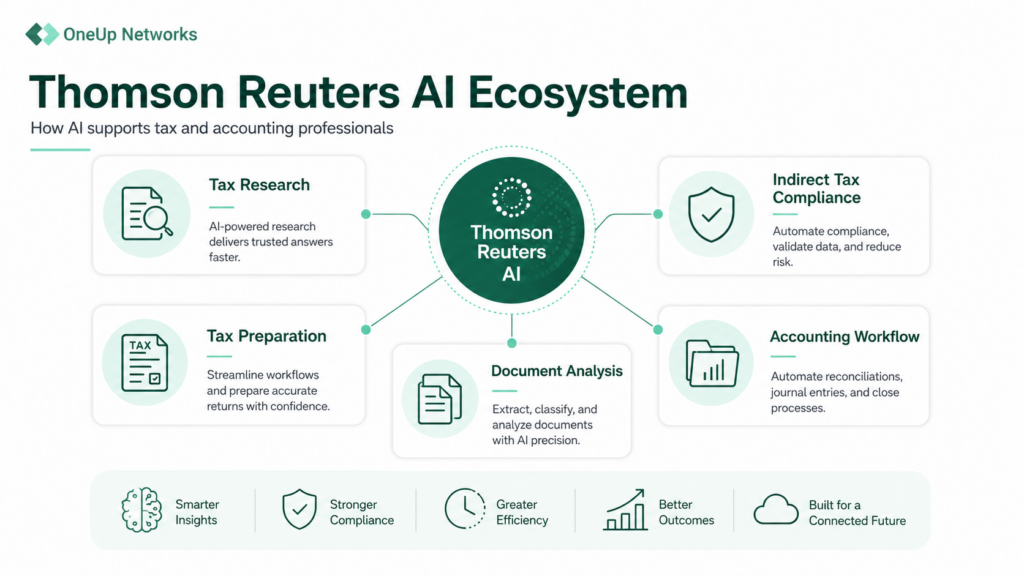
Thomson Reuters uses AI across multiple tax, accounting, and compliance solutions to help professionals research faster, automate repetitive tasks, analyze documents, improve tax workflows, and identify compliance issues. AI features are available across solutions including CoCounsel, Checkpoint Edge, ONESOURCE, UltraTax CS workflows, and other Thomson Reuters professional tools.
Why Are Indirect Tax Teams Turning to AI?
Indirect tax compliance often requires teams to move information between ERP systems, general ledgers, spreadsheets, e-commerce platforms, tax engines, and government portals. Every manual transfer creates another opportunity for a missing transaction, mapping mistake, or reconciliation problem.
In a Thomson Reuters survey, 54% of U.S. indirect tax professionals identified regulatory compliance as a leading challenge. In a separate study, 89% of indirect tax respondents considered filing accuracy an important measure of success, while 63% focused on avoiding penalties and 51% wanted to reduce time spent on compliance.
AI is most useful in this environment when it handles repetitive data work, identifies exceptions early, and gives professionals enough evidence to review the result confidently. It should not make unexplained tax decisions or remove professional oversight.
What AI Features Does Thomson Reuters Offer for Indirect Tax?
Thomson Reuters now uses agentic AI and rules-based tax logic across two important indirect tax workflows: U.S. sales and use tax compliance and multinational VAT or GST compliance.
1. Automated Data Collection and Return Preparation
ONESOURCE Sales & Use Tax powered by CoCounsel can transfer data from ERP, billing, financial, and e-commerce systems into the compliance workflow. The platform validates the data and maps it to official, signature-ready returns, reducing the need to extract files and re-enter information manually.
Tax professionals do not lose control of the process. They continue to review the completed returns, investigate exceptions, and provide final approval before filing. For a company filing in many states, this can replace a monthly routine in which staff download transaction files, reformat spreadsheets, copy figures into returns, and manually check whether totals match the general ledger.
2. Continuous VAT and GST Preparation
ONESOURCE Indirect Compliance powered by CoCounsel is designed to prepare global indirect tax packages throughout the reporting period instead of waiting until the filing deadline approaches.
The platform can continuously ingest information from:
- ERP transaction systems
- General ledger balances
- ONESOURCE Pagero e-invoicing data
- Exchange-rate feeds
- Tax authority prefilled returns
It then runs validations and reconciliations so each country or registration package moves closer to review-ready status during the month.
This is particularly useful for multinational tax teams that manage separate VAT returns, listings, SAF-T reports, SII filings, and other digital reporting requirements across multiple countries.
3. Earlier Detection of Indirect Tax Errors
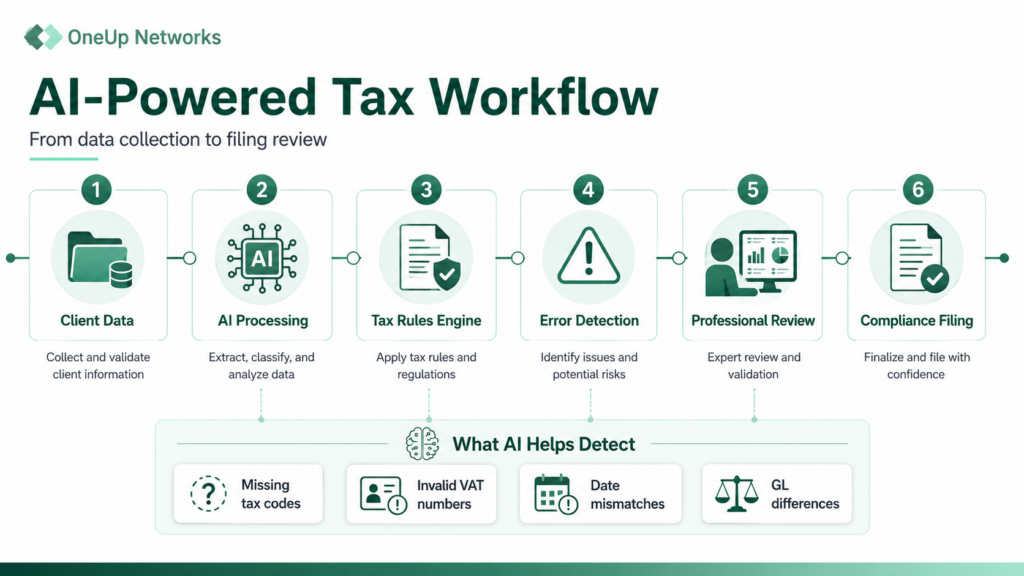
Thomson Reuters’ validation routines can flag problems such as:
- Missing tax code mappings
- Invalid VAT registration numbers
- Out-of-balance control accounts
- Transaction-date mismatches
- Allocation errors
- Missing foreign-exchange information
- Incorrect customer or vendor classifications
Instead of finding these issues during the final days of the filing cycle, teams can investigate them while there is still time to correct the source data or document an appropriate adjustment.
Consider a retailer that adds a new product category to its ERP. Transactions begin flowing through the system, but some items do not have the correct tax mapping. Continuous validation can bring the unmapped items to the tax team’s attention before they affect several filing periods.
4. Three-Way Reconciliation and Variance Explanations
Global indirect tax teams frequently need to reconcile what the ERP recorded, what the e-invoicing system reported, and what the tax authority expects.
ONESOURCE Indirect Compliance can compare:
- Compliance data against ONESOURCE Pagero e-invoicing records
- Compliance calculations against ERP and general ledger balances
- Calculated returns against available tax authority prefills
When the amounts do not agree, the system can document possible reasons, including tax-point timing differences, classifications, foreign-exchange effects, or data-quality issues. Users can then drill down to the affected transactions.
This is more useful than a basic warning that two totals are different. Reviewers need to understand what caused the difference and whether it requires a correction, deferral, reclassification, or documented explanation.
5. AI-Assisted Exception Resolution
The agentic AI in ONESOURCE Indirect Compliance can analyze exceptions and suggest corrections based on established rules and previously accepted resolutions.
Potential suggestions can include:
- Correcting a tax code mapping
- Adjusting an allocation
- Reclassifying a transaction
- Filling an exchange-rate gap
- Deferring a transaction to another reporting period
- Repeating an approved workbook adjustment
The user can accept, reject, or override the recommendation. Approved changes remain traceable, and transaction edits include the user, time, and business justification. Revert controls preserve the underlying history.
This human-in-the-loop approach matters because the same variance can require different treatment depending on the jurisdiction, transaction facts, materiality, and the company’s tax policy.
6. Current Forms, Filing Coverage, and Audit Trails
For U.S. sales and use tax, ONESOURCE Sales & Use Tax powered by CoCounsel provides access to more than 1,200 state, county, and city signature-ready returns covering the United States, Canada, and Puerto Rico.
Thomson Reuters currently states that electronic filing is supported in 33 U.S. states and Canada. Forms receive monthly content updates, while audit trails record the automated work completed during the filing process.
For international compliance, ONESOURCE Indirect Compliance currently supports statutory reporting for 62 countries and electronic filing for 38 countries, along with formats such as SAF-T and SII.
What Results Has Thomson Reuters Reported?
Thomson Reuters reported the following early customer results when it launched ONESOURCE Sales and Use Tax AI in January 2026:
- Up to 65% less time spent on routine reporting
- Up to 75% lower audit exposure among early customers
- Large-enterprise compliance cycles reduced from 30 days to 11 days
- Approximately $25,000 in annual time and efficiency savings for smaller enterprises
- Savings of $60,000 or more for large enterprises
These are Thomson Reuters-reported results, not guaranteed outcomes. Actual benefits will depend on transaction volumes, number of jurisdictions, existing data quality, integrations, filing complexity, and how much of the current process is manual.
Does AI Replace the Indirect Tax Professional?
No. The current Thomson Reuters approach is designed around human review and sign-off.
AI can perform repetitive work, identify patterns, prepare returns, and recommend corrections. Tax professionals are still responsible for evaluating unusual transactions, applying judgment, approving changes, assessing materiality, and signing off on the final filing.
This distinction is important because indirect tax errors are not always caused by arithmetic. They can arise from incomplete business data, unusual contracts, product classifications, exemption treatment, nexus decisions, or inconsistent processes between departments.
Is Thomson Reuters AI the Same as Thomson Reuters Cloud Hosting?
No. They solve different problems.
ONESOURCE Sales & Use Tax powered by CoCounsel and ONESOURCE Indirect Compliance powered by CoCounsel are cloud software products operated by Thomson Reuters. A business licenses and accesses those products through Thomson Reuters.
OneUp Networks provides managed cloud hosting for properly licensed Thomson Reuters desktop applications such as UltraTax CS, Accounting CS, Practice CS, Fixed Assets CS, Planner CS, FileCabinet CS, and other supported applications. Thomson Reuters Hosting can help firms:
- Migrate licensed Thomson Reuters applications and data
- Provide secure remote access for authorized users
- Manage the Windows server environment
- Support application installation and configuration
- Monitor infrastructure and performance
- Manage backups and disaster recovery
- Apply security controls such as MFA, firewalls, and encrypted access
- Coordinate technical issues involving Thomson Reuters applications
OneUp Networks does not provide Thomson Reuters software licenses and does not replace Thomson Reuters’ ONESOURCE SaaS platform. For firms using both SaaS tax tools and desktop applications, OneUp Networks can manage the hosted desktop environment surrounding the broader tax workflow.
What Should a Tax Team Review Before Adopting Indirect Tax AI?
Before implementing an AI-assisted compliance workflow, review the operational foundation behind it:
- Which ERP, billing, e-commerce, and general ledger systems contain the required data?
- Are product, customer, vendor, and tax code mappings accurate?
- Which adjustments happen repeatedly each month?
- Which jurisdictions still depend on spreadsheets or manual forms?
- Who will review AI-generated exceptions and recommendations?
- What evidence must be retained for audits?
- Which users may approve, edit, defer, or file transactions?
- How will the team test integrations before moving into production?
- Which desktop applications still require managed hosting?
- Who is responsible for software licensing, SaaS support, hosting support, and tax decisions?
AI works best when responsibilities are clear and the underlying data is controlled. Automating an inconsistent process can simply produce inconsistencies faster.
How Are Businesses Using Thomson Reuters AI in Actual Workflows?
1. Thomson Reuters CoCounsel AI
What it does:
CoCounsel is Thomson Reuters’ generative AI assistant designed to help tax and legal professionals complete knowledge-intensive tasks faster.
Real use cases:
Tax Research Assistance
A CPA researching a complex tax question can ask in natural language instead of manually searching through thousands of pages of tax guidance.
AI helps:
- Find relevant tax authorities
- Summarize research materials
- Extract important information
- Create research summaries
Document Analysis
Useful for reviewing:
- Tax documents
- Client agreements
- Regulatory documents
- Financial information
Example: A tax professional reviewing a large client document package can use AI to identify important clauses or information requiring attention.
CoCounsel does not replace tax professionals. It helps them find information, analyze documents, and complete repetitive tasks faster.
2. Checkpoint Edge AI
Purpose: Tax research and professional guidance
Checkpoint Edge combines Thomson Reuters tax research content with AI capabilities.
AI-assisted workflows:
- Natural language tax searches
- Faster access to tax explanations
- Summaries of complex tax topics
- Research guidance
Example:
Instead of searching: “State sales tax exemption requirements for manufacturing equipment”
A professional can ask: “What are the current sales tax exemption rules for manufacturing equipment in Texas?”
AI helps locate relevant tax guidance and supporting resources.
3. ONESOURCE Sales & Use Tax AI
Purpose: Sales tax compliance automation
AI helps businesses manage:
- Sales tax calculations
- Return preparation
- Data validation
- Tax compliance workflows
Real client workflow:
A company selling products across multiple states receives thousands of transactions monthly.
AI can help:
- Review transaction data
- Identify missing tax information
- Highlight unusual transactions
- Prepare compliance reports
The tax team reviews exceptions instead of manually checking every transaction.
4. ONESOURCE Indirect Compliance AI
Purpose: Global VAT and indirect tax compliance
Used by companies managing:
- VAT
- GST
- SAF-T
- Digital tax reporting
- E-invoicing compliance
Real use case:
A multinational company operating across Europe may have different VAT reporting requirements in each country.
AI helps:
- Compare ERP and tax data
- Detect inconsistencies
- Support reconciliation
- Prepare compliance information
5. UltraTax CS and Thomson Reuters CS Professional Suite
UltraTax CS itself is primarily a professional tax preparation application, not an AI-first product like ONESOURCE AI. However, AI is influencing the wider tax preparation ecosystem through:
- Data extraction
- Document processing
- Research assistance
- Workflow automation
- Review support
CPA firm example:
During tax season, a firm using UltraTax CS may combine:
- Thomson Reuters tax applications
- AI-assisted research
- Document automation tools
- Hosted cloud infrastructure
to improve preparation speed and remote collaboration.
For hosted UltraTax CS environments, OneUp Networks helps firms with:
- Secure cloud access
- Application hosting
- Migration
- Server management
- Backups
- Disaster recovery
- Performance optimization
6. Accounting CS and Practice CS Workflows
Thomson Reuters accounting practice solutions support firm operations.
AI can assist with:
- Data analysis
- Workflow improvement
- Client information processing
- Productivity enhancement
Example:
An accounting firm managing hundreds of client records can reduce manual administrative work by using automation and AI-assisted workflows.
7. Checkpoint Catalyst / Tax Knowledge Solutions
For enterprise tax departments:
AI helps professionals:
- Analyze tax regulations
- Understand jurisdiction changes
- Access compliance information faster
Useful for:
- Corporate tax teams
- Multinational organizations
- Tax advisory firms
8. AI + Tax Document Automation
Many modern tax workflows involve:
- PDFs
- W-2s
- 1099s
- Client documents
- Financial statements
AI helps extract information and reduce manual entry.
Example:
A CPA receives hundreds of client documents before tax season.
AI-powered extraction can identify:
- Names
- Amounts
- Dates
- Relevant tax information
Then professionals verify before using the information.
Thomson Reuters Provides AI-Powered Tax Software
Thomson Reuters develops:
- CoCounsel AI
- Checkpoint Edge
- ONESOURCE AI
- Tax research platforms
- Tax preparation applications
OneUp Networks Provides Managed Hosting for Licensed Applications
OneUp Networks helps firms securely run their licensed Thomson Reuters desktop applications with:
- Cloud hosting
- Application migration
- Remote access
- Server management
- Security controls
- Backups
- Disaster recovery
- Technical support
- Claude Integration
For example: A CPA firm may use: Thomson Reuters AI tools + OneUp Networks hosted UltraTax CS environment to create a more efficient tax workflow.
Frequently Asked Questions
AI in indirect tax refers to software that helps collect transaction data, validate tax information, identify unusual items, reconcile systems, prepare returns, recommend corrections, and document the filing workflow. Tax professionals retain oversight of important decisions.
It is Thomson Reuters’ cloud-based sales and use tax compliance solution. It uses agentic AI to automate data transfer, validation, return mapping, and preparation while allowing tax professionals to review and approve the final returns.
The software runs validation and reconciliation checks across transaction data, general ledgers, e-invoices, tax mappings, exchange rates, and authority information. It can flag missing codes, invalid VAT numbers, timing differences, allocation problems, and out-of-balance conditions.
The technology can automate much of the preparation and electronic filing workflow, but Thomson Reuters emphasizes human-in-the-loop review and final sign-off. The tax team controls approvals and exception handling.
ONESOURCE Sales and Use Tax AI is a SaaS product hosted and operated by Thomson Reuters. OneUp Networks can host licensed Thomson Reuters desktop applications and supporting business software in a managed cloud environment.
OneUp Networks can migrate, host, secure, back up, manage, and support licensed Thomson Reuters desktop applications. This helps tax and accounting teams centralize access, support remote staff, reduce infrastructure work, and maintain a managed application environment.
Build a More Reliable Thomson Reuters Application Environment
AI can reduce repetitive indirect tax work, but your wider tax operation still depends on reliable applications, controlled access, responsive support, and a clear division of responsibility between software vendors, hosting providers, IT teams, and tax professionals.
OneUp Networks helps accounting firms and tax teams migrate and run licensed Thomson Reuters desktop applications in a secure, fully managed cloud environment.
Read Also:


























