
Quick Summary
In 2026, UltraTax CS can be deployed in both on-premise and cloud-hosted environments, and the right choice depends on a CPA firm’s infrastructure, remote work requirements, tax-season workload, security needs, and long-term IT strategy. The right choice depends on a CPA firm’s infrastructure, remote work requirements, tax-season workload, security needs, and long-term IT strategy. While on-premise hosting provides direct control over servers, cloud hosting offers managed infrastructure, scalability, backups, and reduced IT responsibilities.
- On-premise UltraTax CS provides direct infrastructure control: Firms manage their own servers, maintenance, security, backups, and remote access setup.
- Cloud-hosted UltraTax CS provides a managed environment: Tax professionals continue using UltraTax CS while the hosting provider manages the underlying infrastructure.
- The best option depends on firm requirements: CPA firms should evaluate performance, application compatibility, user access, security, backup strategy, and future scalability before making a decision.
- Virtual Office CS and third-party hosting offer different approaches: Firms should compare flexibility, customization, application support, and migration assistance when selecting a hosting model.
- A successful transition requires planning: Reviewing workflows, connected applications, users, and data requirements helps firms move UltraTax CS without disrupting tax operations.
Introduction
Choosing between UltraTax CS on-premise and cloud hosting is a strategic technology decision for CPA firms. The choice affects tax-season performance, remote collaboration, security responsibilities, backup readiness, IT workload, and the ability to support growing teams. While a well-maintained local server can continue supporting some firms, growing practices often evaluate cloud hosting to improve remote access, reduce infrastructure responsibilities, strengthen backup planning, and create a more flexible environment for their tax teams.
The real question is not whether cloud technology is better in every situation. It is whether your current UltraTax CS environment can support the way your CPA firm needs to operate during tax season and throughout the year.cAs CPA firms evaluate their technology strategy in 2026, the decision between maintaining local UltraTax CS infrastructure and moving to managed cloud hosting has become increasingly important.
Which Is Better: UltraTax CS On-Premise or Cloud Hosting?
Neither option is universally better. UltraTax CS on-premise works well for firms with modern infrastructure, dedicated IT resources, and limited remote requirements. Cloud hosting is often preferred by firms that need remote access, managed infrastructure, scalable resources, centralized applications, and reduced IT responsibility.
UltraTax CS On-Premise vs Cloud Hosting: Key Differences CPA Firms Should Evaluate
| Decision Factor | On-Premise UltraTax CS | Cloud-Hosted UltraTax CS |
|---|---|---|
| Infrastructure ownership | Firm owns and manages servers, hardware, and network infrastructure | Hosting provider manages the underlying cloud infrastructure |
| Infrastructure management | Firm or IT provider handles maintenance, updates, troubleshooting, and system management | Hosting provider manages server infrastructure, maintenance, and hosting environment |
| Remote access | Requires VPN, Remote Desktop, firewall configuration, and ongoing management | Users access UltraTax CS through a hosted desktop or application environment |
| Performance during tax season | Performance depends on existing server capacity, hardware, and network setup | Resources can be designed around user demand, application workload, and peak filing periods |
| Scalability | Increasing capacity may require additional hardware investment | Resources can often be adjusted as users, applications, and workload requirements change |
| Backup management | Firm selects, manages, monitors, and tests its own backup strategy | Backup processes may be managed by the hosting provider based on the service agreement |
| Disaster recovery | Firm is responsible for designing, testing, and maintaining recovery processes | Recovery infrastructure and processes may be included as part of the hosting service |
| Application control | Firm has direct control over installed applications and local configurations | Control depends on hosting provider capabilities, environment design, and hosting plan |
| Application support | Firm coordinates support between internal IT teams, software vendors, and application providers | Hosting provider may assist with hosting-related issues, environment configuration, and technical coordination |
| Customization | Firm controls server configuration, installed applications, and environment changes | Customization depends on hosting provider capabilities and infrastructure options |
| Security management | Firm manages security tools, access controls, monitoring, and infrastructure protection | Provider manages hosting security controls while the firm manages user-level security responsibilities |
| Cost structure | Requires investment in hardware, maintenance, IT resources, and replacement planning | Usually follows a recurring hosting model based on users, resources, or services |
| Internet dependency | Local users may continue working during internet outages affecting remote access only | Users require reliable internet connectivity to access the hosted environment |
| Best fit | Firms with current hardware, strong IT capabilities, and limited remote-work requirements | Firms prioritizing remote access, managed infrastructure, scalability, and reduced IT workload |
Both models can support a productive UltraTax CS workflow. The difference is who owns and manages the technical environment.
What Does “UltraTax CS in the Cloud” Actually Mean?
UltraTax CS is professional desktop tax software. Moving it to the cloud does not turn it into a different browser-based tax application. Instead, the UltraTax CS program and its data are installed on remote infrastructure that authorized staff access through a secure connection.
CPA firms generally encounter three deployment options:
1. On-Premise Installation
UltraTax CS is installed on a workstation or server managed by the firm. The firm is responsible for hardware, network access, security tools, Windows maintenance, backups, disaster recovery, and technical troubleshooting.
2. Thomson Reuters Virtual Office CS
Virtual Office CS is Thomson Reuters’ own hosted environment. Thomson Reuters states that it supports the CS Professional Suite and selected Microsoft products while handling infrastructure maintenance and data backups.
3. Third-Party Managed UltraTax Hosting
A specialized hosting provider installs the firm’s licensed UltraTax CS application in a managed server environment. Depending on the provider, the same environment may also support full CS Professional Hosting that includes Accounting CS, Fixed Assets CS, Practice CS, Microsoft applications, QuickBooks, document-management tools, tax add-ons, and other licensed business software.
The firm still owns or purchases its UltraTax CS license from Thomson Reuters. The hosting provider supplies and manages the infrastructure.
How Should CPA Firms Choose Between Virtual Office CS and Managed Hosting?
Choosing between Thomson Reuters Virtual Office CS and a third-party managed hosting provider depends on the firm’s workflow requirements.
Firms should evaluate:
| Consideration | Why It Matters |
|---|---|
| Application flexibility | Can other accounting applications run in the same environment? |
| Customization | Can the environment match the firm’s workflow? |
| Support model | Who helps when application or infrastructure issues occur? |
| Migration assistance | Is help available during transition? |
| Scalability | Can resources grow with the firm? |
What Stays the Same After Moving UltraTax CS to the Cloud?
A properly planned hosting move should preserve the familiar UltraTax CS experience. Preparers still work with the same returns, input screens, diagnostics, calculations, e-filing processes, and client data.
UltraTax CS supports federal, state, and local tax programs, data sharing between related returns, multi-monitor workflows, automated diagnostics, and integration with other CS Professional Suite applications. These are software capabilities that remain available regardless of whether the application runs on-premise or in a hosted environment.
What changes is the supporting environment:
- Staff sign in to a hosted workspace.
- UltraTax CS processing takes place on the remote server.
- The Ultratax hosting provider manages the underlying server.
- Printers, scanners, mapped drives, and multi-monitor workflows are configured for remote use.
- Backups and recovery processes follow the provider’s service design.
- Server upgrades no longer require the firm to replace office hardware.
This distinction matters because cloud hosting should improve infrastructure management without unnecessarily changing how tax professionals prepare and review returns.
1. Tax-Season Performance
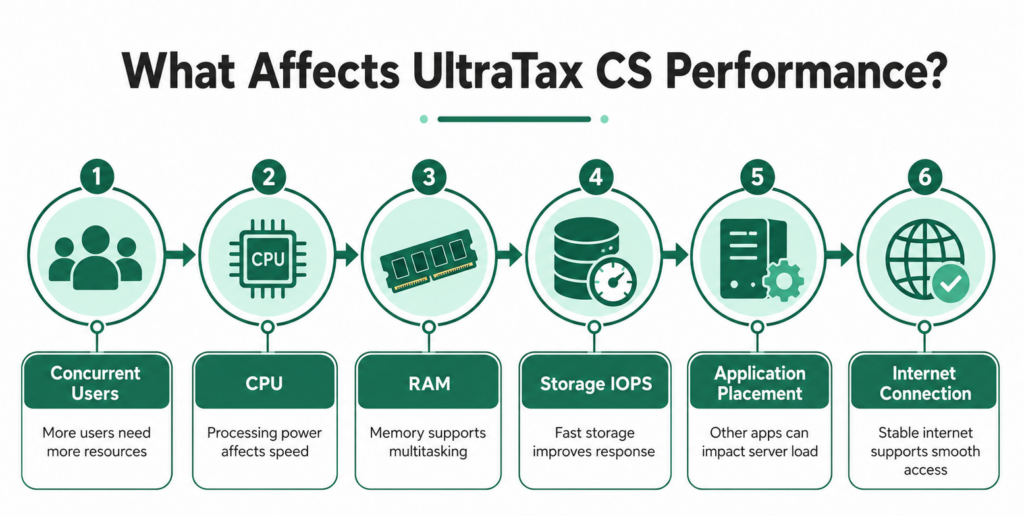
UltraTax CS performance depends on more than whether the server is local or hosted. Important factors include:
- Number of concurrent users
- Processor performance
- Available memory
- Storage latency and IOPS
- Size and location of client data
- Other applications running on the server
- Network and internet quality
- User profile and remote-session configuration
A well-maintained on-premise server can perform well. An undersized cloud environment can perform poorly. Cloud hosting is not automatically faster simply because it is in a data center.
The advantage of a properly managed hosted environment is that CPU, RAM, and storage resources can often be adjusted without purchasing and installing a new physical server. Providers using dedicated resources and NVMe storage can also reduce the infrastructure bottlenecks that appear when several preparers calculate, print, review, and transmit returns simultaneously.
2. Remote and Hybrid Work
On-premise UltraTax CS can be accessed remotely, but the firm must build and manage the connection. That may involve a VPN, Remote Desktop Services, firewall rules, authentication controls, and support for employees’ devices.
Cloud hosting centralizes remote access. Staff can connect to the same hosted workspace from approved locations without connecting directly to an office server.
This can help firms that employ:
- Remote tax preparers
- Seasonal staff
- Employees working across several offices
- Partners who review returns away from the office
- Outsourced or extended tax teams
Cloud access still depends on stable internet service. Firms should consider business-grade connectivity and a backup connection for employees whose work cannot stop during filing deadlines.
3. Security and the Shared-Responsibility Model
Cloud hosting does not automatically make a CPA firm compliant, and on-premise infrastructure is not automatically insecure. The important question is whether the environment is properly secured, monitored, updated, and governed.
IRS Publication 4557 tells tax professionals to implement safeguards that include multi-factor authentication, encryption, secure backups, limited access to taxpayer data, security software, and audit logs. It also states that professional tax preparers must maintain a written information security plan under the FTC Safeguards Rule.
With an on-premise environment, the firm and its IT provider are responsible for implementing and maintaining these controls.
With managed hosting, the provider may manage controls such as:
- Firewalls
- Server monitoring
- Endpoint Detection and Response
- Operating-system patching
- Encryption
- MFA
- IDS/IPS
- Network segmentation
- Backup infrastructure
- Data center access controls
The CPA firm still owns responsibilities such as user approval, password practices, staff training, access reviews, incident procedures, device security, and its written information security plan.
CPA firms should evaluate hosting providers based on documented security practices, access controls, backup processes, infrastructure design, and contractual responsibilities.
4. Backup and Disaster Recovery
Saving a daily copy of UltraTax CS data is not the same as having a disaster recovery plan.
CPA firms should ask:
- Where are backups stored?
- Are backup copies isolated from the production environment?
- How long are backups retained?
- Are backups encrypted?
- How frequently is data captured?
- How long would recovery take?
- Who performs recovery testing?
- Can individual files be restored?
- What happens if the entire primary environment becomes unavailable?
On-premise firms must design, monitor, and test this process themselves or through an IT provider. Recovery Point Objective (RPO) defines how much recent data a firm could potentially lose after an incident, while Recovery Time Objective (RTO) defines how quickly systems can be restored.
Managed hosting can shift much of that work to the host, but firms should review the actual backup retention, recovery point objective, recovery time objective, and geographic redundancy included in the agreement.
5. UltraTax Integrations and Related Applications
UltraTax CS rarely operates alone in a full-service accounting firm.
A firm may also use:
- Accounting CS
- Fixed Assets CS
- Practice CS
- Planner CS
- Microsoft 365 applications
- QuickBooks Desktop or Enterprise
- Document-management tools
- Tax scanning and workpaper applications
- E-signature and client-delivery tools
Thomson Reuters identifies integration and data sharing with other CS Professional Suite products as key UltraTax CS capabilities.
Before moving to any hosted environment, create an application inventory. Confirm that each licensed application, add-on, printer, scanner, mapped drive, and data connection can be supported.
For the smoothest workflow, applications that frequently exchange data should generally be placed within the same managed environment. Separating UltraTax CS from its data or heavily used integrations can introduce avoidable delays and support complications.
6. Total Cost: Look Beyond the Monthly Hosting Fee
Comparing a cloud-hosting invoice with the price of an existing server does not show the full financial picture.
On-Premise Cost Formula
Server hardware + operating-system licensing + remote-access licensing + security software + backup systems + IT labor + maintenance + recovery planning + hardware replacement + downtime exposure
Cloud-Hosting Cost Formula
Monthly hosting + onboarding or migration + optional storage or security services + internet redundancy + any application-specific support charges
Use a three-to-five-year comparison rather than evaluating only the first month.
| Cost Area | On-Premise Questions | Cloud-Hosting Questions |
|---|---|---|
| Hardware | When will the server need replacement? | Are server resources included? |
| IT labor | How many hours are spent on maintenance? | What support is included? |
| Security | Which tools must the firm purchase? | Which security controls are included? |
| Backups | Who monitors and tests them? | What retention and recovery targets apply? |
| Scaling | Will new hardware be required? | How are additional users or resources priced? |
| Downtime | What is the cost of an unavailable server? | What uptime and support terms are documented? |
| Migration | Is an IT project required later? | Is assisted migration included? |
Cloud hosting is not guaranteed to cost less. Its financial value often comes from replacing unpredictable infrastructure expenses and reducing the time a firm spends managing technology.
When Keeping UltraTax CS On-Premise May Make Sense
An on-premise environment may remain practical when:
- The server is relatively new and sized for peak-season demand.
- Most employees work from one office.
- The firm has dependable internal IT resources.
- Remote access is limited and properly secured.
- Offsite backups and disaster recovery are already tested.
- The firm wants direct infrastructure control.
- Existing applications or devices have unusual local requirements.
There is no need to move solely because cloud hosting is popular. A stable local environment with proper safeguards can continue to serve the firm.
Signs Your CPA Firm Should Consider UltraTax CS Cloud Hosting
Your firm may benefit from cloud hosting if:
- Your server hardware is approaching replacement.
- Employees need secure access from multiple locations.
- Tax season creates performance concerns.
- IT maintenance takes time away from core business priorities.
- You need stronger backup and disaster recovery planning.
- You want UltraTax CS and related applications available in one managed environment.
When Cloud Hosting Deserves Serious Consideration
A hosted environment becomes more compelling when:
- The office server is nearing replacement.
- Performance drops as concurrent users increase.
- Employees regularly work from home or multiple offices.
- VPN support consumes too much IT time.
- The firm lacks tested offsite recovery capabilities.
- Partners want more predictable technology expenses.
- Several accounting and tax applications need to be centralized.
- Infrastructure maintenance is distracting staff from client work.
- The firm needs to add seasonal users without purchasing new hardware.
The best time to evaluate hosting is before a server failure or filing-season slowdown forces an urgent decision.
A Practical UltraTax Hosting Decision Checklist
Use these questions during your internal review:
- How many people use UltraTax CS at the busiest time of year?
- Which other applications exchange data with UltraTax CS?
- Where do preparers and reviewers work?
- How old is the current server?
- Who installs patches and monitors security alerts?
- When was the last successful backup-restoration test?
- How long could the firm operate without UltraTax CS?
- Can additional users be supported without new hardware?
- Are printers, scanners, and multiple monitors business-critical?
- Does the firm have documented recovery targets and a written information security plan?
The answers will usually make the appropriate deployment model much clearer.
Evaluating Managed UltraTax CS Hosting from OneUp Networks
OneUp Networks helps CPA firms transition from locally managed UltraTax CS environments to a managed cloud infrastructure designed around accounting workflows. The focus is not only hosting the application, but creating a dependable environment where tax professionals can access their tools, collaborate securely, and reduce the burden of managing servers.
Hence, its UltraTax environment can include private dedicated infrastructure, NVMe storage, 24/7 technical assistance, 120-day backup retention, three backup locations, and disaster recovery with an RPO of approximately 2 to 4 hours and an RTO of approximately 3 to 4 hours. OneUp Networks can also help coordinate with Thomson Reuters and other software vendors when application-level assistance is required.
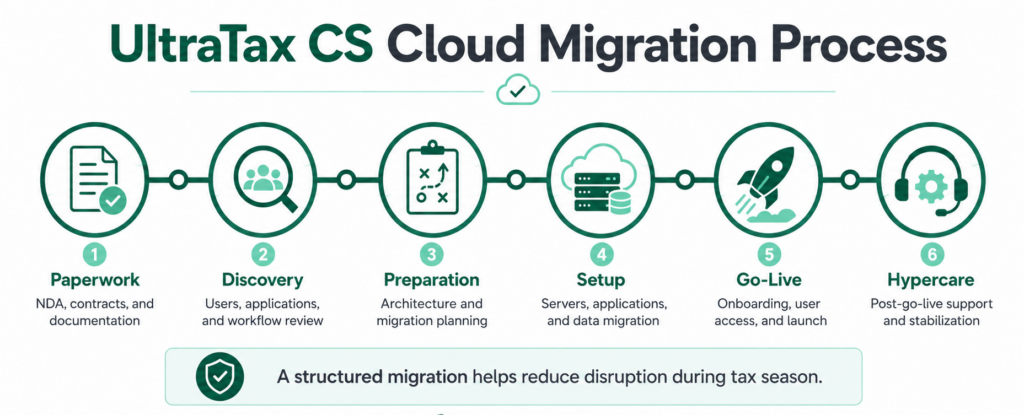
The migration process is planned around the firm’s users, applications, data, integrations, peripherals, and preferred cutover window. Firms provide their valid software licenses, while OneUp Networks prepares and manages the hosted environment.
Unlike generic infrastructure providers, OneUp Networks focuses on hosting accounting and tax applications where performance, application compatibility, migration planning, and user experience directly impact daily firm operations.
Explore the technical environment, pricing, migration support, and trial options on the UltraTax CS Hosting page.
Frequently Asked Questions:
UltraTax CS is desktop tax software that can run on local infrastructure or inside a hosted environment. Thomson Reuters offers Virtual Office CS, and firms may also use a third-party provider to host their licensed UltraTax CS application.
No. Performance depends on server sizing, storage, concurrent users, application configuration, data location, and internet connectivity. A well-designed hosted environment can provide more flexible resources, but firms should test their actual workflow before going live.
Yes. Firms can configure remote access to an on-premise server through technologies such as VPN and Remote Desktop Services. The firm or its IT provider must manage, secure, monitor, and support that remote-access environment.
Firms should evaluate application compatibility, user requirements, security controls, backup strategy, migration support, and the provider’s experience with accounting workflows.
Yes, depending on licensing, compatibility, and hosting architecture. Many CPA firms evaluate hosted environments that support both tax applications and accounting workflows to simplify access, management, and collaboration.
Final Verdict
Moreover, UltraTax CS on-premise remains viable for firms with current hardware, dependable IT support, secure remote access, and tested recovery processes. Managed cloud hosting is usually the stronger operational choice for firms seeking remote collaboration, adjustable resources, centralized applications, managed backups, and less responsibility for server maintenance.
The right decision should be based on your actual tax-season workload, recovery needs, application ecosystem, and long-term IT costs, not on a generic claim that one model is always better.
Ready to Evaluate Your UltraTax CS Hosting Options?
OneUp Networks helps CPA firms understand their current environment, plan migration requirements, and build a managed hosting setup designed around their tax workflow.
- Talk to a Tax Software Hosting Expert – Discuss your current UltraTax CS setup.
- Schedule a Demo – See how managed hosting supports accounting workflows.
- Get a Custom Quote – Receive a recommendation based on your users and applications.