Quick Summary
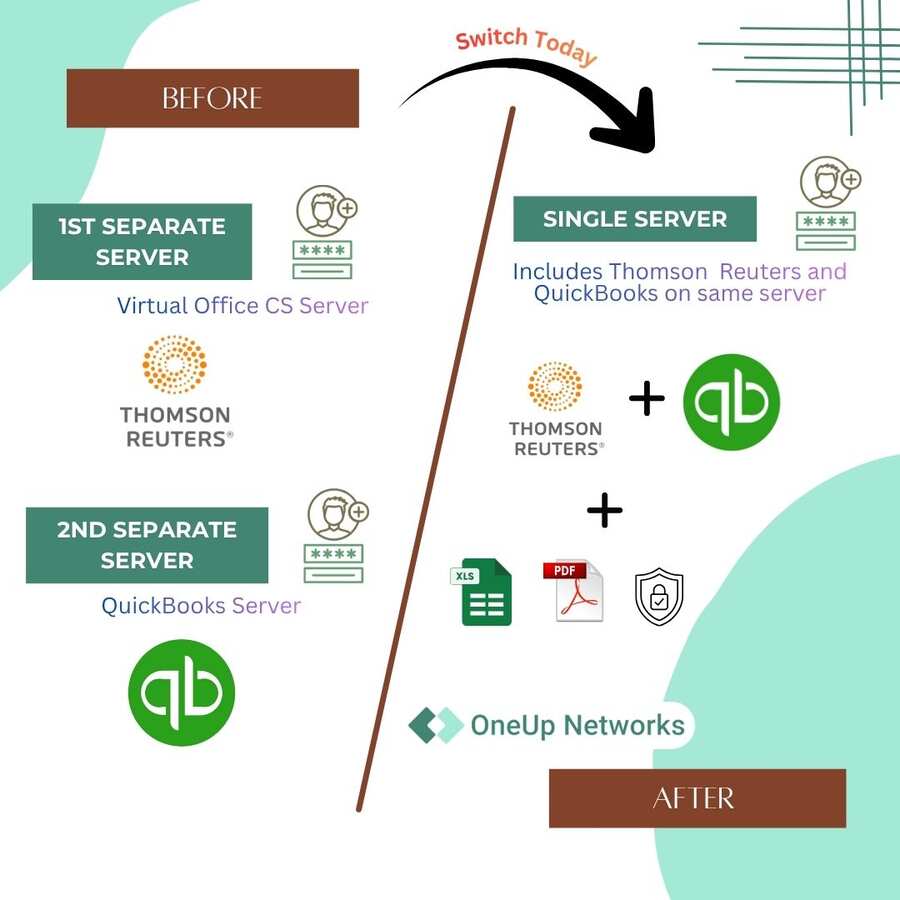
Many CPA firms gradually build separate hosting environments for QuickBooks Enterprise and Thomson Reuters applications as their technology needs grow. While each platform may solve a specific business requirement, managing multiple environments can create challenges with access, support coordination, security management, backups, and daily workflows.
- Separate hosting environments can increase complexity: Firms may need to manage different providers, login processes, support channels, and administrative responsibilities across their accounting and tax applications.
- The challenge is usually workflow coordination: QuickBooks Enterprise and Thomson Reuters applications can work effectively, but disconnected environments may make it harder for teams to move smoothly between accounting, tax, and practice management workflows.
- A unified managed hosting approach can simplify operations: By evaluating applications, users, infrastructure, and support requirements together, firms can create a more connected technology environment.
- CPA firms should evaluate more than hosting cost: Security, backup strategy, application compatibility, migration planning, performance, and ongoing technical support are important factors when choosing a hosting strategy.
OneUp Networks helps CPA firms evaluate, migrate, and manage cloud hosting environments designed around accounting and tax workflows, allowing teams to focus on client work instead of managing disconnected infrastructure.
Introduction
Many CPA firms do not start with a complicated technology strategy. Their hosting environment usually develops over time as the firm grows, adds employees, and adopts new applications to support accounting and tax workflows. A firm may move QuickBooks Enterprise to one hosting provider because accountants need reliable remote access and centralized company files, while later adopting Thomson Reuters applications such as UltraTax CS, Practice CS, or Accounting CS through another hosted environment. Solutions like Thomson Reuters Virtual Office CS provide firms with cloud access to CS Professional Suite applications without requiring them to manage the underlying infrastructure.
Each decision solves a legitimate business need. The difficulty appears when these applications become part of the same daily workflow but remain separated across different hosting environments. Employees may need to move between platforms, support teams may need to coordinate across providers, and administrators may have to manage multiple systems to keep everything running smoothly.
For growing CPA firms, the question is no longer only whether applications are available in the cloud. The more important question is whether the firm’s hosting environment is designed around the way accountants, tax professionals, and firm leaders actually work.
Why CPA Firms End Up With Separate Hosting Environments
Technology decisions inside accounting firms are usually made based on immediate requirements. A firm may first move QuickBooks Enterprise to a hosted environment because local servers are becoming difficult to maintain, employees need remote access, or multiple team members need to collaborate on the same company files. The move solves an immediate operational problem and allows the firm to work more flexibly.
As the practice expands, the technology requirements become broader. Tax departments may begin using Thomson Reuters applications such as UltraTax CS, Practice CS, or Accounting CS. Other teams may rely on Microsoft applications, document management platforms, and accounting integrations to complete their daily responsibilities.
Because these applications are often introduced at different times, firms may naturally develop a technology environment that looks like this:
| Business Function | Application Examples |
|---|---|
| Accounting operations | QuickBooks Enterprise |
| Tax preparation | UltraTax CS |
| Practice management | Practice CS |
| Financial workflows | Accounting CS |
| Productivity | Microsoft applications |
| Documents | Document management systems |
Each application may work perfectly within its own environment. The concern appears when employees need to use these applications together as part of one client workflow.
A CPA firm does not experience technology as separate software products. Employees experience it as one process — preparing returns, reviewing financial information, communicating with clients, managing documents, and completing engagements. That is where hosting architecture starts becoming important.
When Separate Hosting Starts Creating Workflow Challenges
The impact of separate hosting environments is usually not visible when everything is working normally. The problems appear during everyday situations where employees need multiple systems at the same time.
A tax professional may review financial information from QuickBooks Enterprise while preparing a return in UltraTax CS. A partner may need access to accounting records, tax applications, reports, and supporting documents while reviewing a client engagement.
When these applications operate across different environments, employees may need to manage different login processes, access methods, and support procedures. For a small team, this may feel manageable. However, as firms add more users, locations, and applications, those small points of friction become operational issues.
The problem is not that QuickBooks Enterprise or Thomson Reuters applications are incapable. They are established solutions used by accounting professionals every day. The question is whether the surrounding hosting environment helps employees complete their work efficiently or creates additional technology steps they must manage themselves.
Where Split Hosting Creates Hidden Operational Costs
Employees Spend More Time Managing Access
One of the first areas where firms notice friction is employee access.
A team member may need to:
- Open one environment for accounting work
- Access another environment for tax preparation
- Remember different login procedures
- Follow separate support instructions
Individually, these steps seem minor. Across a full accounting team, they become repeated interruptions throughout the workday.cThis becomes especially noticeable during tax season, when professionals are working under deadlines and need fast, consistent access to the applications and information required for client work. A well-designed hosting environment should make technology easier for employees, not add more steps to complete routine tasks.
Support Becomes More Difficult to Coordinate
Another challenge appears when technical problems involve multiple systems. For example, an employee may experience an issue accessing information required for a client workflow. The cause could involve user permissions, application settings, connectivity, file access, or hosting configuration.
With separate hosting providers, determining responsibility can take additional time.
The firm may need to communicate with:
- The QuickBooks hosting provider
- The Thomson Reuters hosting provider
- Internal IT staff
- Application support teams
Instead of having one team responsible for understanding the complete environment, the firm may need to coordinate between multiple parties. For many growing CPA firms, simplifying support ownership becomes just as important as simplifying access.
Security and Backup Management Require More Planning
Accounting firms handle sensitive financial information, which makes security and recovery planning critical.
When applications are hosted separately, firms may need to evaluate different approaches for:
- User permissions
- Security controls
- Backup processes
- Recovery procedures
- Administrative management
The challenge is maintaining consistency. A firm may have strong security practices in each individual environment, but managing multiple environments requires additional oversight to ensure policies remain aligned. A unified managed environment allows firms to evaluate infrastructure, security, and recovery planning as one connected strategy.
Separate Hosting vs Unified Managed Hosting
| Decision Factor | Separate Hosting Environments | Unified Managed Hosting Environment |
|---|---|---|
| Application access | Employees work across multiple platforms | Applications can be organized around one workflow |
| Support | Different providers manage different systems | One hosting partner can coordinate infrastructure support |
| Administration | Multiple environments require separate management | Simplified environment management |
| Security planning | Policies may differ between platforms | Security approach can be managed centrally |
| Backup strategy | Different backup processes may exist | Recovery planning can be coordinated |
| Scalability | Each environment is evaluated separately | Infrastructure can be planned around future requirements |
A unified hosting approach does not mean changing the applications a firm already uses. The goal is to create a better infrastructure foundation where licensed applications can support the firm’s workflow more effectively.
Is Separate Hosting Always the Wrong Approach?
No. There are situations where separate hosting environments continue to work well.
A firm may choose to maintain separate environments when:
- Current workflows are stable
- Applications have specific requirements
- Internal IT teams prefer direct control
- Support responsibilities are clearly defined
The important factor is not whether a firm uses one environment or multiple environments. The important factor is whether the current setup supports the firm’s operational needs. A technology structure that works well for a smaller practice may become more difficult to manage as the firm grows.
When CPA Firms Should Evaluate a Unified Hosting Strategy
Many firms begin reviewing their hosting approach when technology management starts taking attention away from client work.
Common indicators include:
- Employees frequently switching between systems
- Increasing support coordination
- More applications being added
- Growing remote work requirements
- Additional administrative workload
- Difficulty maintaining consistent workflows
At this point, firms are not simply looking for another hosting provider. They are looking for a technology partner that understands how accounting applications, users, security, and infrastructure work together.
How OneUp Networks Helps CPA Firms Build a Managed Hosting Environment
OneUp Networks helps CPA firms evaluate and manage cloud hosting environments designed around accounting and tax workflows. Rather than treating each application as a separate technology problem, OneUp Networks helps firms look at the complete environment — including users, applications, integrations, performance requirements, security considerations, and migration planning.
OneUp Networks supports hosting solutions for applications such as:
- QuickBooks Enterprise
- Thomson Reuters applications
- CCH
- Sage
- Drake
- Microsoft business applications
The process begins by understanding how the firm currently operates. This includes reviewing existing applications, user requirements, workflows, and business objectives.
A structured migration approach typically includes:
- Discovery and planning: Understanding the current environment and identifying requirements.
- Environment preparation: Configuring the infrastructure, access controls, and hosting setup.
- Migration and testing: Moving applications and data while validating workflows.
- Deployment and support: Helping users transition and providing ongoing technical assistance.
Firms continue using their licensed software while OneUp Networks manages the hosting infrastructure where those applications operate. The focus is not simply putting applications in the cloud. It is creating a dependable environment where accounting teams can work efficiently without spending unnecessary time managing infrastructure complexity.
Frequently Asked Questions
Depending on licensing, compatibility, and infrastructure requirements, many CPA firms evaluate environments where accounting and tax applications can operate together.
No. Virtual Office CS is one hosted option for CS Professional Suite applications. Firms can evaluate different hosting approaches based on workflow needs, application requirements, and support expectations.
No. Separate environments can work well when they meet the firm’s needs. The key consideration is whether the setup continues supporting productivity, security, and growth.
CPA firms should review application compatibility, migration planning, security practices, backup strategy, performance requirements, and ongoing support capabilities.
Final Thoughts: Building a Hosting Strategy That Supports Growth
Separate hosting environments often develop because firms make practical technology decisions as their needs change. Hosting QuickBooks Enterprise with one provider and Thomson Reuters applications through another may solve immediate requirements, but growing firms should regularly evaluate whether that structure still supports their long-term goals.
The best hosting strategy is not about choosing the newest technology or reducing the number of applications a firm uses. It is about creating an environment where employees can access the tools they already depend on, support teams can respond efficiently, and the infrastructure can scale with the business.
For CPA firms evaluating their next step, the right question is simple: Does your current hosting environment make your team more productive, or does it create additional complexity that your firm has to manage?
Evaluate Your CPA Firm’s Hosting Environment
OneUp Networks helps CPA firms review, migrate, and manage hosting environments for QuickBooks Enterprise, Thomson Reuters applications, and other business-critical software.
- Talk to a Cloud Hosting Expert – Discuss your current environment and challenges.
- Schedule a Demo – Explore managed hosting options for your applications.
- Get a Custom Quote – Build a solution based on your users and workflow.