
Quick Summary
- QuickBooks Enterprise software licensing is only one part of the cost of operating an in-house environment.
- Businesses should also include server hardware, IT support, security, backup, disaster recovery, remote access, maintenance, and replacement.
- The cost usually increases as the number of users, applications, locations, and remote workers grows.
- Businesses should calculate QuickBooks infrastructure costs across three to five years rather than focusing only on the original server purchase.
- Managed hosting can move many infrastructure responsibilities to a hosting provider, while the business continues to maintain the appropriate QuickBooks software licenses.
Running QuickBooks Enterprise on your own server costs more than the accounting software itself. The real expense can include server hardware, IT administration, security, backups, disaster recovery, remote-access infrastructure, system maintenance, and eventual hardware replacement. Looking at these costs together gives you a much clearer picture of what your QuickBooks environment actually costs to operate.
For many businesses, the company purchased the server years ago, and it has simply become part of the office infrastructure. QuickBooks works, employees know how to access it, and IT takes care of problems when they occur. Because businesses spread those expenses across hardware purchases, support contracts, staff time, security tools, backups, and occasional repairs, they may find it difficult to see the total cost.
That matters when a CPA firm, accounting team, or growing business starts considering whether to replace its server, expand remote access, or move QuickBooks Enterprise into a managed environment. Comparing only the purchase price of a server with a monthly hosting fee does not tell you which option costs less. You first need to understand the total cost of maintaining QuickBooks Enterprise in-house.
What Does Running QuickBooks Enterprise In-House Actually Involve?
Businesses can deploy QuickBooks Enterprise in a multi-user environment where employees connect to company data that a central system stores and manages. Depending on how the business configures that environment, it may involve a dedicated server, user workstations, network access, database services, security controls, backups, and remote-access technology.
The important point is that QuickBooks is only the application layer. Something still has to provide the computing resources underneath it.
Your business or IT provider must keep that environment available, updated, protected, and capable of supporting the workload. Intuit’s own installation guidance highlights networking, file sharing, permissions, firewall configuration, server setup, Database Server Manager configuration, and user setup as parts of an Enterprise deployment.
For a small office, that responsibility may initially be manageable. As more employees use QuickBooks, company files grow, businesses introduce additional accounting applications, and employees begin working from different locations, the infrastructure behind QuickBooks becomes increasingly important.
That is where many of the costs that are easy to overlook begin to appear.
7 Hidden Costs of Running QuickBooks Enterprise on Your Own Server
1. Server Hardware Is More Than a One-Time Purchase
A physical server is often the most obvious infrastructure expense, but its purchase price represents only the beginning of its lifecycle.
The server needs enough processing capacity, memory, and storage performance for the number of users and applications it supports. As workloads increase, businesses may need additional RAM, faster storage, replacement drives, network upgrades, extended warranties, or other hardware improvements.
Capacity also changes over time. A server that performed comfortably when five employees used QuickBooks may behave differently when the organization has fifteen users, larger company files, browser applications, document-management tools, tax applications, or other programs running alongside it.
Hardware also has a finite useful life. Eventually, the organization faces another decision: upgrade individual components, continue operating aging equipment, or purchase a replacement server.
For an accurate cost comparison, that future replacement expense belongs in the QuickBooks infrastructure budget even if the business has already paid for the current server.
2. The Server Needs an Operating Environment
QuickBooks Enterprise does not operate in isolation. Depending on how the business designs the environment, a multi-user or remote-access deployment may require additional Microsoft infrastructure.
For example, Intuit currently states that QuickBooks Desktop Enterprise is compatible with Remote Desktop Services and notes that Microsoft Server operating systems, Windows Server licenses, and Remote Desktop Services Client Access Licenses are separate considerations in applicable configurations.
This is important because businesses sometimes calculate their QuickBooks infrastructure cost using only two numbers: the QuickBooks subscription and the physical server.
The actual environment can involve additional licensing, configuration, and administration. Those requirements should be reviewed with the IT team based on the exact architecture rather than assumed to be included with QuickBooks.
3. IT Administration Becomes a Recurring Cost
A server does not remain reliable simply because it was configured correctly on the day it was installed.
Someone must manage Windows updates, security patches, application updates, user permissions, storage, performance, network issues, backup alerts, printer problems, remote sessions, software compatibility, and unexpected errors.
Sometimes that work is performed by an internal IT employee. Other businesses use a managed IT provider or call a technician when problems arise. Either way, the cost exists.
The harder expense to identify is the time spent on small problems. A server may never experience a major failure, but repeated login issues, application updates, permissions problems, slow sessions, backup warnings, and user-support requests can consume IT hours throughout the year.
When calculating total cost of ownership, count both planned maintenance and the support required when something does not work as expected.
4. Security Requires Technology and Ongoing Management
Accounting systems can contain financial records, payroll information, customer data, employee information, and other sensitive business records. Protecting that information requires more than installing antivirus software and assuming the server is safe.
A properly managed environment may use firewalls, endpoint protection or EDR, multi-factor authentication, encryption, access controls, security monitoring, patch management, intrusion detection and prevention, network segmentation, and secure remote-access policies.
Those technologies create direct expenses, but there is also an operational cost. Someone must configure them correctly, review alerts, maintain policies, apply patches, remove former users, and respond when suspicious behavior appears.
An on-premises deployment is not inherently insecure. The important distinction is that the organization managing the infrastructure also carries responsibility for maintaining the infrastructure security surrounding QuickBooks.
For accounting firms handling sensitive client information, that responsibility should be treated as part of the cost of operating the system—not as an optional add-on.
5. Backup Is Not the Same as Disaster Recovery
Almost every business understands that QuickBooks data should be backed up. Fewer calculate the complete cost of being able to recover that data after a serious problem.
A useful backup strategy involves more than creating another copy of a company file. Businesses need to consider where they store backups, how frequently backups run, how long they retain copies, whether they keep offsite copies, whether they monitor failures, and whether they have actually tested restoration.
Then comes the larger question: what happens when the server itself is unavailable?
If hardware fails, ransomware affects the environment, the office loses access to its systems, or a major outage occurs, the business may need to rebuild more than a QuickBooks file. It may need a functioning server environment, applications, permissions, user access, and data restored in the correct sequence.
That is why backup and disaster recovery should be evaluated separately. Backup protects copies of data. Disaster recovery addresses how the organization returns to operation.
Both have a cost.
6. Remote Access Adds Another Infrastructure Layer
Remote work has made this expense more important for CPA firms, accounting teams, and businesses with employees working outside the main office.
QuickBooks Enterprise can support remote-access architectures, but the organization still needs a reliable method for users to reach the environment. Depending on the design, that may involve Remote Desktop Services, secure network connectivity, authentication controls, firewall configuration, user licensing, session management, and additional technical support.
Intuit specifically describes QuickBooks Enterprise as Remote Desktop Services compliant, so remote use itself does not create the limitation that many older QuickBooks articles suggest. The real issue is the infrastructure businesses need to provide that access reliably.
For a business with only office-based employees, this may be a relatively small consideration. For a CPA firm with remote preparers, reviewers, seasonal staff, or employees across several locations, secure remote access becomes part of the day-to-day accounting environment.
It should therefore be included in the cost calculation.
7. Downtime, Growth, and Hardware Replacement Are Easy to Underestimate
Some of the largest infrastructure costs do not appear on an IT invoice.
Consider what happens when twelve employees cannot access QuickBooks for several hours. The immediate technical expense may be a replacement drive or an engineer’s support time, but the business cost also includes employees waiting, delayed client work, postponed invoicing, interrupted payroll processes, or employees having to complete the work later.
Growth creates another hidden expense.
Adding more employees, larger company files, additional applications, or heavier reporting workloads can increase the resources required by the server. A business may need more memory, additional storage, different licensing, infrastructure changes, or a larger replacement system sooner than expected.
A realistic QuickBooks Enterprise server cost should therefore account for both expected growth and unexpected interruption.
How to Calculate the True Cost of Your QuickBooks Enterprise Environment
The simplest way to understand your infrastructure is to calculate its total cost of ownership, or TCO, over a consistent period such as three years.
Instead of asking, “How much did our server cost?”, ask:
What does it cost us to keep QuickBooks Enterprise available, secure, backed up, remotely accessible, supported, and recoverable for the next three years?
A practical framework looks like this:
QuickBooks Infrastructure TCO = Hardware + Infrastructure Licensing + IT Labor + Security + Backup and Recovery + Remote Access + Maintenance and Upgrades + Downtime and Recovery Costs
Use the same time period when comparing alternatives.
| Cost AreaWhat to IncludeCommonly Missed? | ||
|---|---|---|
| Server infrastructure | Server, storage, networking, hardware warranty | Sometimes |
| Infrastructure licensing | Applicable server and remote-access licensing | Often |
| IT administration | Maintenance, updates, troubleshooting, monitoring | Frequently |
| Cybersecurity | Firewalls, EDR, MFA, monitoring, access controls | Frequently |
| Backup | Software, storage, offsite copies, retention | Often |
| Disaster recovery | Recovery environment, testing, restoration planning | Often |
| Remote access | Connectivity, authentication, configuration, support | Sometimes |
| Growth | Additional resources and infrastructure upgrades | Often |
| Hardware replacement | Future server refresh | Frequently |
| Downtime | Lost productivity and emergency recovery | Very often |
There is no universal number that applies to every company, and presenting one would be misleading. A five-user local office and a 30-user accounting firm with seasonal staff have very different infrastructure requirements.
The value of the calculation is not finding an industry-average number. It is understanding your own number.
QuickBooks Licensing and Infrastructure Are Two Different Costs
One of the most important distinctions in any QuickBooks Enterprise cost analysis is the difference between the application and the environment used to run it.
Your QuickBooks Enterprise subscription covers the licensed accounting software according to Intuit’s terms. Infrastructure costs cover the systems needed to operate and access that software.
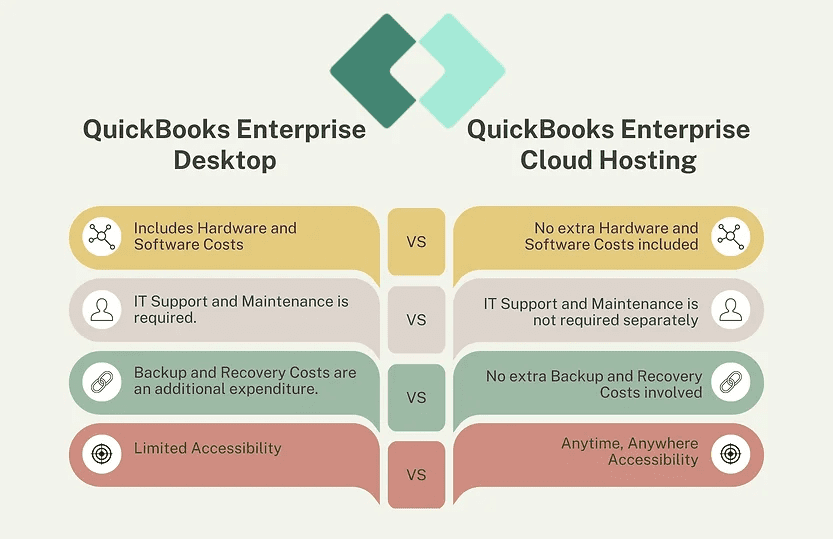
Cloud hosting works the same way conceptually. Hosting does not automatically eliminate the need for appropriate QuickBooks licensing. Intuit itself treats Desktop Enterprise software and cloud hosting as distinct components in its current offering.
This distinction prevents an unfair comparison.
You should not compare a fully managed hosting quote that includes infrastructure, backups, monitoring, support, and recovery against only the purchase price of an office server.
Compare complete environments against complete environments.
When Is It Worth Reviewing Your Current QuickBooks Server?
Most businesses do not need to reconsider their infrastructure every few months. There are, however, several moments when a proper cost review becomes valuable.
A server approaching replacement is the most obvious trigger. Growth is another. If more employees need access, company files are getting larger, the business is introducing additional accounting applications, remote work is increasing, or backup and recovery expectations have changed, the assumptions behind the original server may no longer apply.
CPA firms should pay particular attention to seasonal demand. An environment that performs adequately for much of the year may become more difficult to manage when user counts, client workloads, application usage, and support requests increase during tax season.
The purpose of a review is not to prove that the cloud is better. It is to determine whether maintaining the infrastructure internally still makes operational and financial sense.
What Changes with Managed QuickBooks Enterprise Hosting?
Managed hosting changes the ownership of many infrastructure responsibilities.
Instead of maintaining the underlying accounting server internally, the business works with a hosting provider that manages the environment. Depending on the service, this can include server administration, security controls, monitoring, backups, disaster recovery, maintenance, technical support, and infrastructure scaling.
The QuickBooks application itself remains familiar. What changes is the infrastructure underneath it and who is responsible for keeping that infrastructure running.
For businesses evaluating that approach, OneUp Networks provides managed QuickBooks Enterprise hosting for CPA firms, accounting teams, finance departments, and other businesses that want to continue using their licensed desktop accounting applications without managing the server environment themselves.
OneUp Networks can also build environments that host QuickBooks alongside compatible tax applications, Microsoft applications, accounting add-ons, add-ins, and other business software so users can work within a centralized hosted workspace.
If your question is specifically whether an on-premises or hosted environment is the better operating model, that deserves its own comparison. This article is focused on the step that should come first: understanding what your current infrastructure actually costs.
How OneUp Networks Approaches the Infrastructure Side
OneUp Networks manages the technical environment around client-licensed accounting and business applications. That can include migration planning, server setup, application configuration, security management, monitoring, backups, disaster recovery, infrastructure maintenance, and ongoing technical support.
The provider designs the infrastructure for business-critical workloads using technologies such as NVMe SSD storage, DDR5 memory, high-performance processors, access controls, MFA, firewalls, endpoint protection, encryption, and network security controls.
For backup and recovery, OneUp Networks maintains three backup locations—one onsite and two offsite—with 120-day retention. Disaster recovery planning targets an RPO of approximately 2–4 hours and an RTO of approximately 3–4 hours.
The important licensing distinction remains: clients own or purchase their QuickBooks and other application licenses from the applicable software vendors. OneUp Networks hosts and manages those licensed applications rather than positioning hosting as a replacement for the software license itself.
Frequently Asked Questions About QuickBooks Enterprise Server Costs
There is no single server cost that applies to every business. The total should include hardware, applicable infrastructure licensing, IT administration, security, backups, disaster recovery, remote access, maintenance, upgrades, and eventual hardware replacement. Calculating those costs across three to five years provides a more useful figure than looking only at the initial server purchase.
Yes. QuickBooks Enterprise supports multi-user configurations where businesses can manage company data in a central environment and allow authorized users to access it. The exact server, networking, user, and remote-access requirements depend on the deployment and the QuickBooks version the business uses.
Not every QuickBooks Enterprise deployment requires the same Microsoft infrastructure. If a business uses certain server or Remote Desktop Services configurations, it may need additional Microsoft operating-system and client-access licenses. Businesses should review the architecture before budgeting rather than assume QuickBooks includes those components.
IT labor, cybersecurity management, offsite backups, disaster recovery, remote-access infrastructure, future server replacement, and the productivity impact of downtime are frequently harder to see than the initial server invoice. They should still be included when comparing the long-term cost of different deployment models.
No. Businesses with suitable existing infrastructure, experienced IT staff, limited remote-access needs, and predictable workloads may find an internally managed environment practical. Managed hosting can become more attractive when a business wants to reduce server administration, improve remote accessibility, centralize applications, strengthen backup and recovery processes, or avoid another hardware refresh.
Hosting and QuickBooks licensing are separate considerations. With OneUp Networks, customers own or purchase their licensed applications from the original software vendors, while OneUp Networks provides and manages the hosted infrastructure.
Understand the Cost Before You Replace the Server
The real cost of running QuickBooks Enterprise in-house is rarely one invoice. It is the combined cost of the server, IT time, security, backup, recovery, remote access, maintenance, growth, and the next hardware refresh. Once those expenses are visible, your business can make a far more informed decision about whether continuing to manage the environment internally still makes sense.
If your server is approaching replacement or your accounting environment is becoming harder to support, talk to a OneUp Networks cloud hosting expert. OneUp Networks can review your users, applications, workflow, infrastructure, backup requirements, and migration needs and help you evaluate a managed QuickBooks Enterprise environment without disrupting the software your team already relies on.


























